Applications often report every failed name lookup as a connection problem, even though DNS can return several distinct outcomes. dig exposes the response code, answer count, resolver, authority data, and optional Extended DNS Error text needed to locate the failure before any record is changed.
Without an explicit @server argument, dig asks a resolver from /etc/resolv.conf. Repeating the identical name and record type through a known public resolver separates a workstation or local-resolver view from a response visible outside that network.
An authoritative query with recursion disabled provides the final zone-side boundary. NXDOMAIN means the name does not exist, NOERROR with no answer means the name exists without the requested type, SERVFAIL means resolution failed, REFUSED indicates a policy rejection, and a timeout means no DNS response arrived.
Related: How to query DNS records with dig
Related: How to compare DNS answers across resolvers with dig
Related: How to find authoritative nameservers with dig
Related: How to trace DNS delegation with dig
Related: How to check DNSSEC validation with dig
Related: How to set dig timeout and retry behavior
Tool: DNS Record Lookup
Steps to diagnose DNS lookup failures with dig:
- Query the failing hostname through the resolver configured on the system.
$ dig does-not-exist.iana.org A +noall +comments +question +answer +authority
;; Got answer:
;; ->>HEADER<<- opcode: QUERY, status: NXDOMAIN, id: 45870
;; flags: qr rd ra; QUERY: 1, ANSWER: 0, AUTHORITY: 0, ADDITIONAL: 0

;; QUESTION SECTION:
;does-not-exist.iana.org.       IN      A
The controlled example uses does-not-exist.iana.org and A in place of the application's failing hostname and required record type. A received DNS response can leave the dig shell status at 0 even when the DNS header reports NXDOMAIN; no reply uses shell status 9.
- Classify the configured resolver's response from the header status and section counts.
NOERROR with answer rows returns data for the requested type. NOERROR with ANSWER: 0 is a no-data response, not a missing name. NXDOMAIN reports a nonexistent name. SERVFAIL reports a resolution failure, and an EDE line may narrow it to DNSSEC, unreachable authority, or filtering. REFUSED reports a policy rejection. A timeout has no DNS status because no response arrived.
- Repeat the same question through Cloudflare Public DNS.
$ dig @1.1.1.1 does-not-exist.iana.org A +noall +comments +question +answer +authority
;; Got answer:
;; ->>HEADER<<- opcode: QUERY, status: NXDOMAIN, id: 59940
;; flags: qr rd ra ad; QUERY: 1, ANSWER: 0, AUTHORITY: 1, ADDITIONAL: 1

;; OPT PSEUDOSECTION:
; EDNS: version: 0, flags:; udp: 1232
;; QUESTION SECTION:
;does-not-exist.iana.org.       IN      A

;; AUTHORITY SECTION:
iana.org.       3600    IN      SOA     sns.dns.icann.org. noc.dns.icann.org. 2026070816 7200 3600 1209600 3600
Matching responses place the issue beyond the configured resolver. A successful public answer beside a local SERVFAIL, REFUSED, or timeout points to the local resolver path, its policy, or network access instead.
- Compare the configured and public resolver classifications.
A valid comparison keeps the hostname, record type, and query options identical. Different cached TTL values are expected; a different status or record set is the diagnostic difference.
- List the zone's nameservers through the public resolver.
$ dig @1.1.1.1 iana.org NS +noall +comments +answer
;; Got answer:
;; ->>HEADER<<- opcode: QUERY, status: NOERROR, id: 46373
;; flags: qr rd ra ad; QUERY: 1, ANSWER: 4, AUTHORITY: 0, ADDITIONAL: 1

;; ANSWER SECTION:
iana.org.       86400   IN      NS      a.iana-servers.net.
iana.org.       86400   IN      NS      b.iana-servers.net.
iana.org.       86400   IN      NS      c.iana-servers.net.
iana.org.       86400   IN      NS      ns.icann.org.
The enclosing zone for the failing name supplies the NS set for a direct check. A delegation trace is the stronger follow-up when the expected nameservers do not appear.
- Query one listed nameserver with recursion disabled.
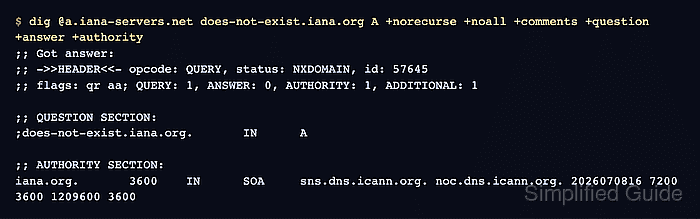
$ dig @a.iana-servers.net does-not-exist.iana.org A +norecurse +noall +comments +question +answer +authority
;; Got answer:
;; ->>HEADER<<- opcode: QUERY, status: NXDOMAIN, id: 57645
;; flags: qr aa; QUERY: 1, ANSWER: 0, AUTHORITY: 1, ADDITIONAL: 1

;; OPT PSEUDOSECTION:
; EDNS: version: 0, flags:; udp: 4096
;; QUESTION SECTION:
;does-not-exist.iana.org.       IN      A

;; AUTHORITY SECTION:
iana.org.       3600    IN      SOA     sns.dns.icann.org. noc.dns.icann.org. 2026070816 7200 3600 1209600 3600
The aa flag marks an authoritative response. A direct timeout or SERVFAIL points to the authority or its network path, while REFUSED without aa can mean the selected server is not authoritative for that zone.
- Confirm the failure boundary from the authoritative response.
The observed NXDOMAIN and aa flag prove that the sample name is absent from the authoritative zone, so changing recursive-resolver settings would not create it. An authoritative NOERROR answer beside recursive SERVFAIL calls for DNSSEC validation checks; inconsistent authoritative answers call for zone synchronization or delegation checks.

Mohd Shakir Zakaria is a cloud architect with deep roots in software development and open-source advocacy. Certified in AWS, Red Hat, VMware, ITIL, and Linux, he specializes in designing and managing robust cloud and on-premises infrastructures.


