DNSSEC failures often appear as an ordinary SERVFAIL even when the requested records still exist on the authoritative servers. Testing one correctly signed domain and one deliberately broken domain reveals whether a recursive resolver authenticates DNS answers or merely returns DNSSEC records.
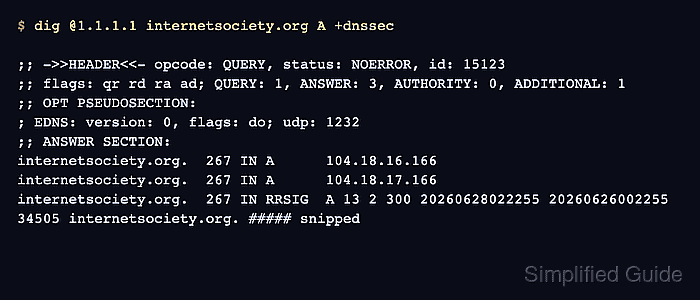
Cloudflare's Public DNS resolver at 1.1.1.1 provides a public validating baseline. Corporate, ISP, and self-hosted DNS paths can instead be tested through the recursive resolver used by the affected clients.
The dig client sends the request but leaves cryptographic validation to the recursive resolver. The ad flag reports an authenticated answer, while the do flag only confirms that +dnssec requested DNSSEC data; the broken-zone test and its +cd comparison establish whether validation caused a rejection.
Related: How to query DNS records with dig
Related: How to trace DNS delegation with dig
Tool: DNSSEC Validator
Steps to check DNSSEC validation with dig:
- Choose @1.1.1.1 for the public baseline or the affected clients' recursive resolver as the target used by every command.
- Query a correctly signed control through the resolver under test.
$ dig @1.1.1.1 internetsociety.org A +dnssec

; <<>> DiG 9.20.18-1ubuntu2.1-Ubuntu <<>> @1.1.1.1 internetsociety.org A +dnssec
; (1 server found)
;; global options: +cmd
;; Got answer:
;; ->>HEADER<<- opcode: QUERY, status: NOERROR, id: 34667
;; flags: qr rd ra ad; QUERY: 1, ANSWER: 3, AUTHORITY: 0, ADDITIONAL: 1

;; OPT PSEUDOSECTION:
; EDNS: version: 0, flags: do; udp: 1232
##### snipped #####
;; ANSWER SECTION:
internetsociety.org.  300  IN  A  104.18.16.166
internetsociety.org.  300  IN  A  104.18.17.166
##### snipped #####
;; SERVER: 1.1.1.1#53(1.1.1.1) (UDP)
NOERROR with ad means the resolver authenticated the signed answer. The do flag alone does not prove validation.
- Test the same resolver with the deliberately broken DNSSEC control.
$ dig @1.1.1.1 www.dnssec-failed.org A +dnssec

; <<>> DiG 9.20.18-1ubuntu2.1-Ubuntu <<>> @1.1.1.1 www.dnssec-failed.org A +dnssec
; (1 server found)
;; global options: +cmd
;; Got answer:
;; ->>HEADER<<- opcode: QUERY, status: SERVFAIL, id: 48559
;; flags: qr rd ra; QUERY: 1, ANSWER: 0, AUTHORITY: 0, ADDITIONAL: 1

;; OPT PSEUDOSECTION:
; EDNS: version: 0, flags: do; udp: 1232
; EDE: 9 (DNSKEY Missing): (no SEP matching the DS found for dnssec-failed.org.)
;; QUESTION SECTION:
;www.dnssec-failed.org.  IN  A

;; SERVER: 1.1.1.1#53(1.1.1.1) (UDP)
A validating resolver rejects this intentionally broken trust chain with SERVFAIL. Extended DNS Error text is supplemental and can be absent or worded differently on another resolver.
- Disable checking for the broken control to confirm that validation caused the rejection.
$ dig @1.1.1.1 www.dnssec-failed.org A +dnssec +cd

; <<>> DiG 9.20.18-1ubuntu2.1-Ubuntu <<>> @1.1.1.1 www.dnssec-failed.org A +dnssec +cd
; (1 server found)
;; global options: +cmd
;; Got answer:
;; ->>HEADER<<- opcode: QUERY, status: NOERROR, id: 35009
;; flags: qr rd ra cd; QUERY: 1, ANSWER: 3, AUTHORITY: 0, ADDITIONAL: 1

;; OPT PSEUDOSECTION:
; EDNS: version: 0, flags: do; udp: 1232
; EDE: 9 (DNSKEY Missing): (no SEP matching the DS found for dnssec-failed.org.)
##### snipped #####
;; ANSWER SECTION:
www.dnssec-failed.org.  300  IN  A  69.252.193.191
www.dnssec-failed.org.  300  IN  A  68.87.109.242
##### snipped #####
;; SERVER: 1.1.1.1#53(1.1.1.1) (UDP)
+cd sets the Checking Disabled bit for this request. SERVFAIL without +cd and NOERROR with address records after adding +cd show that DNSSEC validation blocked the original answer.

Mohd Shakir Zakaria is a cloud architect with deep roots in software development and open-source advocacy. Certified in AWS, Red Hat, VMware, ITIL, and Linux, he specializes in designing and managing robust cloud and on-premises infrastructures.


