Mocking user notifications in Detox lets an end-to-end test open the app from a push-style payload and assert the routed screen. It is useful when order updates, chat messages, reminders, or other notification taps must land on the same screen in a simulator or emulator run.
Detox 20.x exposes two notification entry points. device.launchApp({ userNotification }) starts or resumes the configured app with a notification payload, while device.sendUserNotification() delivers a notification to an app that is already running or has been sent to the background.
The mock simulates the user opening a notification, not the native notification banner or notification-center UI. Keep the test focused on the app's route handling, payload parsing, and visible post-notification state instead of asserting system notification chrome.
Related: How to test deep links with Detox
Related: How to handle permission dialogs in Detox
Related: How to run Detox tests locally
Steps to mock user notifications in Detox:
- Choose one notification payload and one routed screen assertion.
Use test data that does not need production push services, such as a seeded order, chat thread, reminder, or inbox item. The assertion should check a route-specific element, not only that the app opened.
- Create a reusable notification fixture.
- e2e/fixtures/orderNotification.js
const DetoxConstants = require('detox/index').DetoxConstants;

const orderNotification = {
  trigger: {
    type: DetoxConstants.userNotificationTriggers.push,
  },
  title: 'Order update',
  body: 'Order 123 is ready',
  payload: {
    route: 'order',
    orderId: '123',
  },
};

module.exports = { orderNotification };
trigger is required for iOS notification mocks. payload is the field the app should route from, and it is the main supported notification data shape on Android.
- Add a cold-launch notification test.
- e2e/notification.e2e.js
const { orderNotification } = require('./fixtures/orderNotification');

describe('user notifications', () => {
  it('opens the order screen from a push notification', async () => {
    await device.launchApp({
      newInstance: true,
      userNotification: orderNotification,
    });

    await expect(element(by.id('order-detail-screen'))).toBeVisible();
    await expect(element(by.id('order-id'))).toHaveText('123');
  });
});
newInstance: true starts the app from the notification payload so app-start routing and first-screen state are tested together.
Related: How to test deep links with Detox - Add a running-app notification test inside the same describe block when the app must resume from the background.
- e2e/notification.e2e.js
it('resumes from the notification payload', async () => {
  await device.launchApp({ newInstance: true });
  await device.sendToHome();
  await device.sendUserNotification(orderNotification);

  await expect(element(by.id('order-detail-screen'))).toBeVisible();
  await expect(element(by.id('order-id'))).toHaveText('123');
});
device.sendUserNotification() sends the payload to the already launched app. On Android, runtime notification data usually arrives through the activity intent, so app code that reads getIntent() later must keep the latest intent state updated.
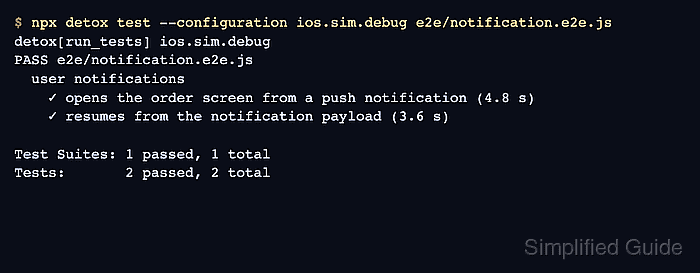
- Run the focused notification spec with the project configuration.
$ npx detox test --configuration ios.sim.debug e2e/notification.e2e.js
detox[run_tests] ios.sim.debug
PASS e2e/notification.e2e.js
  user notifications
    ✓ opens the order screen from a push notification (4.8 s)
    ✓ resumes from the notification payload (3.6 s)

Test Suites: 1 passed, 1 total
Tests:       2 passed, 2 total
Use the real configuration name from the project, such as ios.sim.debug or android.emu.debug. For debug React Native builds, keep Metro running before starting the spec.
Related: How to run Detox tests locally - Treat a missing route assertion as a payload-handling failure.
If order-detail-screen never appears, confirm that the app reads payload.route and payload.orderId from the notification handoff. A passing launch alone does not prove the notification routed to the intended screen.

Mohd Shakir Zakaria is a cloud architect with deep roots in software development and open-source advocacy. Certified in AWS, Red Hat, VMware, ITIL, and Linux, he specializes in designing and managing robust cloud and on-premises infrastructures.


