A Debian server needs a static IP address when DHCP leases, router reservations, or interface recreation should not decide where the host appears after reboot. Set the address on the interface before using the host for SSH handoffs, firewall rules, monitoring targets, DNS records, or services that other systems reach by address.
On Debian systems managed by ifupdown, persistent IPv4 settings live in /etc/network/interfaces or files included from /etc/network/interfaces.d/. The networking service brings auto interfaces up at boot, and ifquery can read the saved stanza before the change is applied.
A single wired interface such as enp1s0 needs an address, prefix, and default gateway that match the local network. Use a local console, out-of-band management, or a second working interface before restarting networking, because changing the active management interface can drop SSH. If NetworkManager, systemd-networkd, netplan, or cloud-init owns the link, change that manager's profile instead of adding a conflicting ifupdown stanza.
Steps to set a static IP address on Debian:
- Open a console or alternate management path before changing the active interface.
Restarting networking can interrupt current SSH sessions. Keep a way back into the host before applying a static address to the interface that carries remote access.
- Identify the interface that should receive the static address.
$ ip -brief addr
lo               UNKNOWN        127.0.0.1/8 ::1/128
enp1s0           UP             192.0.2.42/24 fe80::5054:ff:fe12:3456/64
Replace enp1s0 in the later commands with the actual wired interface name on the Debian host.
- Confirm the interface is known to ifupdown.
$ ifquery --list
lo
enp1s0
If ifquery is missing or the interface does not appear here, confirm which network manager owns the link before editing. Desktop installs commonly use NetworkManager, cloud images may use cloud-init or netplan, and some server builds use systemd-networkd.
- Back up the current Debian network configuration.
$ sudo cp -a /etc/network /etc/network.bak
Use a maintenance-specific backup name if /etc/network.bak already exists.
- Open the interface configuration file.
$ sudoedit /etc/network/interfaces.d/enp1s0
Current Debian ifupdown installations source files from /etc/network/interfaces.d/ by default. If the interface already has a stanza in /etc/network/interfaces, edit that existing stanza instead of creating a duplicate.
- Set the interface to a static IPv4 address.
auto enp1s0
iface enp1s0 inet static
    address 192.0.2.25/24
    gateway 192.0.2.1
Replace the sample address, prefix length, and gateway with values from the approved subnet. Keep the gateway inside the same local network unless the network design explicitly uses another on-link route.
- Confirm ifupdown parses the static stanza.
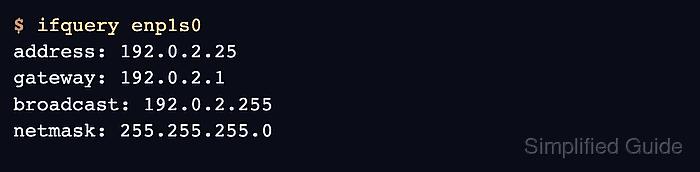
$ ifquery enp1s0
address: 192.0.2.25
gateway: 192.0.2.1
broadcast: 192.0.2.255
netmask: 255.255.255.0
ifquery confirms that ifupdown can read the saved values. It does not prove the running interface has changed yet.
- Restart Debian networking to apply the new interface configuration.
$ sudo systemctl restart networking
This step can briefly remove the host from the network. If the address, gateway, or prefix is wrong, restore the backup from console access and restart networking again.
- Confirm the live address on the interface.
$ ip -brief addr show enp1s0
enp1s0           UP             192.0.2.25/24 fe80::5054:ff:fe12:3456/64
- Confirm the default route uses the expected gateway.
$ ip route show default
default via 192.0.2.1 dev enp1s0
Related: Show routes in Linux
- Confirm name resolution still works after the address change.
$ getent hosts deb.debian.org
2a04:4e42:58::644 debian.map.fastlydns.net deb.debian.org
If address and routing checks pass but names do not resolve, update the resolver layer that owns /etc/resolv.conf or per-link DNS settings.
Related: Change DNS servers in Linux

Mohd Shakir Zakaria is a cloud architect with deep roots in software development and open-source advocacy. Certified in AWS, Red Hat, VMware, ITIL, and Linux, he specializes in designing and managing robust cloud and on-premises infrastructures.


