Many local HTTP APIs expose Unix domain sockets instead of TCP ports so they stay bound to the host and avoid opening another network listener. That is common for container runtimes, reverse proxies, application servers, and control-plane daemons that are meant to be reached only from the local machine.
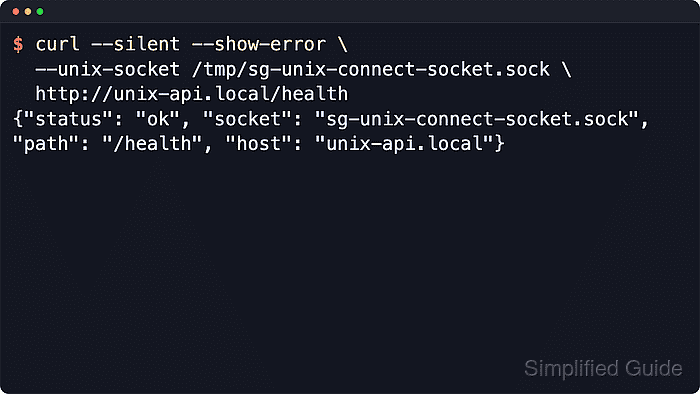
With cURL, --unix-socket replaces the normal TCP connect step with a filesystem socket path while the URL still supplies the request scheme, host, and path. Because the connection goes through the socket file, cURL does not resolve the URL hostname in DNS, but the server still receives that hostname as the HTTP Host value.
Socket access follows normal filesystem permissions, so owner and group access decide who can reach the service. Many local sockets speak plain HTTP rather than HTTPS, and Linux abstract namespace sockets use --abstract-unix-socket with the socket name only, without the leading @ that tools such as ss display. A privileged control socket can expose administrative actions, not just read-only status endpoints.
Steps to connect over Unix sockets with cURL:
- Inspect the socket file first so the request targets the correct path and the current account can open it.
$ ls -l /tmp/sg-unix-connect-socket.sock
srw-rw---- 1 root localapi 0 Jun  6 03:31 /tmp/sg-unix-connect-socket.sock
Privileged sockets can expose full administrative control over the backing service. Treat paths such as /var/run/docker.sock as privileged local access, not as a harmless status interface.
- Send a request through the Unix socket to confirm the local API responds over HTTP.
$ curl --silent --show-error --unix-socket /tmp/sg-unix-connect-socket.sock http://unix-api.local/health {"status": "ok", "socket": "sg-unix-connect-socket.sock", "path": "/health", "host": "unix-api.local"} - Change only the URL host when the same socket fronts multiple local virtual hosts or tenants.
$ curl --silent --show-error --unix-socket /tmp/sg-unix-connect-socket.sock http://tenant-preview.internal.example/health
{"status": "ok", "socket": "sg-unix-connect-socket.sock", "path": "/health", "host": "tenant-preview.internal.example"}
The socket path decides how cURL connects, while the URL host still becomes the HTTP Host value after the request reaches the local service.
- Run the same request with --verbose when the transfer needs to prove that it used the Unix socket path instead of a TCP port.
$ curl -q --verbose --silent --show-error --output /dev/null --unix-socket /tmp/sg-unix-connect-socket.sock http://unix-api.local/health
*   Trying /tmp/sg-unix-connect-socket.sock:0...
* Established connection to unix-api.local (/tmp/sg-unix-connect-socket.sock port 0) from  port 0
* using HTTP/1.x
> GET /health HTTP/1.1
> Host: unix-api.local
> User-Agent: curl/8.18.0
> Accept: */*
>
* Request completely sent off
* HTTP 1.0, assume close after body
< HTTP/1.0 200 OK
< Server: sg-local-api/1.0
< Date: Sat, 06 Jun 2026 03:31:49 GMT
< Content-Type: application/json
< Content-Length: 102
<
##### snipped #####
port 0 is expected because Unix domain sockets do not use TCP ports. -q keeps personal ~/.curlrc defaults out of the debug transcript.
- Print only the HTTP status and exit code when the same request needs to act as a health check in a script.
$ curl --silent --show-error --output /dev/null --write-out 'response_code=%{response_code}\nexitcode=%{exitcode}\n' --unix-socket /tmp/sg-unix-connect-socket.sock http://unix-api.local/ping
response_code=200
exitcode=0
If the socket path is missing or unreadable, cURL fails before any HTTP response is received, so the result is typically response_code=000 with a non-zero exitcode.

Mohd Shakir Zakaria is a cloud architect with deep roots in software development and open-source advocacy. Certified in AWS, Red Hat, VMware, ITIL, and Linux, he specializes in designing and managing robust cloud and on-premises infrastructures.


