When a curl request is used in monitoring, API checks, or shell automation, the response body alone does not show whether the server returned the expected status, redirected somewhere else, or finished in an acceptable time. Capturing a small metrics block after each transfer keeps those details visible without turning every request into a verbose trace.
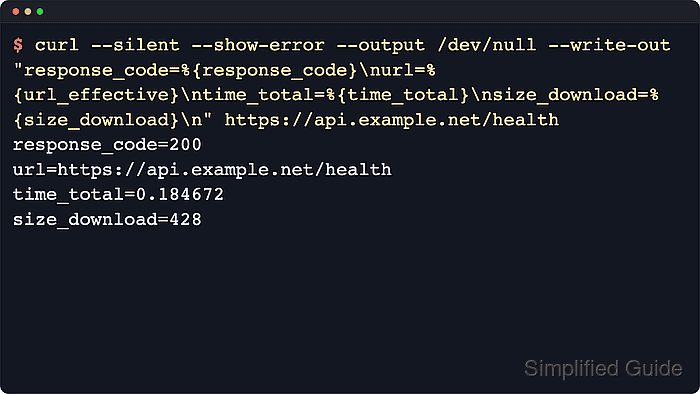
The --write-out option expands transfer variables after the request completes, so one command can print values such as %{response_code}, %{url_effective}, %{num_redirects}, %{size_download}, and %{time_total}. Pair it with --output /dev/null when the response body is not needed, or save the body to a separate file so the metrics block stays easy to read and parse.
Write-out values are client-side observations, so IP addresses, redirect counts, and timing numbers can change between runs as DNS answers, proxies, connection reuse, or server behavior changes. Current curl documentation uses %{response_code} as the preferred status variable, while older examples may still show the legacy alias %{http_code}. The examples below keep --output /dev/null for broad Unix-like compatibility; --out-null is available in curl 8.16.0 and newer when a portable discard target is preferred. The %output{...} destination requires curl 8.3.0 or newer, and %{onerror} requires 7.75.0 or newer.
Related: How to measure request timing with cURL
Related: How to fail on HTTP errors with cURL
Steps to capture response metrics with cURL write-out:
- Print a compact metrics summary for one request while discarding the response body.
$ curl --silent --show-error --output /dev/null --write-out "response_code=%{response_code}\nurl=%{url_effective}\ntime_total=%{time_total}\nsize_download=%{size_download}\n" https://api.example.net/health
response_code=200
url=https://api.example.net/health
time_total=0.176904
size_download=428
Replace the URL with the request you want to measure. %{response_code} is the current upstream variable name for the final protocol response code. Older curl examples that use %{http_code} refer to the same value.
- Capture the redirect count and final destination when the original URL can move.
$ curl --silent --show-error --location --output /dev/null --write-out "response_code=%{response_code}\nnum_redirects=%{num_redirects}\nurl=%{url_effective}\n" https://downloads.example.net/latest
response_code=200
num_redirects=1
url=https://downloads.example.net/releases/latest.json
Without --location, curl stops at the first 3xx response and %{url_effective} stays on that earlier hop.
Related: How to follow HTTP redirects with cURL
Tool: HTTP Redirect Checker - Append a response-metrics block directly to a log file with the write-out file destination.
$ curl --silent --show-error --output /dev/null --write-out '%output{>>curl-metrics.log}response_code=%{response_code}\nurl=%{url_effective}\ntime_total=%{time_total}\nsize_download=%{size_download}\n' https://api.example.net/health%output{>>curl-metrics.log} appends from curl itself, so the metrics can be recorded without mixing the response body into the same log.
- Read the log file to confirm that the metrics block was appended cleanly.
$ cat curl-metrics.log
response_code=200
url=https://api.example.net/health
time_total=0.181227
size_download=428
If the local curl build is older than 8.3.0, keep the write-out output on standard output and redirect it with the shell instead.
- Print status and error fields only when the request fails.
$ curl --silent --show-error --fail --output /dev/null --write-out '%{onerror}response_code=%{response_code}\nexitcode=%{exitcode}\nerrormsg=%{errormsg}\n' https://api.example.net/releases/missing.json
curl: (22) The requested URL returned error: 404
response_code=404
exitcode=22
errormsg=The requested URL returned error: 404
%{onerror} only prints when curl returns a non-zero exit status. Pair it with --fail or --fail-with-body when HTTP 4xx and 5xx responses must count as failures.
Related: How to fail on HTTP errors with cURL

Mohd Shakir Zakaria is a cloud architect with deep roots in software development and open-source advocacy. Certified in AWS, Red Hat, VMware, ITIL, and Linux, he specializes in designing and managing robust cloud and on-premises infrastructures.


