Measuring request timing with curl shows whether delay is building during name resolution, connection setup, TLS negotiation, redirect handling, or the wait for the first response byte. That makes it easier to explain why an API call, health check, or scripted request feels slow even when the returned content looks normal.
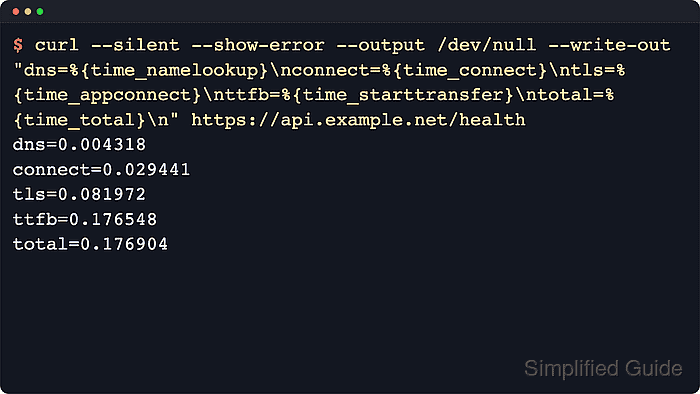
curl prints timing values after a transfer with --write-out. Fields such as {time_namelookup}, {time_connect}, {time_appconnect}, {time_pretransfer}, {time_starttransfer}, {time_redirect}, and {time_total} all count forward from the start of the request, so they show where time accumulates across DNS lookup, TCP setup, TLS handshake, protocol setup, redirect hops, first-byte wait, and the full completed transfer. When the body itself is not needed, discard it with --output /dev/null so the timing block stays clean.
These values are measured on the client side, so DNS cache state, proxies, redirect behavior, network path, and temporary server load can shift the numbers between runs. Use --location when the URL redirects, compare {time_pretransfer} with {time_starttransfer} when first-byte wait matters, and treat {time_starttransfer} as a first-byte checkpoint rather than a pure server-only number because it already includes the earlier connection and TLS phases.
Related: How to capture response metrics with cURL write-out
Related: How to handle timeouts in cURL
Tool: TLS Handshake Trace
Steps to measure request timing with cURL:
- Run one request and print only the full elapsed time.
$ curl --silent --show-error --output /dev/null --write-out "time_total=%{time_total}\n" https://api.example.net/health
time_total=0.184672
time_total is the total client-side time from the start of the request until the transfer completes.
- Print the main HTTPS timing checkpoints when the total alone is not enough.
$ curl --silent --show-error --output /dev/null --write-out "dns=%{time_namelookup}\nconnect=%{time_connect}\ntls=%{time_appconnect}\npretransfer=%{time_pretransfer}\nttfb=%{time_starttransfer}\ntotal=%{time_total}\n" https://api.example.net/health
dns=0.004318
connect=0.029441
tls=0.081972
pretransfer=0.082124
ttfb=0.176548
total=0.176904
The values are cumulative from the start of the request. On HTTPS, tls comes from {time_appconnect}; on plain HTTP it stays at 0.000000 because no TLS handshake happens. pretransfer marks the point just before the transfer begins, so the gap between pretransfer and ttfb shows the wait for the first response byte after setup is complete.
- Add --location when the URL redirects so the timing covers the final destination.
$ curl --silent --show-error --location --output /dev/null --write-out "redirect=%{time_redirect}\nfinal=%{url_effective}\ntotal=%{time_total}\n" https://edge.example.net/redirect/health
redirect=0.143117
final=https://api.example.net/health
total=0.328509
Without --location, curl stops at the first 3xx response and the reported total covers only that hop.
Related: How to follow HTTP redirects with cURL - Time a slower endpoint to see first-byte delay dominate the result.
$ curl --silent --show-error --output /dev/null --write-out "pretransfer=%{time_pretransfer}\nttfb=%{time_starttransfer}\ntotal=%{time_total}\n" https://api.example.net/reports/daily?profile=slow-ttfb
pretransfer=0.086233
ttfb=1.427561
total=1.427856
When {time_starttransfer} jumps, {time_pretransfer} stays low, and the gap to {time_total} stays small, most of the delay happened while waiting for the first response byte rather than during setup or body download.

Mohd Shakir Zakaria is a cloud architect with deep roots in software development and open-source advocacy. Certified in AWS, Red Hat, VMware, ITIL, and Linux, he specializes in designing and managing robust cloud and on-premises infrastructures.


