NTLM still appears on IIS applications, Windows-backed intranet APIs, and other legacy HTTP endpoints that expect a domain account instead of a browser session. When the same protected endpoint needs to be tested from a terminal, curl can complete the NTLM challenge-response exchange directly.
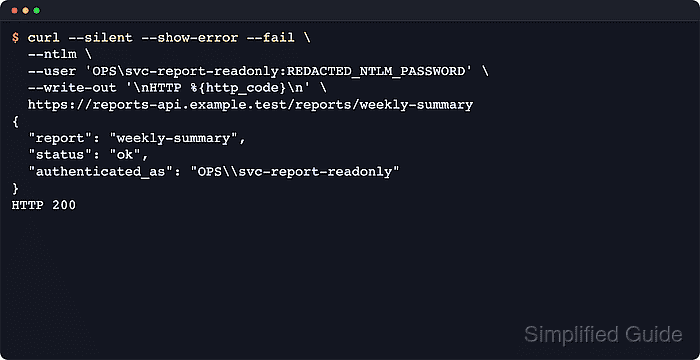
An NTLM-protected origin server usually answers the first unauthenticated HTTP/1.1 request with 401 Unauthorized and a WWW-Authenticate: NTLM header. In curl, --ntlm selects NTLM for the origin server, and --user supplies the account in DOMAIN\username:password or user@example.com:password form.
NTLM is best treated as a compatibility path rather than a preferred long-term authentication method. Keep it on HTTPS, avoid leaving reusable passwords on the literal command line when possible, and use the proxy-authentication path when the challenge is 407 Proxy Authentication Required with Proxy-Authenticate: NTLM. Minimal curl builds may also lack the NTLM or TLS support required for --ntlm, which appears as an unsupported feature rather than a bad password.
Steps to authenticate with NTLM using cURL:
- Request the protected URL without credentials to confirm that the server advertises an NTLM challenge.
$ curl --silent --show-error --verbose --output /dev/null https://api.example.net/reports/weekly-summary
* Host api.example.net:443 was resolved.
##### snipped #####
> GET /reports/weekly-summary HTTP/1.1
> Host: api.example.net
> Accept: */*
< HTTP/1.1 401 Unauthorized
< WWW-Authenticate: NTLM
##### snipped #####
A 401 plus WWW-Authenticate: NTLM means the origin server is asking for NTLM. If the response is 407 Proxy Authentication Required with Proxy-Authenticate: NTLM, the proxy is challenging first and the proxy-authentication path is the correct next step.
- Retry the request with --ntlm and --user using the domain-qualified account.
$ curl --silent --show-error --ntlm --user 'OPS\svc-report-readonly:REDACTED_NTLM_PASSWORD' --write-out '\nHTTP %{http_code}\n' https://api.example.net/reports/weekly-summary
{
  "report": "weekly-summary",
  "status": "ok",
  "authenticated_as": "OPS\\svc-report-readonly"
}
HTTP 200
Inline credentials are easy to copy into notes, shell history, terminal scrollback, and process listings, so use this form for short local tests rather than long-lived automation.
- Omit the password from --user when the secret should be entered interactively instead of typed into the command itself.
$ curl --silent --show-error --ntlm --user 'OPS\svc-report-readonly' --write-out '\nHTTP %{http_code}\n' https://api.example.net/reports/weekly-summary
Enter host password for user 'OPS\svc-report-readonly':
{
  "report": "weekly-summary",
  "status": "ok",
  "authenticated_as": "OPS\\svc-report-readonly"
}
HTTP 200
The interactive prompt keeps the password out of the shell history, but it is not suitable for unattended jobs. For repeatable automation, store the credential in a private cURL config or netrc file instead of retyping it.
- Write only the final status code when a script or health check must prove the NTLM request worked without printing protected content.
$ curl --silent --show-error --output /dev/null --write-out '%{http_code}\n' --ntlm --user 'OPS\svc-report-readonly:REDACTED_NTLM_PASSWORD' https://api.example.net/reports/weekly-summary
200
A repeated 401 usually means the username, password, domain prefix, or upstream account mapping is wrong rather than a generic curl syntax problem.
- Capture the verbose exchange when the NTLM challenge never clears and the server keeps rejecting the account.
$ curl --silent --show-error --verbose --ntlm --user 'OPS\svc-report-readonly:REDACTED_NTLM_PASSWORD' --output /dev/null https://api.example.net/reports/weekly-summary
* Host api.example.net:443 was resolved.
##### snipped #####
* Server auth using NTLM with user 'OPS\svc-report-readonly'
> GET /reports/weekly-summary HTTP/1.1
> Host: api.example.net
> Authorization: NTLM ***REDACTED_NTLM_TOKEN***
> Accept: */*
< HTTP/1.1 401 Unauthorized
< WWW-Authenticate: NTLM ***REDACTED_NTLM_CHALLENGE***
##### snipped #####
* Server auth using NTLM with user 'OPS\svc-report-readonly'
> Authorization: NTLM ***REDACTED_NTLM_TOKEN***
##### snipped #####
< HTTP/1.1 200 OK
Verbose output exposes NTLM tokens and request metadata, so keep traces local and redact them before sharing. Related: How to debug HTTP requests with cURL
Related: View request headers in cURL

Mohd Shakir Zakaria is a cloud architect with deep roots in software development and open-source advocacy. Certified in AWS, Red Hat, VMware, ITIL, and Linux, he specializes in designing and managing robust cloud and on-premises infrastructures.


