HTTP Basic authentication still shows up on internal APIs, admin endpoints, health checks, and compatibility interfaces where one fixed account gates a small set of requests. A clean curl pattern keeps those checks easy to repeat from a terminal, runbook, or incident note.
A protected server usually answers the first unauthenticated request with 401 Unauthorized and a WWW-Authenticate: Basic header. In curl, --user supplies the username:password pair, and that option uses Basic by default unless another HTTP auth method has already been selected.
Basic credentials are only base64-encoded, not encrypted, so transport security and secret handling matter as much as the command syntax. Use HTTPS, and treat command-line passwords as exposed material even on systems where curl briefly hides the --user argument from process listings; omit the password or move recurring credentials into a private netrc file when safer handling is needed.
Related: Store credentials in a netrc file
Related: Authenticate with NTLM
Tool: cURL Command Generator
Steps to use HTTP Basic authentication in cURL:
- Probe the endpoint without credentials to confirm that it really challenges with HTTP Basic authentication.
$ curl --silent --show-error --include https://api.example.net/v1/health
HTTP/2 401
server: envoy
content-type: application/json
www-authenticate: Basic realm="Operations Health API"
x-request-id: 7f9d3d77d8a24c78

{"error":"authentication required"}
A 401 plus a WWW-Authenticate: Basic header is the server-side signal that the request needs a Basic credential pair.
- Send the same request with --user and the username:password pair.
$ curl --silent --show-error --user "svc-health-readonly:REDACTED_BASIC_AUTH_PASSWORD" https://api.example.net/v1/health
{
  "service": "ops-api",
  "status": "ok",
  "authenticated_as": "svc-health-readonly"
}
--user uses Basic by default for HTTP, so --basic is only needed when another auth option or config would otherwise take precedence.
- Omit the password from --user when the secret should be entered interactively instead of appearing in shell history.
$ curl --silent --show-error --include --user "svc-health-readonly" https://api.example.net/v1/health
Enter host password for user 'svc-health-readonly':
HTTP/2 200
content-type: application/json
x-request-id: 2eb7d163c14a4c6b

{
  "service": "ops-api",
  "status": "ok",
  "authenticated_as": "svc-health-readonly"
}
If only the username is provided, curl prompts for the password before sending the request.
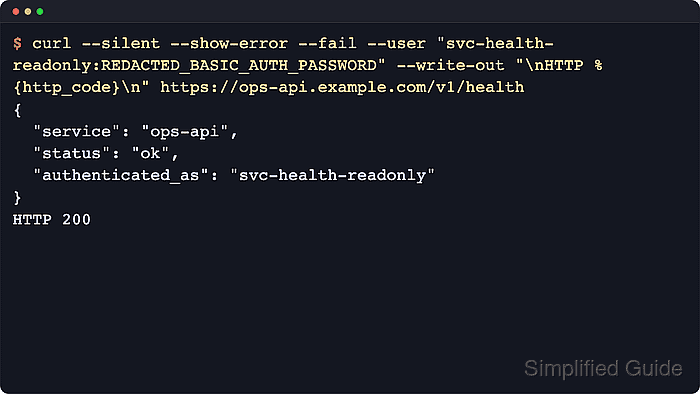
- Add --fail and --write-out when the command needs an explicit success signal in scripts or runbooks.
$ curl --silent --show-error --fail --user "svc-health-readonly:REDACTED_BASIC_AUTH_PASSWORD" --write-out "\nHTTP %{http_code}\n" https://api.example.net/v1/health
{
  "service": "ops-api",
  "status": "ok",
  "authenticated_as": "svc-health-readonly"
}

HTTP 200
The extra status line makes it easier to distinguish an auth success from a TLS, DNS, or application failure in automation.
- Use verbose mode when the server keeps rejecting credentials that look correct.
$ curl --verbose --silent --user "svc-health-readonly:REDACTED_BASIC_AUTH_PASSWORD" https://api.example.net/v1/health
* Host api.example.net:443 was resolved.
##### snipped #####
* Server auth using Basic with user 'svc-health-readonly'
> GET /v1/health HTTP/2
> Host: api.example.net
> Authorization: Basic ***REDACTED_BASE64_CREDENTIALS***
> Accept: */*
##### snipped #####
< HTTP/2 200
{
  "service": "ops-api",
  "status": "ok",
  "authenticated_as": "svc-health-readonly"
}
Verbose output exposes the encoded Authorization header, so keep traces local and redact or discard them before sharing.
Related: View request headers in cURL
- Repeat the request with a known-wrong password when the failure path needs to be separated from DNS, TLS, or application issues.
$ curl --silent --show-error --include --user "svc-health-readonly:REDACTED_WRONG_PASSWORD" https://api.example.net/v1/health
HTTP/2 401
server: envoy
content-type: application/json
www-authenticate: Basic realm="Operations Health API"
x-request-id: c9bc154c50c34011

{"error":"authentication required"}
A repeated 401 with the Basic challenge usually means the username, password, or upstream credential mapping is wrong rather than the curl syntax itself.

Mohd Shakir Zakaria is a cloud architect with deep roots in software development and open-source advocacy. Certified in AWS, Red Hat, VMware, ITIL, and Linux, he specializes in designing and managing robust cloud and on-premises infrastructures.


