During a cutover or incident check, the URL hostname often has to stay fixed while one request reaches a candidate backend. The --resolve option in cURL sends that request to a chosen address without editing /etc/hosts or changing DNS for any other application on the workstation.
The --resolve option adds a host:port:address entry to curl's in-memory DNS cache for the current command. curl connects to the supplied IP address, but it still keeps the hostname from the URL for the HTTP Host header and, on HTTPS, for SNI and certificate checks.
The match is exact on both hostname and port, so a mapping for api.example.test:18080 does not apply to api.example.test:18081 or api.example.test:443. Repeated --resolve flags let one command cover redirects or companion hostnames, and every mapping disappears when the command exits. The example names and output below are masked while keeping the same request shape as a real backend check.
Related: How to override the Host header with cURL
Related: How to debug TLS handshake with cURL
Tool: DNS Record Lookup
Steps to override DNS resolution with cURL:
- Send the request with one --resolve entry so the URL hostname stays unchanged while the connection goes to the chosen address.
$ curl --silent --show-error --resolve api.example.test:18080:127.0.0.1 \
  http://api.example.test:18080/
host=api.example.test:18080
server_port=18080
Replace the example hostname, port, and address with the real values for the backend you need to test.
- Repeat the request with –verbose when you need to confirm that curl used the injected DNS entry and kept the URL host in the request.
$ curl --silent --show-error --verbose --resolve api.example.test:18080:127.0.0.1 \
  http://api.example.test:18080/ --output /dev/null
* Added api.example.test:18080:127.0.0.1 to DNS cache
* Hostname api.example.test was found in DNS cache
*   Trying 127.0.0.1:18080...
* Established connection to api.example.test (127.0.0.1 port 18080) from 127.0.0.1 port 42084
* using HTTP/1.x
> GET / HTTP/1.1
> Host: api.example.test:18080
> User-Agent: curl/8.18.0
> Accept: */*
>
* Request completely sent off
* HTTP 1.0, assume close after body
< HTTP/1.0 200 OK
< Server: BaseHTTP/0.6 Python/3.14.4
##### snipped #####
< Content-Type: text/plain; charset=utf-8
< Content-Length: 46
<
{ [46 bytes data]
* shutting down connection #0
Success is when the Trying and Established connection lines show the override address while the Host: line still shows the hostname from the URL.
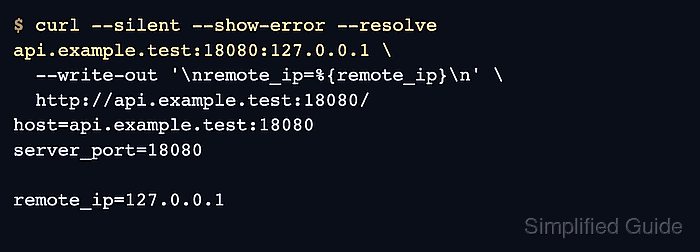
- Capture the final network destination with remote_ip when scripts or runbooks need a decisive success check.
$ curl --silent --show-error --resolve api.example.test:18080:127.0.0.1 \
  --write-out '\nremote_ip=%{remote_ip}\n' \
  http://api.example.test:18080/
host=api.example.test:18080
server_port=18080

remote_ip=127.0.0.1
Use remote_ip when the response body alone is not enough to prove that the request reached the intended address.
- Add a separate mapping for every other port that the same hostname uses.
$ curl --silent --show-error --resolve api.example.test:18081:127.0.0.1 \
  http://api.example.test:18081/
host=api.example.test:18081
server_port=18081
A mapping for api.example.test:18080 does not apply to api.example.test:18081 or api.example.test:443. On HTTPS, curl still uses the hostname from the URL for SNI and certificate verification, so the certificate must match that hostname.

Mohd Shakir Zakaria is a cloud architect with deep roots in software development and open-source advocacy. Certified in AWS, Red Hat, VMware, ITIL, and Linux, he specializes in designing and managing robust cloud and on-premises infrastructures.


