Byte-range downloads are useful when only one section of a remote file is needed for signature checks, trailer inspection, resume preparation, or quick binary probing. Requesting only the relevant bytes avoids re-downloading a full archive, disk image, or media asset when the next task depends on a known offset or final block.
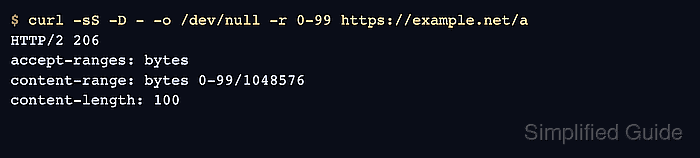
cURL requests a byte range with --range or its short form -r. For HTTP transfers, the request maps to the Range header, byte offsets start at zero, and the end offset is inclusive, so 0-99 returns 100 bytes when the server honors the request. Open-ended syntax such as 1024- starts at an offset and continues to the end, while suffix syntax such as -128 requests the final 128 bytes.
Some servers ignore range requests and return the full file with 200 OK instead of 206 Partial Content, and an offset past the remote object size can return 416 Range Not Satisfiable. Comma-separated multi-range requests also produce multipart output instead of one plain byte slice, so single-range syntax is the safer default when another tool expects one contiguous fragment. Use --continue-at instead for interrupted downloads because cURL does not use --range and --continue-at together in one transfer.
Related: How to resume a download with cURL
Related: How to save cURL output to a file
Steps to download a specific byte range with cURL:
- Download bytes 0 through 99 to a dedicated local file.
$ curl --silent --show-error --range 0-99 --output head.bin \
  https://downloads.example.net/releases/agent.tar.gz
Use --range when the exact start and end offsets are known and one contiguous slice is enough for the next check.
- Confirm that the saved file contains exactly 100 bytes.
$ wc -c head.bin
100 head.bin
The byte count should match the inclusive interval, so 0-99 produces 100 bytes rather than 99.
- Request everything from byte 1024 to the end of the remote file when the trailing remainder matters more than a fixed end offset.
$ curl --silent --show-error --range 1024- --output rest.bin \
  https://downloads.example.net/releases/agent.tar.gz
Open-ended syntax like 1024- starts at the specified byte offset and continues until the remote object ends.
- Request the final 128 bytes with a suffix range when only the trailer matters.
$ curl --silent --show-error --range -128 --output trailer.bin \
  https://downloads.example.net/releases/agent.tar.gz
Suffix syntax like -128 asks for the last 128 bytes without needing the remote file size first.
- Print the response headers for the range request when the transfer needs proof that the server honored the requested bytes.
$ curl --silent --show-error --dump-header - --output /dev/null --range 0-99 \
  https://downloads.example.net/releases/agent.tar.gz
HTTP/1.1 206 Partial Content
accept-ranges: bytes
content-range: bytes 0-99/1048576
content-length: 100
206 Partial Content with Content-Range confirms that the server returned only the requested slice instead of the full object.
If the response shows 200 OK, the server ignored the range and sent the full file. If the response shows 416 Range Not Satisfiable, reduce the offset or confirm the remote file size before retrying.

Mohd Shakir Zakaria is a cloud architect with deep roots in software development and open-source advocacy. Certified in AWS, Red Hat, VMware, ITIL, and Linux, he specializes in designing and managing robust cloud and on-premises infrastructures.


