Authenticated API testing has to prove more than network reachability. A protected endpoint should reject an anonymous request, accept the right credential, perform the intended API action, and expose enough response detail for another engineer to repeat the check.
curl can send bearer tokens, request headers, JSON bodies, timeouts, and response-code output from one terminal session. Keeping the base URL and token in shell variables keeps the command shape reusable while keeping real credentials out of copied examples, tickets, and screenshots.
Use a non-production endpoint, a short-lived token, a disposable test object, and an approved cleanup path before sending state-changing requests. The transcript below uses local-only values; replace them with the staging API URL and token supplied by the API owner when testing a real service.
Steps to test an authenticated API workflow with curl:
- Set the API base URL and bearer token for the test session.
$ API_BASE_URL="http://127.0.0.1:8080/v1"
$ API_TOKEN="sg_local_demo_token"
Real tokens can appear in shell history, terminal scrollback, process listings, screenshots, and shared logs. Use a short-lived non-production token or an approved secret-injection method when policy forbids typing credentials into a shell.
- Probe a protected endpoint without credentials.
$ curl --silent --show-error --max-time 10 --write-out "\nHTTP %{response_code}\n" "$API_BASE_URL/me"
{"error":"missing or invalid bearer token"}
HTTP 401
HTTP 401 or HTTP 403 confirms the endpoint is protected. HTTP 200 usually means the path is public, the wrong endpoint was selected, or credentials are being added outside this command.
- Run the same read request with the bearer token.
$ curl --silent --show-error --max-time 10 --oauth2-bearer "$API_TOKEN" --write-out "\nHTTP %{response_code}\n" "$API_BASE_URL/me"
{"user":"api-runner","scope":"projects:read projects:write"}
HTTP 200
–oauth2-bearer sends an Authorization: Bearer header. If the API expects a custom key header instead, use that documented header in the same position rather than sending both credential types.
- Send the disposable authenticated API action with a JSON body.
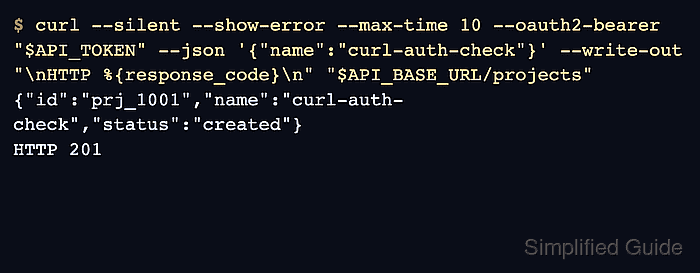
$ curl --silent --show-error --max-time 10 --oauth2-bearer "$API_TOKEN" --json '{"name":"curl-auth-check"}' --write-out "\nHTTP %{response_code}\n" "$API_BASE_URL/projects"
{"id":"prj_1001","name":"curl-auth-check","status":"created"}
HTTP 201
Run mutating methods such as POST, PUT, PATCH, and DELETE only against endpoints where the test object is allowed and reversible.
- Verify the created object with a follow-up authenticated read.
$ curl --silent --show-error --max-time 10 --oauth2-bearer "$API_TOKEN" --write-out "\nHTTP %{response_code}\n" "$API_BASE_URL/projects/prj_1001"
{"id":"prj_1001","name":"curl-auth-check","status":"created"}
HTTP 200
The follow-up read proves that the authenticated write changed the resource state, not only that the server accepted a request body.
- Remove the disposable test object through the API cleanup path.
$ curl --silent --show-error --max-time 10 --oauth2-bearer "$API_TOKEN" --request DELETE --write-out "\nHTTP %{response_code}\n" "$API_BASE_URL/projects/prj_1001" {"deleted":true,"id":"prj_1001"} HTTP 200 - Clear the token variable from the current shell session.
$ unset API_TOKEN
Clearing the variable does not erase earlier terminal history or saved transcripts. Sanitize real endpoint names, tenant IDs, tokens, and response bodies before sharing the command record.

Mohd Shakir Zakaria is a cloud architect with deep roots in software development and open-source advocacy. Certified in AWS, Red Hat, VMware, ITIL, and Linux, he specializes in designing and managing robust cloud and on-premises infrastructures.


