Large Codex reviews can bury the main thread in exploration logs, test output, and partial findings before a decision is ready. A subagent workflow keeps the main session focused by asking Codex to start bounded parallel agents, wait for their summaries, and return one consolidated answer.
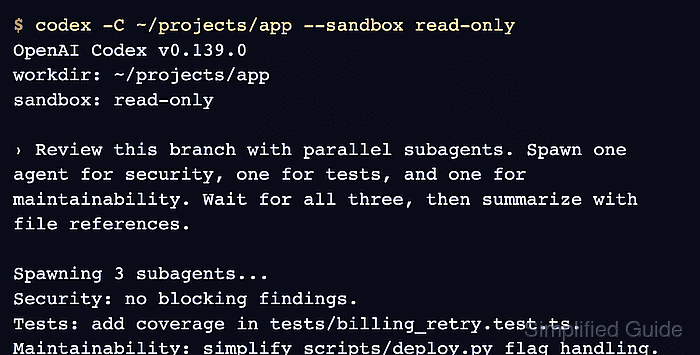
Current Codex releases enable subagent collaboration by default, but child agents start only when the prompt explicitly asks for parallel agent work. Use direct wording that names the split, tells Codex to wait for every agent, and states the summary format that should come back to the main thread.
Parallel agents fit read-heavy work such as codebase exploration, test-gap review, log triage, and document summarization. Keep the first pass read-only when several agents inspect the same repository, because write-heavy delegation can create file conflicts and makes the final synthesis harder to trust.
Related: How to start a Codex interactive session
Related: How to run Codex exec with a prompt
Related: How to set Codex sandbox mode
Related: How to set the default model in Codex
Steps to run a Codex subagent workflow:
- Confirm that the installed Codex CLI has subagent collaboration enabled.
$ codex features list
##### snipped #####
multi_agent                          stable             true
multi_agent_v2                       under development  false
##### snipped #####
The stable multi_agent row should be true on current releases. If it is false, update Codex or check local feature overrides before delegating work.
Related: How to list Codex feature flags - Confirm that the session can reach a logged-in Codex account.
$ codex login status
Logged in using ChatGPT
A real subagent run needs the same authentication as any other model-backed Codex turn.
Related: How to check Codex login status - Start Codex in the repository with a read-only sandbox for the review pass.
$ codex -C ~/projects/app --sandbox read-only --ask-for-approval on-request

╭────────────────────────────────────────────────────╮
│ >_ OpenAI Codex                                    │
│                                                    │
│ directory: ~/projects/app                          │
│ sandbox:   read-only                               │
╰────────────────────────────────────────────────────╯

›
Use the repository root that should provide project files, Git context, and instruction files. Switch to workspace-write only when the delegated agents are supposed to edit files.
Related: How to set the working directory for Codex
Related: How to set Codex approval policy - Send one prompt that names the parallel split and the final summary format.
› Review this branch with parallel subagents. Spawn one agent for security, one for tests, and one for maintainability. Keep each agent read-only. Wait for all three, then summarize confirmed findings with file references.
The prompt should name the agent count, each agent's job, whether edits are allowed, and what the parent answer should contain.
- Inspect spawned agent threads when the workflow is running.
/agent
The /agent command opens the agent-thread picker in the CLI so active subagents can be inspected or continued without losing the main-thread summary.
- Steer any subagent that drifts outside its assigned job.
› Keep the tests agent read-only and report only missing coverage with file references.
Targeted follow-up instructions keep the parent thread focused on concise results from every subagent.
- Review approval requests before allowing actions from inactive agent threads.
When an approval overlay names a subagent thread, press o to open that thread before approving, rejecting, or answering. Do not approve writes, network access, or destructive commands unless they still match the delegated scope.
Related: How to set Codex approval policy
- Wait for the consolidated summary from the main thread.
Security
- No blocking findings.

Tests
- Missing regression coverage in tests/billing_retry.test.ts.

Maintainability
- scripts/deploy.py mixes flag parsing with deployment execution.
Ask for missing file references before acting on a finding. The parent summary should separate each subagent's result and keep raw exploration logs out of the main thread.
- Close completed agent threads after the synthesis is captured.
› Close completed agent threads.
Closed completed agent threads.
Completed subagents can stay open until closed, so closing them keeps the session's agent list and concurrency limit clear for the next workflow.

Mohd Shakir Zakaria is a cloud architect with deep roots in software development and open-source advocacy. Certified in AWS, Red Hat, VMware, ITIL, and Linux, he specializes in designing and managing robust cloud and on-premises infrastructures.


