When Codex starts with the wrong model, every new session can spend its first turn correcting model choice instead of using the intended capability, speed, and cost profile. A default model in Codex configuration pins that starting choice before the first prompt is sent.
Codex reads model settings from command-line flags first, then trusted project .codex/config.toml files, selected profile files, the user-level ~/.codex/config.toml file, system configuration, and built-in defaults. Put the setting in the user file when most local sessions should start with the same model, or in a trusted project file when only one repository needs that default.
Current Codex docs and CLI help expose the top-level model setting and the --model or -m launch flag. There is no current codex model set subcommand, and recurring alternate model choices now belong in separate profile files such as ~/.codex/fast.config.toml instead of legacy [profiles.fast] tables.
Steps to set the default Codex model:
- Create the user-level Codex config directory.
$ mkdir -p ~/.codex
- Open the user configuration file.
$ vi ~/.codex/config.toml
Use .codex/config.toml inside a trusted repository only when the model should apply to that project instead of every local Codex session.
- Set one top-level model value.
model = "gpt-5.5"
Use gpt-5.5 for demanding coding and tool-use work, or gpt-5.4-mini when speed and lower cost matter more than depth. If the active file already contains model = …, replace that line instead of adding a second top-level model entry.
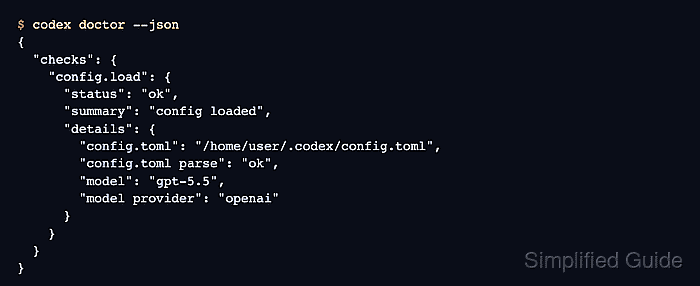
- Check that Codex loads the config file and sees the selected model.
$ codex doctor --json
{
  "schemaVersion": 1,
  "codexVersion": "0.139.0",
  "checks": {
    "config.load": {
      "status": "ok",
      "summary": "config loaded",
      "details": {
        "config.toml": "/home/user/.codex/config.toml",
        "config.toml parse": "ok",
        "model": "gpt-5.5",
        "model provider": "openai"
      }
    }
  }
  ##### snipped #####
}
codex doctor can also report authentication, network, or app-server checks. For this model change, the relevant signal is config.load showing config.toml parse as ok and model as the configured value.
- Start a new interactive session and confirm the header shows the configured model.
$ codex

╭──────────────────────────────────────────────────────────╮
│ >_ OpenAI Codex                                         │
│                                                          │
│ model:     gpt-5.5 high         /model to change        │
│ directory: ~/projects/example-app                       │
╰──────────────────────────────────────────────────────────╯

›
The exact reasoning suffix can differ by account or launch flags. If no cached login exists, complete authentication first and reopen the session.
Related: How to check Codex login status
Related: How to start a Codex interactive session - Override the default model for one run when the change should not persist.
$ codex exec -m gpt-5.4-mini "Reply with exactly OK."
OK
-m is shorthand for --model and has higher precedence than ~/.codex/config.toml for that command process.
Related: How to override Codex configuration for a single run
Related: How to run Codex exec with a prompt - Create a profile file when an alternate model should be reused by name.
$ vi ~/.codex/fast.config.toml
model = "gpt-5.4-mini"
Select the profile with codex --profile fast or codex exec --profile fast "...". Current Codex versions layer ~/.codex/fast.config.toml over the base config for runtime commands.

Mohd Shakir Zakaria is a cloud architect with deep roots in software development and open-source advocacy. Certified in AWS, Red Hat, VMware, ITIL, and Linux, he specializes in designing and managing robust cloud and on-premises infrastructures.


