Local-model routing in Codex chooses a workstation model instead of the default hosted provider for a specific coding task. The route matters when one repository can use normal OpenAI models, but a sensitive prompt or offline lab run should stay on Ollama or LM Studio.
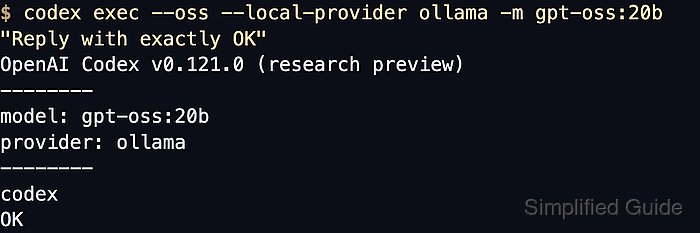
The fastest route is a one-off --oss run with --local-provider and -m. When --oss is used without --local-provider, Codex reads oss_provider from the active user or profile config and still expects the model name from -m unless another layer sets model.
Saved provider routing belongs in the user-level Codex config or in a profile file under $CODEX_HOME. Project .codex/config.toml files cannot select model_provider or define model_providers, so keep local provider choice in ~/.codex/config.toml or ~/.codex/<profile>.config.toml and keep the provider API bound to localhost unless remote access is intentional.
Related: How to use local models with Codex
Related: How to use Ollama models with Codex
Related: How to use LM Studio models with Codex
Related: How to troubleshoot local models in Codex
Steps to route Codex to a local model:
- List the model IDs exposed by the local provider.
$ curl -s http://localhost:11434/v1/models
{"object":"list","data":[{"id":"gpt-oss:20b","object":"model","owned_by":"library"}]}
For LM Studio, use http://localhost:1234/v1/models and copy the returned id value.
Related: How to use Ollama models with Codex
Related: How to use LM Studio models with Codex - Route one Codex run to Ollama with explicit flags.
$ codex exec --oss --local-provider ollama -m gpt-oss:20b -C ~/repo "Reply with exactly OK"
OpenAI Codex v0.139.0
--------
workdir: /home/user/repo
model: gpt-oss:20b
provider: ollama
--------
codex
OK
--local-provider accepts ollama or lmstudio and overrides the saved oss_provider for that run. Codex CLI 0.139.0 requires Ollama 0.13.4 or newer for the --oss route.
Related: How to fix the Codex trusted-directory error - Set the default --oss provider in the user Codex config.
oss_provider = "ollama"
oss_provider selects the backend only when --oss is used. It does not choose the model, and project .codex/config.toml files cannot set provider routing.
- Re-run Codex with --oss to confirm the saved provider is used.
$ codex exec --oss -m gpt-oss:20b -C ~/repo "Reply with exactly OK"
OpenAI Codex v0.139.0
--------
workdir: /home/user/repo
model: gpt-oss:20b
provider: ollama
--------
codex
OK
Use direct flags or -c overrides when only one run should differ from the saved default.
Related: How to override Codex configuration for a single run - Create a profile file when the local provider and model should travel together.
model_provider = "ollama"
model = "gpt-oss:20b"
Codex profiles are separate ~/.codex/<name>.config.toml files with top-level keys. For LM Studio, use model_provider = "lmstudio" and the model ID returned by its local server.
- Run Codex with the profile and confirm the provider line points at the local backend.
$ codex exec --profile local-ollama -C ~/repo "Reply with exactly OK"
OpenAI Codex v0.139.0
--------
workdir: /home/user/repo
model: gpt-oss:20b
provider: ollama
--------
codex
OK

Mohd Shakir Zakaria is a cloud architect with deep roots in software development and open-source advocacy. Certified in AWS, Red Hat, VMware, ITIL, and Linux, he specializes in designing and managing robust cloud and on-premises infrastructures.


