Hooks let Codex run local commands at defined lifecycle points, giving a team a mechanical guardrail around prompts, tool calls, or session cleanup. A hook should stay small and auditable because Codex can load it from user, project, plugin, or managed configuration.
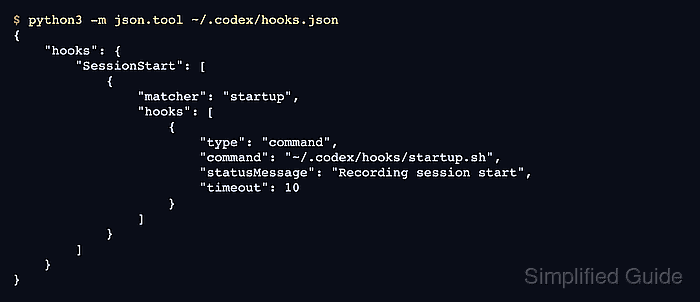
The simplest starting point is a user-level ~/.codex/hooks.json file that points to an executable script under ~/.codex/hooks. Codex also accepts inline [hooks] tables in config.toml, but keeping hook wiring in hooks.json separates lifecycle commands from general settings.
Non-managed command hooks require review and trust before they run, and the Codex CLI exposes that review flow through /hooks. Multiple matching hooks can run from different sources, and matching command hooks for the same event can start concurrently, so each hook should enforce its own safety checks instead of relying on another hook to run first.
Related: How to build a Codex plugin
Related: How to add a command approval rule in Codex
Steps to add a Codex command hook:
- Create the user hook directory.
$ mkdir -p ~/.codex/hooks
Use .codex/hooks.json only when the hook belongs to one trusted repository. Codex ignores project-local hooks in untrusted projects, while user-level hooks remain independent of project trust.
- Save a harmless startup hook script as ~/.codex/hooks/startup.sh.
- startup.sh
#!/bin/sh
printf 'SessionStart startup\n' >> "$HOME/.codex/hook-events.log"
Command handlers are the hook handler type that runs in current Codex releases. Keep the script deterministic and avoid prompting for input.
- Restrict the script so only the current user can run or edit it.
$ chmod 700 \
  ~/.codex/hooks/startup.sh
- Add a SessionStart hook definition.
- ~/.codex/hooks.json
{
  "hooks": {
    "SessionStart": [
      {
        "matcher": "startup",
        "hooks": [
          {
            "type": "command",
            "command": "~/.codex/hooks/startup.sh",
            "statusMessage": "Recording session start",
            "timeout": 10
          }
        ]
      }
    ]
  }
}
The matcher value limits this hook to new startup sessions. Omit matcher, set it to an empty string, or use * only when the hook should match every supported occurrence of that event.
- Validate the hook file syntax.
$ python3 -m json.tool \ ~/.codex/hooks.json { "hooks": { "SessionStart": [ { "matcher": "startup", "hooks": [ { "type": "command", "command": "~/.codex/hooks/startup.sh", "statusMessage": "Recording session start", "timeout": 10 } ] } ] } } - Confirm the hook feature is enabled.
$ codex features list
##### snipped #####
hooks                                stable             true
##### snipped #####
If hooks is false, remove the local feature override or set hooks = true under [features] in the active config.toml layer.
- Start the Codex CLI so it loads the hook source.
$ codex
- Open the hook review browser in the Codex CLI.
/hooks
The hook should appear from ~/.codex/hooks.json as a non-managed command hook. Review the command path, event, matcher, and timeout before trusting it.
- Trust the hook after reviewing the exact command.
Do not use --dangerously-bypass-hook-trust for normal interactive work. That flag skips persisted hook trust for one invocation and belongs only in automation that vets hook sources separately.
- Start a new Codex session after the hook is trusted.
$ codex
- Check the startup hook log.
$ cat ~/.codex/hook-events.log
SessionStart startup
If the log is empty, reopen /hooks and confirm the hook is trusted, enabled, and still matches the startup source.

Mohd Shakir Zakaria is a cloud architect with deep roots in software development and open-source advocacy. Certified in AWS, Red Hat, VMware, ITIL, and Linux, he specializes in designing and managing robust cloud and on-premises infrastructures.


