A local Codex app-server listener fits custom editors, desktop clients, and protocol test harnesses that need the same rich client surface as a full Codex integration. Binding the listener to loopback keeps the JSON-RPC transport reachable for development without exposing agent control on a shared network.
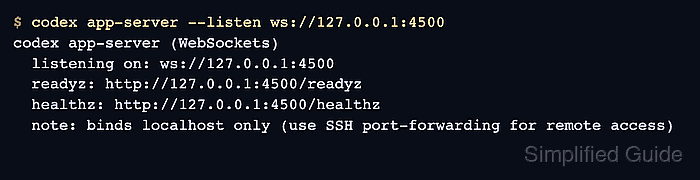
For startup checks, the local WebSocket transport is easier to prove than the default stdio mode because it exposes /readyz and /healthz over HTTP on the same listener. The app server still speaks JSON-RPC over WebSocket frames, while the health endpoints only confirm that the listener is accepting local clients.
The app-server interface is experimental, and real turns still need a valid Codex login or API-key-backed environment. Keep WebSocket listeners on 127.0.0.1 for local development; use WebSocket authentication, TLS, or an SSH tunnel before any non-local client can reach the port.
Steps to start the Codex app server locally:
- Check that the installed Codex CLI exposes the app-server listener options.
$ codex app-server --help
[experimental] Run the app server or related tooling

Usage: codex app-server [OPTIONS] [COMMAND]
##### snipped #####
      --listen <URL>
          Transport endpoint URL. Supported values: `stdio://` (default), `unix://`, `unix://PATH`,
          `ws://IP:PORT`, `off`

          [default: stdio://]
The WebSocket listener is the clearest startup path when a readiness endpoint is useful. The default stdio:// transport fits clients that spawn codex app-server and exchange JSONL over standard input and output.
- Start a loopback WebSocket listener.
$ codex app-server --listen ws://127.0.0.1:4500
codex app-server (WebSockets)
  listening on: ws://127.0.0.1:4500
  readyz: http://127.0.0.1:4500/readyz
  healthz: http://127.0.0.1:4500/healthz
  note: binds localhost only (use SSH port-forwarding for remote access)
Do not bind ws://0.0.0.0:4500 or another reachable interface unless WebSocket auth and a protected network path are configured. Non-local app-server listeners expose agent control to any client that can reach them.
- Check readiness from another terminal.
$ curl --include --silent --show-error http://127.0.0.1:4500/readyz
HTTP/1.1 200 OK
content-length: 0
##### snipped #####
/readyz returns 200 OK once the WebSocket listener can accept new local connections.
- Check the health endpoint from the same local host.
$ curl --include --silent --show-error http://127.0.0.1:4500/healthz
HTTP/1.1 200 OK
content-length: 0
##### snipped #####
/healthz returns 200 OK for non-browser local probes and rejects requests that include an Origin header.
- Connect a local client after readiness passes.
$ codex --remote ws://127.0.0.1:4500
Custom WebSocket clients must send initialize, then initialized, before thread or turn requests. Check the same shell's Codex login before sending model-backed turns.
Related: How to check Codex login status - Stop the foreground app server when client testing is finished.
Press Ctrl-C in the terminal running codex app-server. Stop any custom process manager or daemon from the same place that started it.

Mohd Shakir Zakaria is a cloud architect with deep roots in software development and open-source advocacy. Certified in AWS, Red Hat, VMware, ITIL, and Linux, he specializes in designing and managing robust cloud and on-premises infrastructures.


