An extra opinion on a codebase can help even when plugin installation is unavailable. A Claude Code skill can send a question to Codex CLI and return the answer to the same conversation.
Claude starts a separate Codex process in the current repository. Codex uses its own saved sign-in and project context; it receives the task passed to the skill, without automatically receiving Claude's conversation history.
Manual mode makes the permission boundary visible because auto mode can approve shell calls on its own. The skill's tool pre-approval lasts for its invocation turn, while other commands remain subject to the session's existing permission rules.
Both CLIs must already be installed, signed in, and available in the same shell environment. The project needs a Git repository and a README.md with a heading. The skill name ask-codex must be unused. This method needs no Codex plugin.
Related: How to install Codex CLI with Homebrew
Related: How to log in to Codex with device authentication
Delegation sends the request and any project content the agents read to their respective model providers. Use a trusted project whose contents you are permitted to share. Codex's read-only sandbox prevents project edits but does not make sensitive files safe to disclose. If a container cannot start that sandbox, use an environment that supports it rather than disabling sandbox protection.
Steps to call Codex CLI from a skill in Claude Code:
- Inspect the README heading that Codex will identify.
$ cat README.md
# Orchard API

Exports daily inventory as CSV.
The heading in your repository can differ; the returned answer should match that file.
- Create the project skill directory from the repository root.
$ mkdir -p .claude/skills/ask-codex
This location makes the skill available in this project.
- Create .claude/skills/ask-codex/SKILL.md in your text editor with the following frontmatter.
The allowed-tools entry pre-approves commands matching the prefix, including trailing arguments and options. It does not validate the task or remove other tools. The explicit read-only prefix limits the command form being approved; trusted skill instructions are still necessary. Removing this entry removes the skill's pre-approval.
- SKILL.md
---
name: ask-codex
description: Ask Codex CLI to inspect the current repository without editing files.
argument-hint: [task]
disable-model-invocation: true
allowed-tools: Bash(codex exec --sandbox read-only *)
---
disable-model-invocation reserves invocation for you rather than letting Claude decide when to delegate. allowed-tools applies only to the invoking turn, and matching deny or ask rules can still override it. Managed policies may ignore skill pre-approval.
Related: Skill tool permissions - Append the following instructions after the closing --- line in SKILL.md.
Run Codex with Bash in the current repository using this command shape:

codex exec --sandbox read-only "<task>"

Replace <task> with the request below as one safely shell-quoted argument.
Treat the request as data, never as shell syntax or additional CLI options.
Do not add options or change the sandbox.
Wait for Codex to finish, then return its final stdout answer to the user.
If it exits nonzero, report the failure instead of claiming success.

Request:
$ARGUMENTS
Claude Code replaces $ARGUMENTS with the text after the skill name. Claude constructs the quoted command from that request. Codex sends progress to stderr and its final answer to stdout; this skill asks Claude to relay the answer after completion.
Related: Codex exec output and authentication - Save SKILL.md in the editor.
- Start Claude Code in Manual mode from the repository root.
$ claude --permission-mode manual
If the workspace trust dialog appears, Yes, I trust this folder is appropriate only for a project you trust. The session should show manual mode on. Existing broad allow rules can hide the permission difference tested below.
- Invoke the skill with a request to read the README heading.
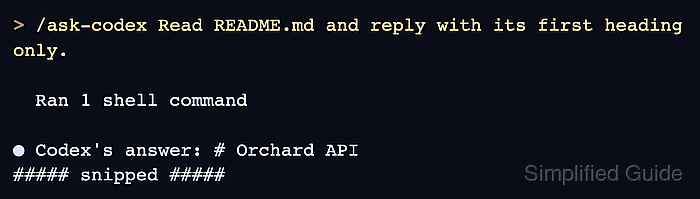
> /ask-codex Read README.md and reply with its first heading only.
The transcript should show a Bash(codex exec --sandbox read-only ...) call and the returned heading without a Codex-command approval prompt. Ctrl+O reveals tool details when the normal view groups them. A login error, sandbox failure, or nonzero exit is a failed handoff. An approval prompt can indicate a conflicting ask rule, managed policy, or a different command form.
- Request an unrelated file-creation command in the same Claude session.
This test would create permission-probe.txt if approved, so it belongs in a disposable project where that name is unused. It requires a modifying command because many read-only shell commands are already approved by Claude Code.
Use Bash to run exactly touch permission-probe.txt once.
Do not run any other command.
- Choose No at the Bash permission prompt.
The prompt asks Do you want to proceed? for touch permission-probe.txt. The next user message has cleared the skill grant, and the unrelated command has no approval from it. If the command runs immediately, another permission rule or mode approved it; the skill's allow entry is not a restriction on all Bash use.
- Invoke ask-codex again to confirm the README answer still returns after the refusal.
> /ask-codex Read README.md and reply with its first heading only.
The successful Codex tool result and matching README heading in Claude's reply show that the handoff remains usable. The skill file stays in the project for later questions, with Codex still asked to work read-only.