Repeated approval prompts can interrupt routine development, while some commands should stay blocked. Claude Code permission rules let a saved allow entry approve a matching command without asking and a deny entry refuse one before it runs.
The settings file determines who receives the rules. A project's .claude/settings.json can be committed for teammates to share; ~/.claude/settings.json applies to your projects on that machine, while .claude/settings.local.json holds personal rules for one project.
Manual mode makes the difference between a prompt and an allowed command visible. Auto mode can approve commands without routine prompts even without an allow rule, and read-only commands such as git log normally need no approval. A commit provides a test that changes repository state, followed by a refused push to check the deny rule.
Claude Code must already be installed and signed in. The commit test needs a Git repository with your author identity configured and a small change you intend to commit. A commit runs repository hooks and records all staged changes, so a disposable repository is preferable for a first test.
Steps to add permission rules in Claude Code:
- Stage the change you want Claude to commit.
$ git add README.md
README.md is the changed file used here; the filename should match your intended change. Staging happens separately because an allow rule for git commit does not approve git add in a compound command.
- Start Claude Code in Manual mode from the repository root.
$ claude --permission-mode manual
The terminal shows manual mode on. Recent versions can start in auto mode by default; manual explicitly selects the mode whose settings value is default.
- Select Yes, I trust this folder if the workspace trust dialog appears for your trusted repository.
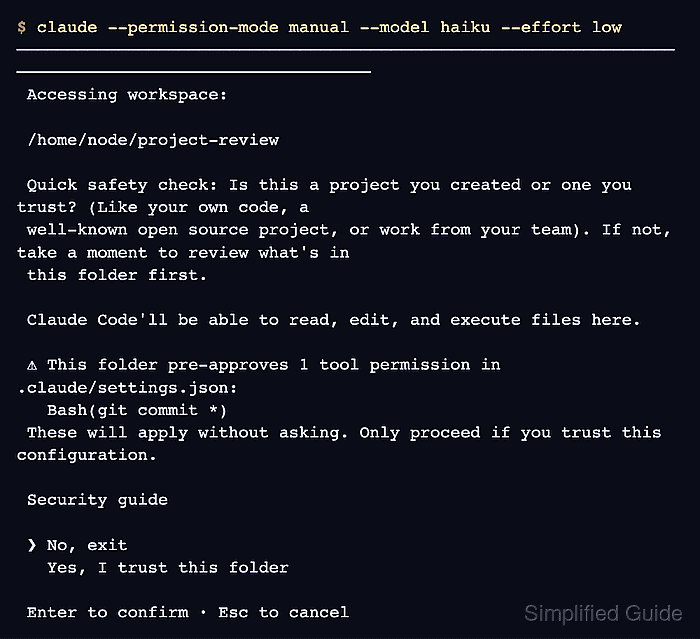
A trusted workspace permits Claude to use repository-provided configuration. When a folder already contains project allow rules, the dialog lists the capabilities it would grant. Project allow rules wait for that trust decision; deny and ask rules apply immediately.
- Request the staged commit in Claude's prompt.
Run exactly git commit -m "Check permission rules" using Bash.
The change is already staged. Do not run any other commands.
- Choose No at the commit permission prompt.
The prompt shows git commit -m "Check permission rules" and This command requires approval. Choosing No leaves the change staged. Yes, and don't ask again would save an allow rule in .claude/settings.local.json instead. If the command already runs without asking, an existing rule or the active mode needs checking before this comparison can show a change.
- Open the repository's .claude/settings.json in your text editor.
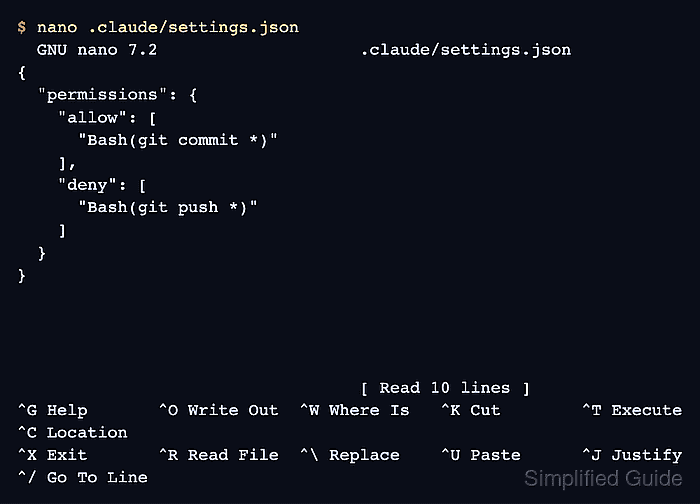
If the file is absent, create it inside a .claude directory at the repository root. The project file is the shared scope used here; personal rules belong in one of the personal files named above.
- Insert the following rules into the top-level permissions object.
Bash(git commit *) approves commit arguments without another prompt, including options such as --amend, and commits can execute Git hooks. Only grant this capability in repositories whose code and hooks you trust. A rule for all of Bash or git * would grant more commands than this task needs.
{
  "permissions": {
    "allow": [
      "Bash(git commit *)"
    ],
    "deny": [
      "Bash(git push *)"
    ]
  }
}
This is the complete content for a new settings file. In an existing file, add these strings to the existing permissions.allow and permissions.deny arrays, creating missing keys inside the one top-level permissions object. Other keys and rules stay intact, and matching entries need no duplicate. Settings require strict JSON, without comments or trailing commas. Removing only the added entries reverses this change.
The space and trailing * match arguments after the subcommand and also the bare subcommand. Rules are evaluated deny, then ask, then allow; a more specific allow cannot override a matching deny or ask. Rule lists from different settings files merge.
A Bash deny rule matches command text, not every way to invoke a program. git -C . push and a full executable path can fall outside Bash(git push *). Other rules and the mode decide those calls. Sandboxing can enforce filesystem and network boundaries; a PreToolUse hook can inspect commands before execution.
- Save .claude/settings.json in the editor.
Claude Code watches settings files and reloads permission changes without restarting. If the file is rejected, claude doctor from another terminal in this repository reports settings errors or skipped entries. A malformed file or skipped rule must be corrected before relying on it.
- Check for Bash(git commit *) in the Allow tab of /permissions.
> /permissions
The tested version identified this entry as From shared project settings when selected, meaning .claude/settings.json. Selecting an existing rule opens a deletion confirmation, so No or Esc preserves it.
- Check for Bash(git push *) in the Deny tab.
The arrow keys switch tabs. An ask entry would require confirmation instead of refusing the call. The Add a new rule… option offers an interactive alternative to editing JSON, with a choice of settings scope.
- Close the permissions dialog with Esc.
- Request the same staged commit again.
Run exactly git commit -m "Check permission rules" using Bash.
The change is already staged. Do not run any other commands.
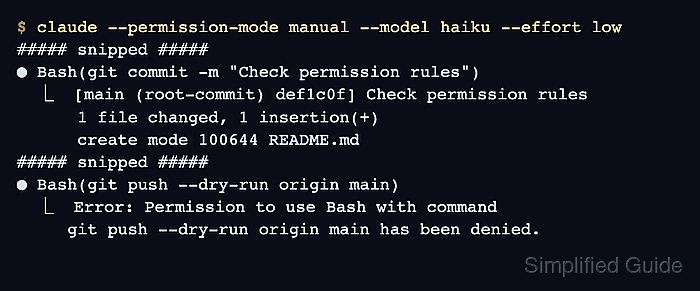
● Bash(git commit -m "Check permission rules")
  ⎿  [main (root-commit) def1c0f] Check permission rules
      1 file changed, 1 insertion(+)
      create mode 100644 README.md
The tool should return commit output without another approval prompt. The branch, hash, and change summary depend on your repository. A loaded rule alone does not prove that it matched; a remaining prompt can indicate a conflicting ask rule or a different command form.
- Confirm the new commit from another terminal in the same repository.
$ git log -1 --oneline
def1c0f Check permission rules
- Request a dry-run push to confirm the deny rule refuses it.
Attempt exactly git push --dry-run origin main with Bash once.
Do not substitute another command or bypass a denial.
● Bash(git push --dry-run origin main)
  ⎿  Error: Permission to use Bash with command
     git push --dry-run origin main has been denied.
The denial should come from the tool before Git runs. --dry-run avoids updating the remote if the rule is missing or fails to match; the remote and branch names should match your repository. A Git authentication error or a remote error is not this permission denial. The commit and both saved rules remain in place.
A file rule such as Read(./.env) in deny blocks that Read-tool path, but does not by itself stop Bash or another tool from reading the same file. The one-session --allowedTools and --disallowedTools flags can apply rules without saving them. Scripted use has different prompt behavior; headless prompts cover that separate case.