An unattended build cannot answer a permission prompt. Claude Code can run a headless prompt, return JSON to the calling script, and deny tool calls that would otherwise wait for approval.
Print mode uses the current Claude Code sign-in and project context. The shell examples require an installed, authenticated CLI, jq, and a trusted, disposable project containing README.md; they work with an existing subscription sign-in rather than requiring a separate API key.
Tool approval and task completion are separate. Claude can explain that an edit was denied and still exit successfully, so an automated job needs to inspect denied tool calls as well as the process status.
Without --bare, print mode loads local configuration and can run project hooks or connect MCP servers without a trust dialog. Run it only in a directory whose project and user configuration you trust. Upstream recommends bare mode for isolated scripts, but it skips subscription credentials and requires separate API or provider authentication.
Related: Claude Code bare mode
Steps to run a headless prompt in Claude Code:
- Inspect the README that Claude will read.
$ cat README.md
# Weather service

The service reports the current temperature in Celsius.
Requests send README contents to the model provider, and the JSON redirections overwrite same-named output files. The sample repository describes a weather service. Different README contents will produce a different heading and may require a different replacement in the permission test.
- Run a headless prompt with JSON output.
$ claude -p "Read README.md and reply with its first heading only." \
  --model haiku --effort low --tools Read --allowedTools Read \
  --output-format json --max-turns 3 > answer.json
-p exits after the request. --tools Read exposes only the built-in reading tool, while --allowedTools Read approves its calls. The haiku model and low effort keep this small request inexpensive. --max-turns limits agentic turns, not elapsed time.
- Extract the answer from the JSON result.
$ jq -er '.result' answer.json
# Weather service
The wording can vary. The answer should contain the README heading; jq -e returns non-zero if result is missing or null.
- Inspect the JSON result metadata.
$ jq '{subtype, is_error, session_id, total_cost_usd, permission_denials}' answer.json
{
  "subtype": "success",
  "is_error": false,
  "session_id": "00000000-0000-4000-8000-000000000005",
  "total_cost_usd": 0.0014206499999999999,
  "permission_denials": []
}
The session identifier is anonymized. Cost and response text vary between runs; total_cost_usd is a client estimate, not a subscription charge or an exact bill.
- Request an edit without approving the editing tool.
Existing permission rules, hooks, or a different permission mode can approve the edit and change README.md. This test belongs in a disposable project.
$ claude -p "Read README.md, then use Edit to replace Celsius with Fahrenheit. Do not suggest a manual change." \
  --model haiku --effort low --tools Read,Edit --allowedTools Read \
  --output-format json --max-turns 4 > denied.json
This exposes Edit but leaves only Read pre-approved. With no permission mode configured, -p starts in Manual mode on Claude Code 2.1.302 and later. A call needing approval is denied when nothing approves it. An allowlist alone does not remove other tools or override existing approvals.
- Check which editing calls were denied.
$ jq '[.permission_denials[].tool_name]' denied.json
[
  "Edit"
]
This request returned exit 0 even though the edit was denied. For a job that permits no denials, jq -e '(.permission_denials // []) | length == 0' denied.json returns non-zero for this result.
- Confirm that the README still contains Celsius.
$ cat README.md
# Weather service

The service reports the current temperature in Celsius.
- Limit the read request to one turn.
$ claude -p "Read README.md and reply with its first heading only." \
  --model haiku --effort low --tools Read --allowedTools Read \
  --output-format json --max-turns 1 > limited.json
The read uses the available turn, leaving none for the answer. A failed run can still write JSON to stdout.
- Check the capped command's exit status immediately.
$ echo $?
1
- Inspect the capped run's error fields.
$ jq '{subtype, is_error, errors}' limited.json
{
  "subtype": "error_max_turns",
  "is_error": true,
  "errors": [
    "Reached maximum number of turns (1)"
  ]
}
A script needs to check Claude's exit status before extracting the answer. An optional --max-budget-usd 0.10 limits estimated API spend, but a request can take the estimate past the cap, so it is not a hard billing ceiling.
Related: Claude Code CLI flags - Request a schema-shaped response when the script needs named fields.
$ claude -p 'Return service "weather" and unit "Celsius".' \
  --model haiku --effort low --tools '' --output-format json \
  --json-schema '{"type":"object","properties":{"service":{"type":"string"},"unit":{"type":"string"}},"required":["service","unit"],"additionalProperties":false}' \
  --max-turns 3 > structured.json
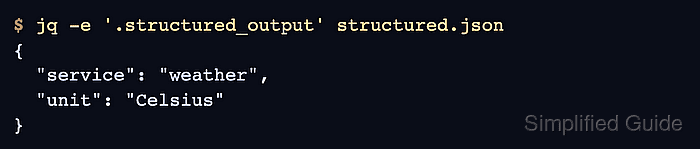
This optional format puts the object in structured_output instead of using the text answer in result. --tools '' disables built-in tools for this request.
- Extract the structured object.
$ jq -e '.structured_output' structured.json
{
  "service": "weather",
  "unit": "Celsius"
}
A missing structured_output fails this check. Automated callers still need the exit-status branch before extraction.
- Record newline-delimited events when the caller needs streaming output.
$ claude -p 'Reply with the word ready.' --model haiku --effort low \
  --tools '' --output-format stream-json --verbose > events.jsonl
This optional output format emits one JSON object per line. --verbose is required for print-mode stream-json output.
- Read the final result event from the stream.
$ jq -c 'select(.type == "result") | {subtype, is_error, result}' events.jsonl {"subtype":"success","is_error":false,"result":"ready"} - Create run-prompt.sh in your text editor with the following contents.
- run-prompt.sh
if claude -p "Read README.md and reply with its first heading only." \
  --model haiku --effort low --tools Read --allowedTools Read \
  --output-format json --max-turns "$1" > answer.json; then
  jq -er '.result' answer.json
else
  status=$?
  printf 'Claude Code failed (exit %s)\n' "$status" >&2
  jq '{subtype, is_error, errors}' answer.json >&2
  exit "$status"
fi
The script takes its turn limit as the first argument. Its success branch extracts result only after Claude exits successfully. The failure branch preserves the non-zero status, prints the JSON error fields, and returns that status to the caller.
- Test the script's failure branch with a one-turn limit.
$ bash run-prompt.sh 1 Claude Code failed (exit 1) { "subtype": "error_max_turns", "is_error": true, "errors": [ "Reached maximum number of turns (1)" ] } - Check the failed script's exit status immediately.
$ echo $?
1
- Run the script again with enough turns to return the answer.
$ bash run-prompt.sh 3
The first heading in README.md is:

# Weather service
The answer is printed only after Claude succeeds; answer.json contains the successful result again.