Local AWS commands often need short-lived credentials without adding access keys to ~/.aws/credentials. aws login connects an existing AWS Management Console sign-in to a named AWS CLI profile so the shell can make signed requests with temporary credentials instead of stored long-lived keys.
The aws login command is available in AWS CLI version 2.32.0 or newer. It can authenticate with root credentials, an IAM user, or federation through IAM, while IAM Identity Center users should use the separate aws sso login flow. Non-root identities need permission to use the AWS Sign-In local development OAuth flow, commonly through the SignInLocalDevelopmentAccess managed policy.
The login-backed profile stores a login_session entry in ~/.aws/config and caches temporary credential material under ~/.aws/login/cache. Existing environment variables or shared-credentials-file entries can still override the login session, so verify that the target profile resolves credentials with TYPE set to login before running account-changing commands.
Steps to log in to AWS CLI with console credentials:
- Confirm that the installed AWS CLI supports aws login.
$ aws --version
aws-cli/2.35.3 Python/3.14.5 Linux/6.12.76 docker/aarch64.amzn.2023
The command requires AWS CLI version 2.32.0 or newer. The exact runtime, kernel, and platform suffix vary by operating system.
Related: How to check AWS CLI version - Choose a profile name, region, and console identity for the session.
Profile: console-dev
Region: us-east-1
Console identity: Developer role in account 123456789012
Use a non-root identity for normal work. If the console identity is an IAM user, role, or federated principal, attach or delegate the SignInLocalDevelopmentAccess permissions before starting the login.
- Start the browser sign-in flow for the named profile.
$ aws login --profile console-dev
No AWS region has been configured. The AWS region is the geographic location of your AWS resources.
AWS Region [us-east-1]: us-east-1

Attempting to open the login page for `us-east-1` in your default browser.
If the browser does not open, use the following URL to complete your login:
https://signin.us-east-1.amazonaws.com/authorize?client_id=<abbreviated>
Use aws login --remote --profile console-dev from an SSH session, browserless host, or web IDE that cannot receive the local browser callback. The remote flow prints a URL and asks for the authorization code displayed in the browser.
- Select the intended console credentials in the browser.
Updated profile console-dev to use arn:aws:sts::123456789012:assumed-role/Developer/console-session credentials.
If the profile already points at a different login session, the CLI asks before replacing the saved login_session value.
- Read back the saved login session.
$ aws configure get login_session --profile console-dev
arn:aws:sts::123456789012:assumed-role/Developer/console-session
The saved value belongs in the shared config file for the profile. It is not a long-lived access key in ~/.aws/credentials.
- Confirm that the profile resolves login credentials.
$ aws configure list --profile console-dev
NAME       : VALUE                    : TYPE             : LOCATION
profile    : console-dev              : manual           : --profile
access_key : ****************ABCD     : login            :
secret_key : ****************WXYZ     : login            :
region     : us-east-1                : config-file      : ~/.aws/config
If TYPE shows env or shared-credentials-file for the access key, that credential source is winning over the login session. Remove or change the stale credential source only after confirming no other shell or profile still needs it.
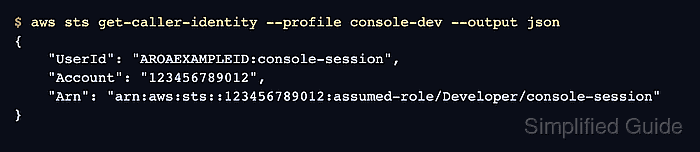
- Run a read-only identity check with the login-backed profile.
$ aws sts get-caller-identity --profile console-dev --output json
{
    "UserId": "AROAEXAMPLEID:console-session",
    "Account": "123456789012",
    "Arn": "arn:aws:sts::123456789012:assumed-role/Developer/console-session"
}
The Account and Arn fields should match the console identity selected in the browser before deployments, data changes, or policy updates continue. Older SDKs or tools that cannot read login-backed profiles can use a separate credential_process bridge.
Related: How to check the current caller identity in AWS CLI
Related: How to configure credential_process in AWS CLI - Clear the cached login credentials when the local session is finished.
$ aws logout --profile console-dev
aws logout removes cached aws login credentials for the selected profile. The profile entry remains in ~/.aws/config so a later aws login --profile console-dev can create a fresh session.

Mohd Shakir Zakaria is a cloud architect with deep roots in software development and open-source advocacy. Certified in AWS, Red Hat, VMware, ITIL, and Linux, he specializes in designing and managing robust cloud and on-premises infrastructures.


