AWS CLI failures can hide the layer that actually broke when the normal error message only names the final service call. Debug output exposes how the client chose credentials, Region, endpoint, signing behavior, retry handling, and the service response before the command returned an error.
The global --debug option writes detailed client logs to stderr for one command. Capture stderr in a file so the command's normal stdout stays separate, especially for JSON-producing commands that may feed a script or deployment step.
Debug logs can include account IDs, ARNs, request parameters, endpoint hostnames, headers, signatures, and token-shaped values. Keep the full file local, copy only the lines needed for a ticket, and mask credentials, signatures, session tokens, request IDs, bucket names, and account-specific resource names before sharing excerpts.
Related: How to check the current caller identity in AWS CLI
Related: How to switch AWS CLI profiles
Related: How to use a custom endpoint URL in AWS CLI
Related: How to set retry mode in AWS CLI
Steps to troubleshoot AWS CLI requests with debug output:
- Capture debug output from the exact failing command.
$ aws sts get-caller-identity --profile operations --region us-east-1 --debug > aws-output.json 2> aws-debug.log
Replace sts get-caller-identity with the failing command, but keep the same --profile, --region, --endpoint-url, and input parameters that reproduce the failure. aws-output.json receives normal stdout; aws-debug.log receives debug and error output.
- Read the final AWS CLI error from the debug log.
$ grep "An error occurred" aws-debug.log
botocore.exceptions.ClientError: An error occurred (InvalidClientTokenId) when calling the GetCallerIdentity operation: The security token included in the request is invalid.
An error occurred (InvalidClientTokenId) when calling the GetCallerIdentity operation: The security token included in the request is invalid.
The named error code is the failure to explain after the lower-level checks show which profile, Region, and endpoint produced it.
- Check which credential provider signed the request.
$ grep "Found credentials" aws-debug.log
2026-06-12 14:24:18,152 - MainThread - botocore.credentials - INFO - Found credentials in shared credentials file: ~/.aws/credentials
If this line names the wrong source, inspect the active profile before retrying.
Related: How to find the AWS CLI shared credentials file location
Related: How to use AWS CLI environment variables - Check the endpoint selected for the service call.
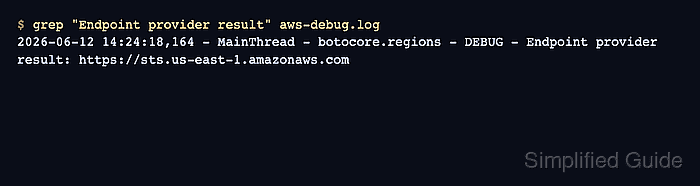
$ grep "Endpoint provider result" aws-debug.log
2026-06-12 14:24:18,164 - MainThread - botocore.regions - DEBUG - Endpoint provider result: https://sts.us-east-1.amazonaws.com
This line shows the URL derived from the command, Region, profile, and endpoint settings. If it points at the wrong Region or host, fix that layer before changing credentials.
Related: How to use a custom endpoint URL in AWS CLI
Related: How to set the default Region in AWS CLI - Check the HTTP status returned by the endpoint.
$ grep "HTTP/1.1" aws-debug.log
2026-06-12 14:24:18,978 - MainThread - urllib3.connectionpool - DEBUG - https://sts.us-east-1.amazonaws.com:443 "POST / HTTP/1.1" 403 306
A 403 with InvalidClientTokenId points at the credentials or session layer; 5xx and throttling responses usually belong with retry and service-side checks.
- Check whether the retry handler ran again.
$ grep "retrying request" aws-debug.log
2026-06-12 14:24:18,982 - MainThread - botocore.retries.standard - DEBUG - Not retrying request.
Not retrying request means the CLI classified the failure as non-retryable. Throttling or transient network failures can show Retry needed with a delay instead.
Related: How to set retry mode in AWS CLI - Rerun the corrected command without debug logging.
$ aws sts get-caller-identity --profile operations --region us-east-1 --query Arn --output text
arn:aws:sts::123456789012:assumed-role/OperationsAdmin/cli-session
Keep --debug off for normal automation after the failing layer is fixed so large stderr traces do not leak into logs.
Related: How to check the current caller identity in AWS CLI

Mohd Shakir Zakaria is a cloud architect with deep roots in software development and open-source advocacy. Certified in AWS, Red Hat, VMware, ITIL, and Linux, he specializes in designing and managing robust cloud and on-premises infrastructures.


