Proxy timeouts decide how long Apache waits for a backend to accept a connection or return data, which determines whether slow upstream work completes cleanly or turns into premature 502 Bad Gateway or 504 Gateway Timeout failures.
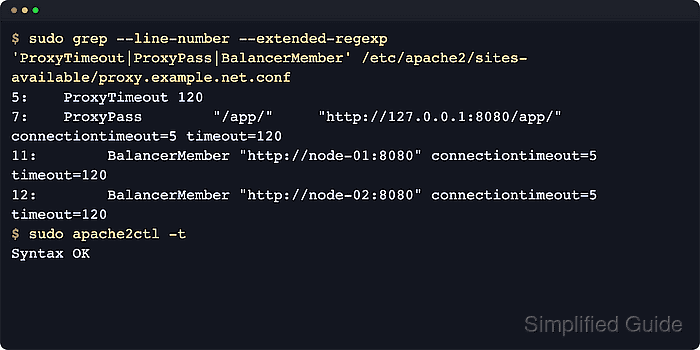
When Apache reverse proxies requests through mod_proxy, the global TimeOut directive remains the base fallback, ProxyTimeout sets the default proxy socket timeout, connectiontimeout limits how long backend connection setup may take, and timeout on a backend worker controls how long Apache waits for data to flow after the connection is established.
Long proxy timeouts can keep workers occupied during upstream stalls and reduce concurrency, so raise them only to match measured application behavior. Examples below use the Debian / Ubuntu layout under /etc/apache2/ with the apache2 service; on RHEL-family systems the configuration usually lives under /etc/httpd/ and the service name is httpd.
Steps to tune Apache proxy timeouts:
- Dump the active VirtualHost map to locate the proxying site file before editing it.
$ sudo apache2ctl -S
AH00558: apache2: Could not reliably determine the server's fully qualified domain name, using 203.0.113.10. Set the 'ServerName' directive globally to suppress this message
VirtualHost configuration:
*:80                   is a NameVirtualHost
         default server 203.0.113.10 (/etc/apache2/sites-enabled/000-default.conf:1)
         port 80 namevhost 203.0.113.10 (/etc/apache2/sites-enabled/000-default.conf:1)
         port 80 namevhost proxy.example.net (/etc/apache2/sites-enabled/proxy.example.net.conf:1)
ServerRoot: "/etc/apache2"
Main DocumentRoot: "/var/www/html"
##### snipped #####
Use the matching /etc/httpd/conf.d/ or vhost file on RHEL-family systems if the site is not under /etc/apache2/sites-available.
- Back up the target VirtualHost file before changing timeout values.
$ sudo cp -a /etc/apache2/sites-available/proxy.example.net.conf /etc/apache2/sites-available/proxy.example.net.conf.bak
- Enable the proxy modules required by the backend protocol or balancer method in use.
$ sudo a2enmod proxy proxy_http
Module proxy already enabled
Considering dependency proxy for proxy_http:
Module proxy already enabled
Module proxy_http already enabled
Add proxy_balancer plus the needed lbmethod_* module when the site proxies to balancer:// URLs instead of a single backend.
- Open the proxying VirtualHost file in an editor.
$ sudoedit /etc/apache2/sites-available/proxy.example.net.conf
- Set a vhost-wide proxy default with ProxyTimeout when the site needs a longer backend I/O window than the global server default.
ProxyTimeout 120
Setting Scope What it limits TimeOut global or VirtualHost Base timeout for several core operations and the fallback value when ProxyTimeout is unset. ProxyTimeout server config or VirtualHost Default socket timeout for proxied requests. connectiontimeout direct ProxyPass worker or BalancerMember Time allowed to establish the backend TCP connection. timeout direct ProxyPass worker or BalancerMember Time allowed for data to be sent to or read from the backend after the connection is open. Worker-level timeout=... overrides ProxyTimeout for the matching direct backend worker or BalancerMember. Do not treat a balancer-level ProxySet timeout as the same backend socket timeout.
- Set per-route connect and I/O timeouts on each direct ProxyPass worker that needs values different from the vhost default.
ProxyPass        "/app/"     "http://127.0.0.1:8080/app/"     connectiontimeout=5 timeout=120
ProxyPassReverse "/app/"     "http://127.0.0.1:8080/app/"

ProxyPass        "/reports/" "http://127.0.0.1:8080/reports/" connectiontimeout=5 timeout=600
ProxyPassReverse "/reports/" "http://127.0.0.1:8080/reports/"
Keep longer and more specific ProxyPass paths above shorter catch-all paths because Apache evaluates the rules in configuration order and the first match wins.
If backend worker URLs overlap, Apache can reuse the first worker and silently ignore later per-worker timeout values, so re-check warnings from apache2ctl -t after reordering similar mappings.
- Set backend connect and I/O timeouts on each BalancerMember inside the existing load balancer definition.
<Proxy "balancer://appcluster">
    BalancerMember "http://node-01:8080" connectiontimeout=5 timeout=120
    BalancerMember "http://node-02:8080" connectiontimeout=5 timeout=120
    ProxySet lbmethod=byrequests
</Proxy>

ProxyPass        "/app/" "balancer://appcluster/app/"
ProxyPassReverse "/app/" "balancer://appcluster/app/"
On a balancer:// target, the timeout key on ProxyPass controls how long the balancer waits for a usable member, not backend socket I/O timeout, so keep the backend timeout on each BalancerMember.
- Validate the updated configuration syntax before reloading the service.
$ sudo apache2ctl -t
Syntax OK
The AH00558 global ServerName warning can still appear before Syntax OK on fresh installs and does not invalidate the test result.
Related: How to test Apache configuration
- Reload the running Apache service to apply the new timeout values.
$ sudo systemctl reload apache2
Use sudo systemctl reload httpd on most RHEL-family systems.
- Re-run a known slow request through the proxy to confirm that the request now completes within the new timeout window.
$ curl --silent --show-error -i http://proxy.example.net/reports/daily.json
HTTP/1.1 200 OK
Date: Sat, 06 Jun 2026 11:32:21 GMT
Server: app-backend
Content-Type: application/json
Content-Length: 32

{"status":"ok","report":"daily"}
If a local loopback request does not hit the same virtual host, use the public hostname directly or add a Host header that matches the vhost you tuned.
- Raise proxy-specific logging temporarily when Apache is still timing out and the failing layer is unclear.
LogLevel warn proxy:info proxy_http:infoVerbose proxy logging can grow /var/log/apache2/error.log quickly on busy hosts, so revert the extra module log levels after the failure is captured.

Mohd Shakir Zakaria is a cloud architect with deep roots in software development and open-source advocacy. Certified in AWS, Red Hat, VMware, ITIL, and Linux, he specializes in designing and managing robust cloud and on-premises infrastructures.


