A reverse proxy can accept a client request while the application behind it is unavailable. On Ubuntu and Debian, match Apache's 502 or 503 response to its error log and test the backend from the Apache host to find where the request failed.
Apache can return a 502 when it cannot read an upstream response or a 503 when it cannot connect to a backend. An application can also return either status itself, so the same code can point to different parts of the request path.
The client URL and the backend URL can have different paths, schemes, and ports. Use the application's documented listener to check the destination Apache logged before changing where the proxy sends requests.
Steps to troubleshoot Apache proxy 502 and 503 errors:
- Repeat a safe request that reproduces the error from the affected client.
$ curl -i -sS http://portal.example.net/api/inventory.json
HTTP/1.1 503 Service Unavailable
##### snipped #####
Substitute the affected URL and retain its method, client network, and authentication context. For a request that could change data, use its existing log entry in place of a repeat request.
- List the Apache virtual host bindings for the request's hostname and port.
$ apache2ctl -S
The Apache inspection and configuration commands require an administrator shell on the Apache host. Apache matches the receiving address and port, then ServerName or ServerAlias. If files changed since Apache last loaded them, establish which configuration the running service uses before editing.
- Read the candidate virtual host's configuration file.
$ cat /etc/apache2/sites-available/app.conf
##### snipped #####
    ProxyPass "/api/" "http://app.internal.example:8081/"
    ProxyPassReverse "/api/" "http://app.internal.example:8081/"
##### snipped #####
The binding usually names a link in /etc/apache2/sites-enabled/ to its editable file in /etc/apache2/sites-available/. In app.conf, ProxyPass maps /api/ to the backend root, so /api/inventory.json becomes /inventory.json. If included files or rewrite rules also proxy the path, identify the rule that handles it before editing.
- Match the failing request to its proxy error in the virtual host logs.
$ tail -n 10 /var/log/apache2/app-access.log \
    /var/log/apache2/app-error.log
==> […]/app-access.log <==
192.0.2.10 […]
[21/Nov/2026:09:52:05 +0000]
"GET /api/inventory.json
HTTP/1.1" 503 […]
==> […]/app-error.log <==
[…] 09:52:05.638966 […]
[pid 496:tid 518]
(111)Connection refused:
AH00957: […] 192.0.2.20:8081
(app.internal.example:8081) […]
[…] 09:52:05.642623 […]
[pid 496:tid 518]
[client 192.0.2.10:32802]
AH01114: […]
The 503 and AH01114 match by time and client address. AH00957 records the refusal on the same worker thread milliseconds earlier. The log paths come from CustomLog and ErrorLog or the inherited server settings. If requests overlap, correlate by request ID where available.
If the backend logged the same request with the expected path and returned 502 or 503, investigate its application logs. If Apache reports that workers are in error after an outage, check the worker's retry interval and the backend's health.
- Check the proxy modules selected by the Apache configuration.
$ apache2ctl -M
##### snipped #####
 proxy_module (shared)
 proxy_http_module (shared)
##### snipped #####
HTTP(S) backends need mod_proxy and mod_proxy_http. HTTPS upstreams also need mod_ssl and SSLProxyEngine On in the appropriate scope. If AH01144 reports a missing protocol handler, compare the configured scheme with the enabled module, such as mod_proxy_fcgi for fcgi://.
The direct curl probes and port repair apply to http:// and https:// backends. For FastCGI (fcgi://) or another backend protocol, use its protocol-specific check to diagnose the backend. After resolving the fault, use the safe frontend retest in the final step. Both probes require a known read-only path, such as a health or static endpoint whose response identifies the application. If you started from a log entry, choose a read-only endpoint on the backend listener for that route. If none is available, skip both probes and the port repair.
- Probe a read-only path on the logged backend listener from the Apache host.
$ curl -i -sS --noproxy '*' --max-time 10 \
    http://app.internal.example:8081/inventory.json
curl: (7) Failed to connect to app.internal.example
port 8081 after 15 ms: Could not connect to server
The probe bypasses any client proxy with --noproxy '*' and stops after 10 seconds. In a container deployment, use Apache's network and DNS context. If the intended port refuses the connection, check the service and its listening address on the backend.
If the name fails to resolve, check the resolver and record for the backend. If the connection opens but the response is slow, compare application latency with the proxy timeout. For a TLS error, check the listener's scheme and port, then verify the certificate name and chain against the intended trust store.
- Probe the same read-only path on the port documented for the application.
$ curl -i -sS --noproxy '*' --max-time 10 \
    http://app.internal.example:8080/inventory.json
HTTP/1.1 200 OK
##### snipped #####

{"sku":"BK-104","in_stock":27}
Continue with the port edit only when Apache's logs tie the failure to a mapped port that differs from the documented port that just returned the expected response. For a different fault, repair the diagnosed component and retest with a safe request through the same route or check the next legitimate request and its backend result.
- Back up the virtual host file to an unused backup path.
$ cp -p /etc/apache2/sites-available/app.conf \
    /etc/apache2/sites-available/app.conf.bak
Changing the target sends matching requests to a different listener. If the change disrupts the site, restore the saved file, test the syntax, and reload Apache.
- Load /etc/apache2/sites-available/app.conf into your text editor.
- Replace only port 8081 with 8080 in the backend URLs for /api/ in ProxyPass and ProxyPassReverse.
    ProxyPass "/api/" "http://app.internal.example:8080/"
    ProxyPassReverse "/api/" "http://app.internal.example:8080/"
ProxyPassReverse uses the backend URL to rewrite redirect headers for clients.
- Save the virtual host file.
- Test the Apache configuration syntax.
$ apache2ctl configtest
Syntax OK
A graceful reload applies all pending Apache configuration changes. Reload only after reviewing those changes and seeing Syntax OK.
- Reload Apache gracefully to apply the port change.
$ apache2ctl graceful
- Confirm that a safe request through the affected proxy route returns the expected backend response.
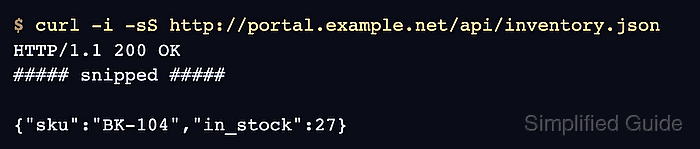
$ curl -i -sS http://portal.example.net/api/inventory.json
HTTP/1.1 200 OK
##### snipped #####

{"sku":"BK-104","in_stock":27}
The inventory GET now returns 27 in stock for BK-104. If the failed request is safe to repeat, keep its URL, method, client network, and authentication context. If it could change data, use a safe request through the same route or check the next legitimate request and its backend result.