Apache sites with many small assets, redirects, or short API calls can waste time and worker capacity when clients open a fresh TCP or TLS session for each request. KeepAlive lets the same client reuse one HTTP connection for follow-up requests, reducing connection churn without changing the virtual host content.
Persistent connection behavior in Apache is controlled by the core KeepAlive, MaxKeepAliveRequests, and KeepAliveTimeout directives. Apache 2.4 documentation lists defaults of KeepAlive On, MaxKeepAliveRequests 100, and KeepAliveTimeout 5, and Debian-family packages ship those defaults in /etc/apache2/apache2.conf unless a later drop-in overrides them.
On Debian and Ubuntu systems, manage the override as a small /etc/apache2/conf-available drop-in, enable it with a2enconf, test syntax, and reload apache2. Many hosts already have keepalive enabled, so the safer job is often to restore or pin the directive outside the vendor file, and KeepAliveTimeout should stay conservative on busy mpm_prefork servers because idle clients can hold workers open; on RHEL-family systems, place the equivalent directive in /etc/httpd/conf/httpd.conf or a file under /etc/httpd/conf.d and reload httpd instead.
Steps to enable KeepAlive in Apache:
- Inspect the packaged KeepAlive defaults in apache2.conf.
$ sudo grep -E \
  '^KeepAlive|^MaxKeep' \
  /etc/apache2/apache2.conf
KeepAlive On
MaxKeepAliveRequests 100
KeepAliveTimeout 5
Debian and Ubuntu already enable KeepAlive by default, so a dedicated drop-in is mainly useful after an older hardening change turned it off or when the directive should be managed outside the vendor file.
- Create a dedicated keepalive.conf override in /etc/apache2/conf-available.
$ cd /etc/apache2/conf-available
$ sudo tee keepalive.conf \
  >/dev/null <<'EOF'
KeepAlive On
EOF
Leave MaxKeepAliveRequests and KeepAliveTimeout at their current values unless the workload needs separate tuning.
Related: Apache configuration file locations
- Enable the keepalive configuration snippet.
$ sudo a2enconf keepalive
Enabling conf keepalive.
To activate the new configuration, you need to run:
  service apache2 reload
If the snippet is already enabled, a2enconf reports that state and leaves the existing symlink under /etc/apache2/conf-enabled unchanged.
- Validate the Apache configuration before reloading the service.
$ sudo apache2ctl \
  configtest
Syntax OK
An AH00558 warning about a missing global ServerName does not block a successful syntax test.
Related: How to test Apache configuration
- Reload the running apache2 service to apply the updated configuration.
$ sudo systemctl reload \
  apache2
A reload is enough for a KeepAlive directive change because the running parent process only needs the updated configuration.
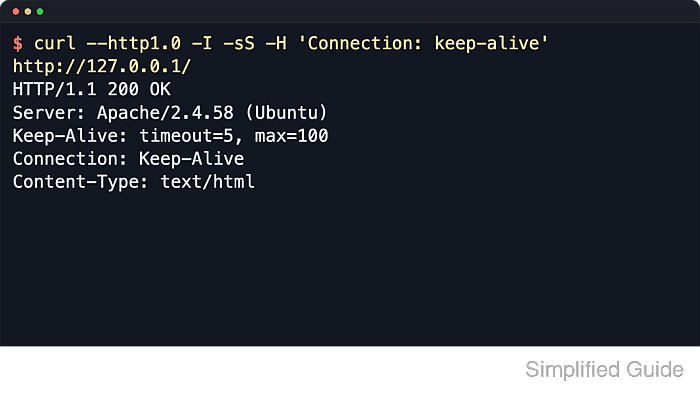
- Verify that Apache now advertises a persistent connection when a client requests it.
$ curl --http1.0 -I -sS \
  -H Connection:keep-alive \
  http://127.0.0.1/
HTTP/1.1 200 OK
##### snipped #####
Server: Apache/2.4.66 (Ubuntu)
Keep-Alive: timeout=5, max=100
Connection: Keep-Alive
Content-Type: text/html
Use the site hostname instead of 127.0.0.1 when the intended virtual host is not served by the default local listener, and expect the timeout and max numbers to match the active server settings on that host.

Mohd Shakir Zakaria is a cloud architect with deep roots in software development and open-source advocacy. Certified in AWS, Red Hat, VMware, ITIL, and Linux, he specializes in designing and managing robust cloud and on-premises infrastructures.


