Browser applications can send cross-origin requests, but the response stays hidden from page JavaScript unless the target path returns matching CORS headers. Configuring those headers in Apache fits API paths, font directories, and browser-read static assets that must be available to a separate frontend while unrelated paths remain same-origin.
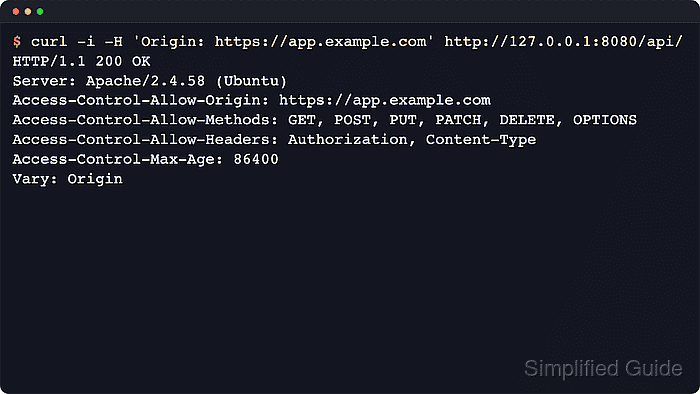
Apache adds response headers through mod_headers rather than through a single CORS switch. SetEnvIfNoCase can compare the incoming Origin header with an allowlist and store the matched origin in an environment variable, while Header always set writes the browser-visible headers only when that match exists.
Scope the policy to the path that needs browser access, add Vary: Origin when the allowed origin can change per request, and keep credentialed browser requests on explicit origins rather than *. CORS does not replace authentication, authorization, or CSRF protection, and duplicate Access-Control-Allow-Origin headers from Apache plus an upstream application can still make the browser reject the response.
Steps to configure CORS headers in Apache:
- Enable mod_headers if it is not already loaded.
$ sudo a2enmod headers
Enabling module headers.
To activate the new configuration, you need to run:
  service apache2 restart
Debian and Ubuntu use a2enmod headers to enable the module. RHEL, AlmaLinux, Rocky Linux, and Fedora commonly load mod_headers from packaged files under /etc/httpd/conf.modules.d/.
- Decide the exact path scope and allowed browser origin before editing the config.
Browsers accept only one Access-Control-Allow-Origin value per response. Use one explicit origin, or echo back only a request origin that matched a maintained allowlist. If the browser must send cookies or HTTP authentication, do not use *.
Keep the rule on a narrow path such as /api/ or a font directory instead of sending CORS headers for the whole virtual host.
- Open or create a dedicated CORS snippet for the apache2 layout.
$ sudo vi /etc/apache2/conf-available/cors.conf
On RHEL-family systems, use a file such as /etc/httpd/conf.d/cors.conf instead; files in that directory are loaded without a2enconf.
- Add a scoped CORS rule for the approved frontend origin and API path.
<IfModule mod_headers.c>
    SetEnvIfNoCase Origin "^https://www\.example\.net$" ORIGIN_ALLOWED=$0

    <LocationMatch "^/api(/|$)">
        Header onsuccess unset Access-Control-Allow-Origin
        Header always unset Access-Control-Allow-Origin
        Header onsuccess unset Access-Control-Allow-Methods
        Header always unset Access-Control-Allow-Methods
        Header onsuccess unset Access-Control-Allow-Headers
        Header always unset Access-Control-Allow-Headers
        Header onsuccess unset Access-Control-Max-Age
        Header always unset Access-Control-Max-Age
        Header onsuccess unset Access-Control-Allow-Credentials
        Header always unset Access-Control-Allow-Credentials
        Header onsuccess unset Access-Control-Expose-Headers
        Header always unset Access-Control-Expose-Headers

        Header always set Access-Control-Allow-Origin "%{ORIGIN_ALLOWED}e" env=ORIGIN_ALLOWED
        Header always set Access-Control-Allow-Methods "GET, POST, PUT, PATCH, DELETE, OPTIONS" env=ORIGIN_ALLOWED
        Header always set Access-Control-Allow-Headers "Authorization, Content-Type" env=ORIGIN_ALLOWED
        Header always set Access-Control-Max-Age "86400" env=ORIGIN_ALLOWED
        Header always merge Vary "Origin" env=ORIGIN_ALLOWED

        # Enable only when the browser must send cookies or HTTP authentication.
        # Header always set Access-Control-Allow-Credentials "true" env=ORIGIN_ALLOWED

        # Expose non-simple response headers to browser JavaScript when needed.
        # Header always set Access-Control-Expose-Headers "Content-Length, Content-Range" env=ORIGIN_ALLOWED
    </LocationMatch>
</IfModule>
Replace https://www.example.net and ^/api(/|$) with the frontend origin and path scope for the application.
If a proxied application or framework already emits CORS headers, keep the policy in one layer only. Duplicate Access-Control-Allow-Origin headers cause browser failures even when both values look correct.
- Enable the new snippet on Debian or Ubuntu.
$ sudo a2enconf cors
Enabling conf cors.
To activate the new configuration, you need to run:
  service apache2 reload
Skip this step on RHEL-family systems when the file is under /etc/httpd/conf.d/.
- Test the Apache configuration before reloading the service.
$ sudo apachectl configtest
Syntax OK
Related: How to test Apache configuration
- Reload Apache to apply the CORS policy.
$ sudo systemctl reload apache2
Use sudo systemctl reload httpd on RHEL-family systems.
- Verify that an allowed origin receives the CORS headers on a normal request.
$ curl -sS -i -H 'Origin: https://www.example.net' http://api.example.net/api/
HTTP/1.1 200 OK
Date: Sat, 06 Jun 2026 03:51:14 GMT
Server: Apache/2.4.66 (Ubuntu)
Access-Control-Allow-Origin: https://www.example.net
Access-Control-Allow-Methods: GET, POST, PUT, PATCH, DELETE, OPTIONS
Access-Control-Allow-Headers: Authorization, Content-Type
Access-Control-Max-Age: 86400
Vary: Origin
##### snipped #####

{"status":"ok"}
Replace api.example.net and /api/ with the real hostname, scheme, port, and resource path.
- Verify that the preflight OPTIONS request returns the same allow policy.
$ curl -sS -i -X OPTIONS \
  -H 'Origin: https://www.example.net' \
  -H 'Access-Control-Request-Method: POST' \
  -H 'Access-Control-Request-Headers: Authorization, Content-Type' \
  http://api.example.net/api/
HTTP/1.1 200 OK
Date: Sat, 06 Jun 2026 03:51:14 GMT
Server: Apache/2.4.66 (Ubuntu)
Access-Control-Allow-Origin: https://www.example.net
Access-Control-Allow-Methods: GET, POST, PUT, PATCH, DELETE, OPTIONS
Access-Control-Allow-Headers: Authorization, Content-Type
Access-Control-Max-Age: 86400
Vary: Origin
Allow: GET,POST,OPTIONS,HEAD
Content-Length: 0
Content-Type: text/html
If the preflight request returns 404 or 405, the backend route usually needs explicit OPTIONS handling even though Apache is already adding the CORS headers.
- Verify that a disallowed origin does not receive an Access-Control-Allow-Origin header.
$ curl -sS -i -H 'Origin: https://attacker.example.net' http://api.example.net/api/
HTTP/1.1 200 OK
Date: Sat, 06 Jun 2026 03:51:14 GMT
Server: Apache/2.4.66 (Ubuntu)
Last-Modified: Sat, 06 Jun 2026 03:50:34 GMT
ETag: "10-6538dadfffb7e"
Accept-Ranges: bytes
Content-Length: 16
Content-Type: text/html

{"status":"ok"}
Allowed origins should receive the expected CORS headers, disallowed origins should not receive Access-Control-Allow-Origin, and apachectl configtest should stay clean before each reload.

Mohd Shakir Zakaria is a cloud architect with deep roots in software development and open-source advocacy. Certified in AWS, Red Hat, VMware, ITIL, and Linux, he specializes in designing and managing robust cloud and on-premises infrastructures.


