Spark internal RPC links the driver, executors, block managers, and cluster-manager daemons that coordinate a running application. Enabling RPC authentication makes those endpoints prove knowledge of a shared secret before they exchange control messages, which matters when Spark daemons listen on a private network shared by several hosts or teams.
The controlling switch is spark.authenticate. YARN and Kubernetes generate an application-specific secret after authentication is enabled, while Spark Standalone and other unmanaged deployments require the operator to provide the same spark.authenticate.secret anywhere masters, workers, drivers, and executors read Spark configuration.
Static-secret Spark Standalone deployments expose the full rollout boundary because the same credential must reach the master, workers, and submitting clients. RPC authentication is not traffic encryption, so use RPC SSL or Spark network encryption as a separate control when the network path also needs confidentiality.
Steps to enable Spark RPC authentication:
- Identify how the deployment will receive the RPC secret.
Deployment mode Secret handling Spark Standalone or other unmanaged daemons Set spark.authenticate and distribute the same protected spark.authenticate.secret to masters, workers, and submitting clients. YARN Set spark.authenticate. Spark generates a unique secret per application, and secure secret distribution depends on YARN RPC encryption. Kubernetes Set spark.authenticate. Spark generates a unique secret per application unless mounted secret files are configured, and namespace RBAC must restrict pod-list access because executor pod environment can expose the secret. - Generate a random shared secret for static-secret deployments.
$ openssl rand -base64 32
W4aq2S8nQAO67NYYg6bd3LpZ21nJmRFfFRUex4iSSFA=
Treat the real value as a credential. Store it in a secret manager or protected deployment file, not in shell history, screenshots, tickets, or shared documentation.
- Open the Spark defaults file used by the master, workers, and submitting clients.
$ sudoedit /etc/spark/conf/spark-defaults.conf
The active location can be a packaged /etc/spark/conf directory, a copied /opt/spark/conf directory, or a deployment-specific SPARK_CONF_DIR.
Related: How to configure Spark defaults - Add the RPC authentication settings to the shared Spark defaults.
spark.authenticate                 true
spark.authenticate.secret          W4aq2S8nQAO67NYYg6bd3LpZ21nJmRFfFRUex4iSSFA=
spark.master.rest.enabled          false
spark.master.rest.enabled false is for the Spark Standalone static-secret path. Leave it out for YARN or Kubernetes submissions unless that setting belongs to a Standalone master in the same configuration set.
- Restrict read access to the file that stores the static secret.
$ sudo chmod 640 /etc/spark/conf/spark-defaults.conf
Use the owner and group that run Spark on the host, such as spark:spark, and distribute the same secret through the same protected channel used for other cluster credentials.
- Start the Standalone master from the authenticated configuration.
$ SPARK_CONF_DIR=/etc/spark/conf spark-class \
  org.apache.spark.deploy.master.Master \
  --host spark-master.example.net \
  --port 7077
INFO SecurityManager: SecurityManager: authentication enabled; RPC SSL disabled
INFO Utils: Successfully started service 'sparkMaster' on port 7077.
INFO Master: Starting Spark master at spark://spark-master.example.net:7077
Use the service unit, supervisor, or Spark start script that normally owns the daemon in production. The direct foreground command shows the same class and log signal used by the wrapper.
- Start a worker from the same authenticated configuration.
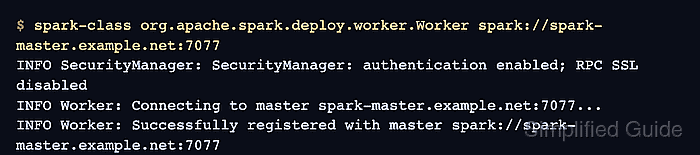
$ SPARK_CONF_DIR=/etc/spark/conf spark-class \
  org.apache.spark.deploy.worker.Worker \
  spark://spark-master.example.net:7077
INFO SecurityManager: SecurityManager: authentication enabled; RPC SSL disabled
INFO Worker: Connecting to master spark-master.example.net:7077...
INFO Worker: Successfully registered with master spark://spark-master.example.net:7077
The worker log should show authentication enabled and a successful registration with the master. Check the deployed worker log source when the process is managed by a service wrapper.
Related: How to view Apache Spark logs - Create a small smoke-test application on the submit host.
from pyspark.sql import SparkSession

spark = SparkSession.builder.appName("sg-rpc-auth-smoke").getOrCreate()
spark.sparkContext.setLogLevel("ERROR")
print(f"spark.authenticate={spark.sparkContext.getConf().get('spark.authenticate')}")
print(f"count={spark.range(4).count()}")
spark.stop()
- Submit the smoke test with the same authenticated Spark defaults.
$ spark-submit \
  --properties-file /etc/spark/conf/spark-defaults.conf \
  --master spark://spark-master.example.net:7077 \
  sg_rpc_auth_smoke.py
INFO SparkContext: Submitted application: sg-rpc-auth-smoke
INFO StandaloneSchedulerBackend: Connected to Spark cluster with app ID app-20260706213200-0000
spark.authenticate=true
count=4
The output should show spark.authenticate=true and the expected count, which means the submit client loaded the authenticated defaults and scheduled work through the authenticated master and worker.
- Confirm a mismatched worker secret is rejected in a staging copy.
$ SPARK_CONF_DIR=/tmp/wrong-spark-conf spark-class \
  org.apache.spark.deploy.worker.Worker \
  spark://spark-master.example.net:7077
INFO SecurityManager: SecurityManager: authentication enabled; RPC SSL disabled
ERROR TransportClientFactory: Exception while bootstrapping client
javax.security.sasl.SaslException: DIGEST-MD5: digest response format violation. Mismatched response.
WARN Worker: Failed to connect to master spark-master.example.net:7077
Run this check only against a disposable or staging worker configuration. A wrong secret on a real worker prevents it from registering with the master.
- Remove the temporary smoke-test script after saving the result.
$ rm -f sg_rpc_auth_smoke.py

Mohd Shakir Zakaria is a cloud architect with deep roots in software development and open-source advocacy. Certified in AWS, Red Hat, VMware, ITIL, and Linux, he specializes in designing and managing robust cloud and on-premises infrastructures.


