Submitting Apache Spark work to Kubernetes creates a driver pod that starts executor pods for the application. This fits teams that already operate a Kubernetes cluster and want Spark jobs to use namespace, image, and service-account controls instead of a separate standalone Spark cluster.
spark-submit talks to the Kubernetes API server, creates the driver pod, and passes Spark configuration into that pod. The driver then uses its Kubernetes service account to create executor pods and clean up executor-side resources when the application finishes.
A small Spark Pi run is enough to prove the submission path because the example JAR is already present in the official apache/spark:4.1.2 image. For a packaged application, keep the same namespace, image, and service-account shape while changing the class name and application URI.
Related: How to submit an Apache Spark job
Steps to submit a Spark job to Kubernetes:
- Check the Kubernetes API server URL for the active context.
$ kubectl cluster-info
Kubernetes control plane is running at https://kubernetes.example.net:6443
CoreDNS is running at https://kubernetes.example.net:6443/api/v1/namespaces/kube-system/services/kube-dns:dns/proxy
The spark-submit master value uses the same API server URL with the k8s://https:// prefix.
- Create a namespace for the Spark application pods.
$ kubectl create namespace spark-jobs
namespace/spark-jobs created
- Create a Kubernetes service account for the Spark driver pod.
$ kubectl -n spark-jobs create serviceaccount spark
serviceaccount/spark created
- Grant the driver service account namespace-scoped permissions for Spark pods and cleanup resources.
$ kubectl -n spark-jobs create role spark-driver \
  --verb=create,get,list,watch,delete,deletecollection \
  --resource=pods,services,configmaps,persistentvolumeclaims
role.rbac.authorization.k8s.io/spark-driver created
A Role is enough when the driver and executors run in one namespace. The deletecollection verb lets Spark remove label-selected executor pods and temporary resources during shutdown.
- Bind the role to the Spark service account.
$ kubectl -n spark-jobs create rolebinding spark-driver \
  --role=spark-driver \
  --serviceaccount=spark-jobs:spark
rolebinding.rbac.authorization.k8s.io/spark-driver created
- Confirm the service account can create driver-managed pods in the namespace.
$ kubectl auth can-i create pods \
  --as system:serviceaccount:spark-jobs:spark \
  -n spark-jobs
yes
- Submit the Spark Pi job to Kubernetes in cluster deploy mode.
$ ./bin/spark-submit \
  --master k8s://https://kubernetes.example.net:6443 \
  --deploy-mode cluster \
  --name spark-pi \
  --class org.apache.spark.examples.SparkPi \
  --conf spark.kubernetes.namespace=spark-jobs \
  --conf spark.kubernetes.authenticate.driver.serviceAccountName=spark \
  --conf spark.kubernetes.container.image=apache/spark:4.1.2 \
  --conf spark.kubernetes.container.image.pullPolicy=IfNotPresent \
  --conf spark.kubernetes.submission.waitAppCompletion=true \
  --conf spark.executor.instances=1 \
  --conf spark.driver.memory=512m \
  --conf spark.executor.memory=512m \
  local:///opt/spark/examples/jars/spark-examples_2.13-4.1.2.jar \
  10
##### snipped #####
Application spark-pi with application ID spark-75c9958819cb4369b1590433d6833e78 and submission ID spark-jobs:spark-pi-509d429f393b50cb-driver finished
The local:///opt/spark/... URI is inside the Spark container image, not on the machine running spark-submit. Use a container image, object-store URI, or upload path that makes the application file visible to the driver pod.
- List the Spark pods created for the application.
$ kubectl get pods -n spark-jobs -l spark-app-name=spark-pi
NAME                               READY   STATUS      RESTARTS   AGE
spark-pi-509d429f393b50cb-driver   0/1     Completed   0          23s
Executor pods usually terminate after the job finishes. The completed driver pod remains long enough for status checks and log review.
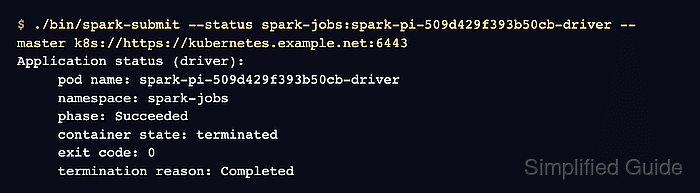
- Check the Spark submission status with the driver pod submission ID.
$ ./bin/spark-submit \ --status spark-jobs:spark-pi-509d429f393b50cb-driver \ --master k8s://https://kubernetes.example.net:6443 Application status (driver): pod name: spark-pi-509d429f393b50cb-driver namespace: spark-jobs phase: Succeeded container state: terminated exit code: 0 termination reason: Completed - Read the driver log to confirm the application result.
$ kubectl logs -n spark-jobs spark-pi-509d429f393b50cb-driver
##### snipped #####
Pi is roughly 3.140931140931141
##### snipped #####
Related: How to view Apache Spark logs
- Remove the sample driver pod after saving any logs you need.
$ kubectl delete pod -n spark-jobs -l spark-app-name=spark-pi
pod "spark-pi-509d429f393b50cb-driver" deleted

Mohd Shakir Zakaria is a cloud architect with deep roots in software development and open-source advocacy. Certified in AWS, Red Hat, VMware, ITIL, and Linux, he specializes in designing and managing robust cloud and on-premises infrastructures.


