Apache Parquet stores column values with the dataset schema, so a Spark job can move typed data between jobs without a separate schema file. A small orders DataFrame can demonstrate the complete handoff by being written to Parquet, loaded again, reduced to paid orders, and saved as a second dataset.
PySpark includes spark.read.parquet() and DataFrameWriter.parquet() without an extra format package. Spark preserves the stored column types when it reads Parquet, but reports the fields as nullable so it can remain compatible with files produced by other systems.
Each write target is a directory containing commit metadata and one or more part-*.snappy.parquet files. The final check reads the output directory, compares every returned row with the expected paid orders, and confirms that Spark retained a Parquet data file for another job to consume.
Related: How to run PySpark locally
Related: How to write partitioned data with Spark
Related: How to read and write ORC files with Spark
Steps to read and write Parquet files with PySpark:
The sample uses overwrite mode, which replaces data already stored at input/parquet-orders and output/parquet-paid-orders. Keep these as new or disposable project-relative paths.
- Create spark_parquet_check.py with the imports, dataset paths, and local Spark session.
- spark_parquet_check.py
from pathlib import Path

from pyspark.sql import SparkSession
from pyspark.sql import functions as F


input_path = "input/parquet-orders"
output_path = "output/parquet-paid-orders"

spark = (
    SparkSession.builder.master("local[1]")
    .appName("spark-parquet-read-write")
    .getOrCreate()
)
spark.sparkContext.setLogLevel("ERROR")
- Define the source orders after the log-level setting.
- spark_parquet_check.py
orders = spark.createDataFrame(
    [
        ("ORD-1001", "APAC", 149.50, "paid", "2026-07-07"),
        ("ORD-1002", "EMEA", 87.25, "paid", "2026-07-07"),
        ("ORD-1003", "APAC", 42.00, "cancelled", "2026-07-07"),
        ("ORD-1004", "NA", 212.10, "paid", "2026-07-08"),
    ],
    "order_id string, region string, amount double, status string, order_date string",
)
- Write the source DataFrame to input/parquet-orders in overwrite mode.
- spark_parquet_check.py
orders.write.mode("overwrite").parquet(input_path)
- Load input/parquet-orders into a new DataFrame.
- spark_parquet_check.py
loaded = spark.read.parquet(input_path)
- Select the paid orders in deterministic order.
- spark_parquet_check.py
paid_orders = (
    loaded.where(F.col("status") == "paid")
    .select("order_id", "region", "amount", "order_date")
    .orderBy("order_id")
)
- Write the selected rows to output/parquet-paid-orders in overwrite mode.
- spark_parquet_check.py
paid_orders.write.mode("overwrite").parquet(output_path)
- Add the output read-back, value assertions, part-file assertion, and summary display.
- spark_parquet_check.py
result = spark.read.parquet(output_path).orderBy("order_id")
actual_rows = [tuple(row) for row in result.collect()]
expected_rows = [
    ("ORD-1001", "APAC", 149.50, "2026-07-07"),
    ("ORD-1002", "EMEA", 87.25, "2026-07-07"),
    ("ORD-1004", "NA", 212.10, "2026-07-08"),
]
assert actual_rows == expected_rows, actual_rows

data_files = sorted(Path(output_path).glob("part-*.snappy.parquet"))
assert data_files, "No Snappy-compressed Parquet data files were written"

print("Read-back schema:")
result.printSchema()
print(f"Read-back rows: {result.count()}")
result.show(truncate=False)
print(f"Parquet data files: {len(data_files)}")

spark.stop()
The row assertion checks the deserialized values, while the file assertion confirms that the output directory contains a Snappy-compressed Parquet part file.
- Assemble the completed spark_parquet_check.py file from the verified sections.
- spark_parquet_check.py
from pathlib import Path

from pyspark.sql import SparkSession
from pyspark.sql import functions as F


input_path = "input/parquet-orders"
output_path = "output/parquet-paid-orders"

spark = (
    SparkSession.builder.master("local[1]")
    .appName("spark-parquet-read-write")
    .getOrCreate()
)
spark.sparkContext.setLogLevel("ERROR")

orders = spark.createDataFrame(
    [
        ("ORD-1001", "APAC", 149.50, "paid", "2026-07-07"),
        ("ORD-1002", "EMEA", 87.25, "paid", "2026-07-07"),
        ("ORD-1003", "APAC", 42.00, "cancelled", "2026-07-07"),
        ("ORD-1004", "NA", 212.10, "paid", "2026-07-08"),
    ],
    "order_id string, region string, amount double, status string, order_date string",
)

orders.write.mode("overwrite").parquet(input_path)
loaded = spark.read.parquet(input_path)

paid_orders = (
    loaded.where(F.col("status") == "paid")
    .select("order_id", "region", "amount", "order_date")
    .orderBy("order_id")
)

paid_orders.write.mode("overwrite").parquet(output_path)

result = spark.read.parquet(output_path).orderBy("order_id")
actual_rows = [tuple(row) for row in result.collect()]
expected_rows = [
    ("ORD-1001", "APAC", 149.50, "2026-07-07"),
    ("ORD-1002", "EMEA", 87.25, "2026-07-07"),
    ("ORD-1004", "NA", 212.10, "2026-07-08"),
]
assert actual_rows == expected_rows, actual_rows

data_files = sorted(Path(output_path).glob("part-*.snappy.parquet"))
assert data_files, "No Snappy-compressed Parquet data files were written"

print("Read-back schema:")
result.printSchema()
print(f"Read-back rows: {result.count()}")
result.show(truncate=False)
print(f"Parquet data files: {len(data_files)}")

spark.stop()
- Run the completed PySpark job.
$ spark-submit spark_parquet_check.py
##### snipped #####
Read-back schema:
root
 |-- order_id: string (nullable = true)
 |-- region: string (nullable = true)
 |-- amount: double (nullable = true)
 |-- order_date: string (nullable = true)

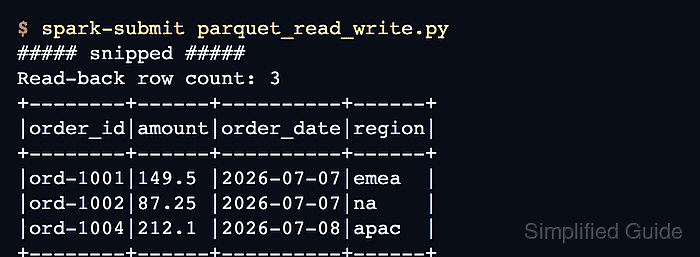
Read-back rows: 3
+--------+------+------+----------+
|order_id|region|amount|order_date|
+--------+------+------+----------+
|ORD-1001|APAC  |149.5 |2026-07-07|
|ORD-1002|EMEA  |87.25 |2026-07-07|
|ORD-1004|NA    |212.1 |2026-07-08|
+--------+------+------+----------+

Parquet data files: 1
- Confirm that the read-back reports three paid orders and at least one Parquet data file.
Both assertions finish before the summary is printed, and output/parquet-paid-orders remains available for another Spark job to read.

Mohd Shakir Zakaria is a cloud architect with deep roots in software development and open-source advocacy. Certified in AWS, Red Hat, VMware, ITIL, and Linux, he specializes in designing and managing robust cloud and on-premises infrastructures.


