How to use launch arguments in XCUITest
Launch arguments let an XCUITest run start the app under test with a test-only mode, fixture choice, or feature switch. The app still owns the behavior change, while the UI test controls which startup values are present for that run.
XCUIApplication passes launchArguments and launchEnvironment into the application process when launch() starts it. Read those values from ProcessInfo.processInfo in the app target, not from the UI test target after the app is already running.
Use arguments for boolean startup flags and environment values for named fixtures or short non-secret strings. Do not pass credentials, tokens, or customer identifiers this way because launch configuration can appear in test logs, reports, or debugging output.
Steps to use launch arguments in XCUITest:
- Add a launch-options helper to the app target.
- UITestLaunchOptions.swift
import Foundation

struct UITestLaunchOptions {
    static let testModeArgument = "-UITestMode"
    static let fixtureEnvironmentKey = "UITEST_FIXTURE"

    let isEnabled: Bool
    let fixtureName: String?

    static var current: UITestLaunchOptions {
        let process = ProcessInfo.processInfo

        return UITestLaunchOptions(
            isEnabled: process.arguments.contains(testModeArgument),
            fixtureName: process.environment[fixtureEnvironmentKey]
        )
    }
}
launchArguments are available through ProcessInfo.processInfo.arguments. launchEnvironment values are available through ProcessInfo.processInfo.environment.
- Read the launch options before the app builds the tested UI.
- MyApp.swift
import SwiftUI

@main
struct MyApp: App {
    private let launchOptions = UITestLaunchOptions.current

    var body: some Scene {
        WindowGroup {
            LoginView(
                useFixtureData: launchOptions.isEnabled,
                fixtureName: launchOptions.fixtureName ?? "default"
            )
        }
    }
}
For UIKit app delegates, read the same helper near the start of application(_:didFinishLaunchingWithOptions:). Values set after app.launch() are not applied to the already-running app.
- Expose a visible state that proves the app read the test values.
- LoginView.swift
import SwiftUI

struct LoginView: View {
    let useFixtureData: Bool
    let fixtureName: String

    var body: some View {
        VStack {
            if useFixtureData {
                Text("Using UI test fixture")
                    .accessibilityIdentifier("fixture-banner")

                Text(fixtureName)
                    .accessibilityIdentifier("fixture-name")
            }

            Button("Sign In") {
                signIn(usingFixture: useFixtureData ? fixtureName : nil)
            }
            .accessibilityIdentifier("sign-in-button")
        }
    }
}
The proof can be a screen identifier, seeded account, mock service, disabled animation state, or another app-owned result. Keep the assertion tied to the startup value that the test sets.
- Set the argument and environment value before launching the app in the UI test.
- MyAppUITests/LoginUITests.swift
import XCTest

final class LoginUITests: XCTestCase {
    func testLoginUsesUITestFixture() {
        let app = XCUIApplication()
        app.launchArguments.append("-UITestMode")
        app.launchEnvironment["UITEST_FIXTURE"] = "login-success"
        app.launch()

        XCTAssertTrue(app.staticTexts["fixture-banner"].waitForExistence(timeout: 5))
        XCTAssertEqual(app.staticTexts["fixture-name"].label, "login-success")
    }
}
Set launchArguments and launchEnvironment on the XCUIApplication instance that will launch the app. Relaunch the app when a later test needs a different startup mode.
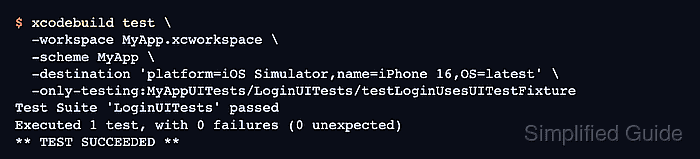
- Run only the UI test that proves the launch configuration.
$ xcodebuild test \
  -workspace MyApp.xcworkspace \
  -scheme MyApp \
  -destination 'platform=iOS Simulator,name=iPhone 16,OS=latest' \
  -only-testing:MyAppUITests/LoginUITests/testLoginUsesUITestFixture
Test Suite 'LoginUITests' passed
Executed 1 test, with 0 failures (0 unexpected)
** TEST SUCCEEDED **
A passing run proves the UI test supplied the launch values and the app changed startup behavior only for that test run. Use the real workspace, scheme, simulator name, UI test target, class, and method from the project.