How to save raw whois output
Raw WHOIS output is the private evidence copy behind a registration, allocation, abuse, renewal, or handoff check. Save the exact response before parsing, redacting, or summarizing it when the server output may need to be reviewed later.
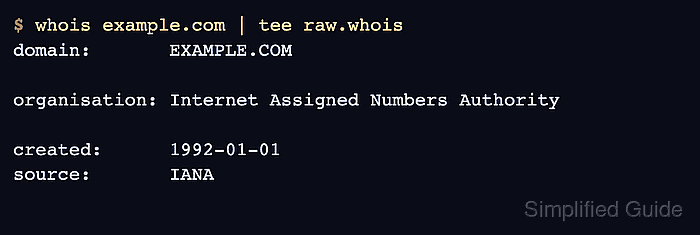
Different WHOIS paths can return different text. A default lookup may stop at an IANA object, a registry server may return domain lifecycle fields, and a registrar server may expose a separate referral view, so the saved file should keep the query, chosen server, and lookup time beside the raw response.
Treat raw records as restricted evidence. Real lookups can include personal contact fields, account clues, phone numbers, addresses, or role mailboxes, and even public records can change after the first check. Keep the raw file private, verify that it contains the expected object, and create a sanitized copy before sharing outside the authorized case folder.
Related: How to query a domain with whois
Related: How to follow a WHOIS referral server
Related: How to sanitize whois contact data
Related: How to parse whois output
Steps to save raw whois output:
- Create a private evidence directory for the lookup files.
$ mkdir -p whois-evidence/private
$ chmod 700 whois-evidence/private
- Save the raw response from the exact server that produced the evidence.
$ whois -h whois.verisign-grs.com example.com > whois-evidence/private/example.com.verisign.raw.whois
The filename should identify the resource and source server when referrals matter. Use tee instead of > only when the terminal view needs to be displayed while the file is written.
Related: How to find a TLD WHOIS server
Related: How to follow a WHOIS referral server - Save the UTC lookup time next to the raw file.
$ date -u +"%Y-%m-%dT%H:%M:%SZ" > whois-evidence/private/example.com.checked-at.txt
- Save the exact command that generated the raw record.
$ printf '%s\n' 'whois -h whois.verisign-grs.com example.com' > whois-evidence/private/example.com.command.txt
A command note makes it clear whether the file came from the default resolver path, IANA, a registry server, or a registrar server.
- Create a checksum before the file is copied or attached to another case system.
$ shasum -a 256 whois-evidence/private/example.com.verisign.raw.whois > whois-evidence/private/example.com.verisign.raw.whois.sha256
- Restrict the raw evidence files to the current account.
$ chmod 600 whois-evidence/private/*
Do not paste raw registration output into public tickets, documentation, chat, or screenshots until contact data and account clues have been reviewed.
- Confirm that the private evidence folder contains the raw record and sidecar files.
$ ls -ld whois-evidence/private
drwx------ 6 user  staff   192 Jun 11 17:25 whois-evidence/private
$ ls -l whois-evidence/private
total 32
-rw------- 1 user  staff    21 Jun 11 17:25 example.com.checked-at.txt
-rw------- 1 user  staff    44 Jun 11 17:25 example.com.command.txt
-rw------- 1 user  staff  1062 Jun 11 17:25 example.com.verisign.raw.whois
-rw------- 1 user  staff   120 Jun 11 17:25 example.com.verisign.raw.whois.sha256
- Verify that the saved file contains the expected object fields.
$ grep -Ei '^ *(Domain Name|Registrar WHOIS Server|Registry Expiry Date|Domain Status|Name Server):' whois-evidence/private/example.com.verisign.raw.whois
   Domain Name: EXAMPLE.COM
   Registrar WHOIS Server: whois.iana.org
   Registry Expiry Date: 2026-08-13T04:00:00Z
   Domain Status: clientDeleteProhibited https://icann.org/epp#clientDeleteProhibited
   Domain Status: clientTransferProhibited https://icann.org/epp#clientTransferProhibited
   Domain Status: clientUpdateProhibited https://icann.org/epp#clientUpdateProhibited
   Name Server: ELLIOTT.NS.CLOUDFLARE.COM
   Name Server: HERA.NS.CLOUDFLARE.COM
For an IP address or ASN record, verify labels such as NetRange, CIDR, ASNumber, ASName, OrgName, or source instead of forcing the domain field list.
Related: How to query an IP address with whois
Related: How to query an ASN with whois - Make a separate copy for redaction before wider sharing.
$ mkdir -p whois-evidence/share
$ cp whois-evidence/private/example.com.verisign.raw.whois whois-evidence/share/example.com.sanitized.whois
The raw evidence set is ready when it includes the response, lookup time, command, checksum, restricted permissions, and a verified resource field. Share the sanitized copy, not the private raw file.
Related: How to sanitize whois contact data
Related: How to parse whois output
Related: How to query RDAP for a domain