An IP address in a firewall log, access review, abuse queue, or provider ticket needs a registration-side check before it is treated as belonging to a network operator. A WHOIS lookup should show the containing range, registry server, organization, and reference record for that same public address.
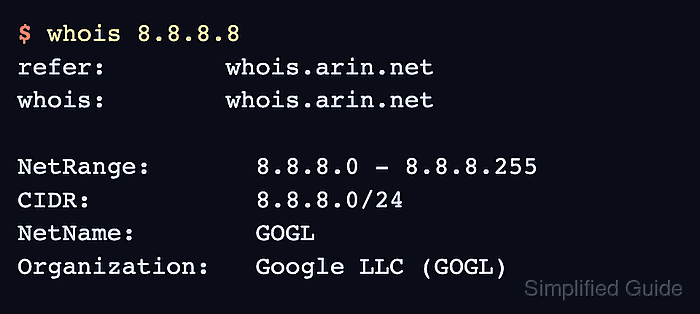
IP number resources are registered through IANA, regional internet registries, and downstream allocations or assignments. A default WHOIS client may start at IANA and follow the referral automatically, or it may stop at a broad parent record that names the registry server to query next.
WHOIS shows registration responsibility, not physical location, current routing, reverse DNS, or proof that a host is active. Use ASN, RDAP, DNS, packet-log, or provider evidence when the decision depends on live routing, an abuse contact, or structured registration data.
Related: How to find abuse contacts with whois
Related: How to query an ASN with whois
Related: How to query RDAP for a domain
Related: How to follow a WHOIS referral server
Steps to query an IP address with whois:
- Query the exact public IP address from the log, ticket, or remote service.
$ whois 8.8.8.8
% IANA WHOIS server
% This query returned 1 object

refer:        whois.arin.net
whois:        whois.arin.net

# whois.arin.net

NetRange:       8.8.8.0 - 8.8.8.255
CIDR:           8.8.8.0/24
NetName:        GOGL
Organization:   Google LLC (GOGL)
Ref:            https://rdap.arin.net/registry/ip/8.8.8.0
##### snipped #####
Use the public address visible to the remote service. Private or special-use addresses such as 10.0.0.5, 192.168.1.10, and 100.64.10.20 do not identify the public registration record for the remote connection.
- Follow the referred WHOIS server when the first answer stops at IANA or a parent registry pointer.
$ whois -h whois.arin.net 8.8.8.8
NetRange:       8.8.8.0 - 8.8.8.255
CIDR:           8.8.8.0/24
NetName:        GOGL
Organization:   Google LLC (GOGL)
Ref:            https://rdap.arin.net/registry/ip/8.8.8.0
##### snipped #####
Query the server named in the refer or whois field instead of guessing a registry. Some clients follow the referral automatically, while others print only the first response.
Related: How to follow a WHOIS referral server - Read the range or CIDR that contains the queried address.
NetRange:       8.8.8.0 - 8.8.8.255
CIDR:           8.8.8.0/24
The containing range can be broader or narrower than the address block seen in routing data. For route origin or prefix decisions, check ASN or BGP evidence separately.
Related: How to query an ASN with whois - Read the network name, registry type, and organization.
NetName:        GOGL
NetType:        Direct Allocation
Organization:   Google LLC (GOGL)
- Keep the RDAP reference when the lookup needs structured confirmation.
Ref: https://rdap.arin.net/registry/ip/8.8.8.0
Use RDAP when WHOIS output is sparse, hard to parse, or being compared with JSON evidence.
Related: How to query RDAP for a domain - Use role contacts only when the task is abuse or support escalation.
OrgAbuseHandle: ABUSE5250-ARIN
OrgAbuseName:   Abuse
OrgAbuseEmail:  abuse@example.net
The example email is sanitized. Keep real public role contacts in the private ticket, and remove unrelated personal, postal, or technical contact fields before sharing excerpts.
Related: How to find abuse contacts with whois
Related: How to sanitize whois contact data - Save the raw lookup when it supports a ticket or audit trail.
$ whois 8.8.8.8 > 8.8.8.8.whois
Save the exact command output before trimming it for a handoff, because referrals, disclaimers, and registry fields can change.
Related: How to save raw whois output - Verify the record before acting on it.
The lookup is ready to use when the WHOIS or referred registry record contains the queried public IP address, names the responsible registry or organization, and gives the range, CIDR, or reference field needed for the decision.

Mohd Shakir Zakaria is a cloud architect with deep roots in software development and open-source advocacy. Certified in AWS, Red Hat, VMware, ITIL, and Linux, he specializes in designing and managing robust cloud and on-premises infrastructures.


