How to find abuse contacts with whois
When a firewall log, spam trace, phishing report, or abuse queue points to a public IP address or domain, the escalation target should come from the registration record for that same resource. A role mailbox or reporting URL tied to the matching range, registrar, or registry record is safer than an address copied from a parent allocation or unrelated contact block.
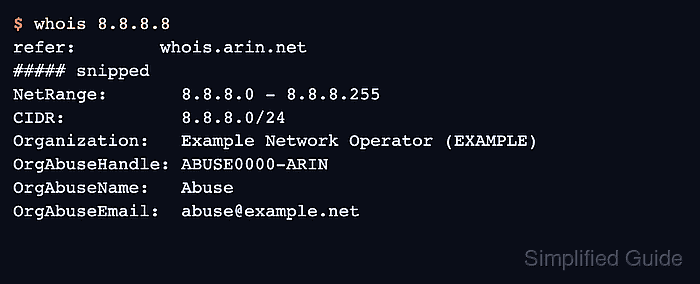
WHOIS output is free-form text, so abuse fields appear in different places. IP address records from regional internet registries can expose OrgAbuseEmail or abuse point-of-contact handles, while domain records often expose registrar abuse fields even when registrant data is redacted.
RDAP is the confirmation path when WHOIS is thin, redacted, or difficult to parse. For gTLD domains, RDAP is now the primary registration-data source; for IP address and ASN records, RDAP can also expose role entities that confirm the same responsibility in structured JSON.
Related: How to query an IP address with whois
Related: How to query a domain with whois
Related: How to query RDAP for a domain
Steps to find abuse contacts with whois:
- Query the exact resource named in the complaint or log.
$ whois 8.8.8.8
Use the logged public IP address for network abuse. Use a domain name only when the complaint is about registration, delegation, phishing, or registrar-controlled behavior.
- Follow the authoritative WHOIS server when the first answer is only a broad registry pointer.
refer:        whois.arin.net
whois:        whois.arin.net
Some WHOIS clients follow referrals automatically. If the client stops at an IANA or registry pointer, query the named server directly, such as whois -h whois.arin.net 8.8.8.8.
- Read the most specific registry, network, or registrar section before copying a contact.
NetRange:       8.8.8.0 - 8.8.8.255
CIDR:           8.8.8.0/24
Organization:   Example Network Operator (EXAMPLE)
- Select the abuse role contact, not a personal or unrelated administrative contact.
OrgAbuseHandle: ABUSE0000-ARIN
OrgAbuseName:   Abuse
OrgAbuseEmail:  abuse@example.net
The example email is sanitized. Keep the real role address in the private ticket or report, not in published documentation.
- Match the contact back to the same resource before sending the report.
NetRange:       8.8.8.0 - 8.8.8.255
CIDR:           8.8.8.0/24
OrgAbuseEmail:  abuse@example.net
Do not send abuse reports to a parent block when a more specific allocation, reassignment, or referral identifies another responsible party.
- Check RDAP when WHOIS is redacted, sparse, or ambiguous.
For domains, compare registrar abuse fields with the RDAP record before deciding that no public role contact exists. For IP addresses and ASNs, look for RDAP entities with an abuse role.
Related: How to query RDAP for a domain
Tool: WHOIS / RDAP Lookup - Save the evidence that links the contact to the resource.
$ whois 8.8.8.8 > 8.8.8.8.abuse.whois
Related: How to save raw whois output
Related: How to sanitize whois contact data - Verify the final escalation target before sending.
The report target is ready when the role address or reporting URL belongs to the same IP range, ASN, registrar, or domain record that triggered the investigation.