How to ignore robots.txt in wget
Recursive wget downloads can silently skip paths that a site's /robots.txt excludes, even when the starting page links to those files. When you have explicit permission to fetch paths that the site blocks from crawlers, turn that check off only for the bounded capture that needs it.
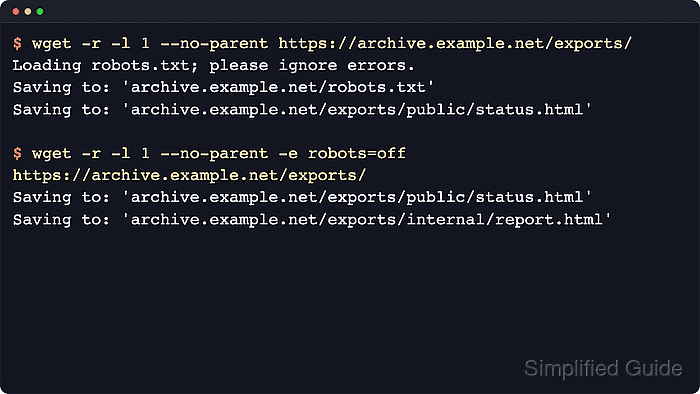
GNU wget uses the robots setting for this behavior. The command-line form --execute robots=off disables the usual /robots.txt check for the current command, while robots = off in ~/.wgetrc makes the override persistent for that account. The same setting also disables document-level nofollow rules during recursive retrieval.
Use the override narrowly. Keep the approved start URL, recursion depth, parent-directory boundary, and output directory explicit, then restore the default policy when the special-case capture is finished so later recursive jobs do not keep bypassing crawl rules.
Steps to ignore robots.txt in wget:
- Review the published crawler policy before bypassing it.
$ wget --quiet --output-document=- https://archive.example.net/robots.txt
User-agent: *
Disallow: /exports/internal/
This confirms which path the default recursive run will refuse to fetch.
- Run the recursive download once with the default policy and an explicit output directory.
$ wget --quiet --recursive --level=1 --no-parent --directory-prefix=approved-capture https://archive.example.net/exports/
$ ls approved-capture/archive.example.net/exports
index.html
public
The blocked internal directory is absent, so the baseline run gives you a before state for the later override.
- Re-run the same bounded capture with --execute robots=off and confirm that the previously blocked path is now downloaded.
$ wget --quiet --recursive --level=1 --no-parent --directory-prefix=approved-capture --execute robots=off https://archive.example.net/exports/
$ ls approved-capture/archive.example.net/exports/internal
report.html
Use this only for approved captures. The short -e robots=off form is the same override.
- Persist the override in ~/.wgetrc only when the same approved recursive job must repeat under the same account.
~/.wgetrc
robots = off
This changes every later recursive wget run for that user until you remove it or set it back to on. Related: How to configure default options in ~/.wgetrc
- Restore the default crawler policy as soon as the special-case download is complete.
~/.wgetrc
robots = on
Remove the override entirely if you do not want any saved robots setting in the user profile.