How to use a SOCKS proxy with wget
When a download host is reachable only through an SSH dynamic forward, Tor gateway, or SOCKS bastion, wget needs a wrapper because its documented proxy settings cover HTTP, HTTPS, and FTP proxy URLs rather than a SOCKS option. Running the request through proxychains4 sends the TCP connection to the SOCKS endpoint while wget still handles the retrieval.
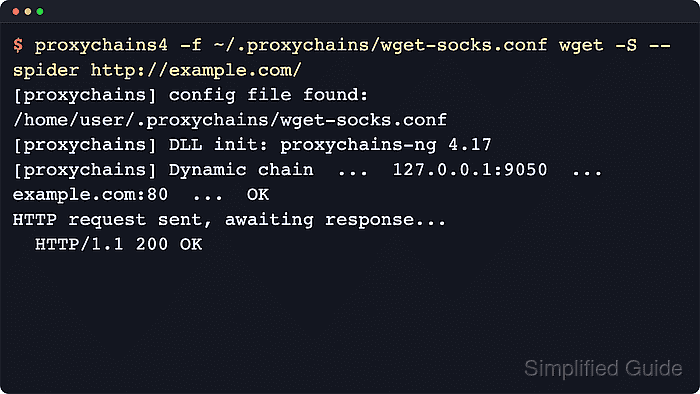
proxychains4 reads a small policy file that names the SOCKS4 or SOCKS5 hop, then intercepts the connection opened by wget and hands it to that proxy. Keep that policy in a job-specific file when only one automation path should use the tunnel, and use --no-config in test probes when saved /etc/wgetrc/ or /$HOME/.wgetrc/ defaults would hide which route is active.
Choose DNS handling before the first probe. Without proxy_dns, the local host resolves names before the SOCKS connection starts; with proxy_dns, proxychains4 asks the proxy side to resolve the target name. Trust the proxychains chain line that names the SOCKS hop and final target, not just a 200 OK response from wget.
Related: How to use an HTTP proxy with wget
Tool: Wget Command Generator
Steps to use a SOCKS proxy with wget:
- Start or confirm a SOCKS endpoint that proxychains4 can reach from the shell that will run wget.
$ ssh -N -D 127.0.0.1:1080 ops@bastion.ops.example.test
Run the SSH dynamic forward in a separate terminal and keep it open while wget runs. If a SOCKS service already exists, use that service's host and port instead.
- Create a user-space directory for the wrapper config.
$ mkdir -p ~/.proxychains
- Save the SOCKS policy in a dedicated proxychains4 config file.
~/.proxychains/wget-socks.conf
dynamic_chain

[ProxyList]
socks5 127.0.0.1 1080
Add proxy_dns above [ProxyList] only when hostname lookups must also happen from the proxy side.
- Clear ordinary wget proxy variables in the test shell when the probe must prove that the SOCKS path is the only proxy route.
$ unset http_proxy https_proxy ftp_proxy no_proxy
wget uses those variables for HTTP, HTTPS, and FTP proxies. Clearing them during the probe keeps the proxychains4 chain line tied to the target host instead of an unrelated HTTP proxy.
- Run a short spider probe through proxychains4 and confirm that the chain line names the SOCKS hop.
$ proxychains4 -f ~/.proxychains/wget-socks.conf wget --no-config -S --spider http://mirror.example.test/health
[proxychains] config file found: /home/user/.proxychains/wget-socks.conf
##### snipped #####
[proxychains] DLL init: proxychains-ng 4.17
Spider mode enabled. Check if remote file exists.
--2026-06-06 10:00:55--  http://mirror.example.test/health
Resolving mirror.example.test (mirror.example.test)... 198.51.100.24
Connecting to mirror.example.test (mirror.example.test)|198.51.100.24|:80... [proxychains] Dynamic chain  ...  127.0.0.1:1080  ...  198.51.100.24:80  ...  OK
connected.
HTTP request sent, awaiting response...
  HTTP/1.1 200 OK
  Content-Type: text/plain
  Content-Length: 3
Remote file exists.
--no-config keeps saved wget config out of the probe. Remove it only when the saved config is part of the job being tested.
- Run the real download with the same wrapper config and the wget options needed for the file.
$ proxychains4 -f ~/.proxychains/wget-socks.conf wget --no-config -O asset-index.xml http://mirror.example.test/releases/asset-index.xml
[proxychains] config file found: /home/user/.proxychains/wget-socks.conf
##### snipped #####
[proxychains] DLL init: proxychains-ng 4.17
--2026-06-06 10:00:55--  http://mirror.example.test/releases/asset-index.xml
Resolving mirror.example.test (mirror.example.test)... 198.51.100.24
Connecting to mirror.example.test (mirror.example.test)|198.51.100.24|:80... [proxychains] Dynamic chain  ...  127.0.0.1:1080  ...  198.51.100.24:80  ...  OK
connected.
HTTP request sent, awaiting response... 200 OK
Length: 18432 [application/xml]
Saving to: 'asset-index.xml'

asset-index.xml        100%[===================>]  18.00K  --.-KB/s    in 0.01s

2026-06-06 10:00:55 (1.76 MB/s) - 'asset-index.xml' saved [18432/18432]
Use the Wget Command Generator to compose the inner wget flags for filenames, headers, retries, or output paths, then prefix the reviewed command with proxychains4 -f ~/.proxychains/wget-socks.conf.
- Add a short timeout probe for scheduled checks so a dead SOCKS tunnel fails before the job waits on normal retries.
$ proxychains4 -f ~/.proxychains/wget-socks.conf wget --no-config --tries=1 --timeout=10 --spider http://mirror.example.test/health
##### snipped #####
Spider mode enabled. Check if remote file exists.
--2026-06-06 10:00:56--  http://mirror.example.test/health
Resolving mirror.example.test (mirror.example.test)... 198.51.100.24
Connecting to mirror.example.test (mirror.example.test)|198.51.100.24|:80... [proxychains] Dynamic chain  ...  127.0.0.1:1080  ...  198.51.100.24:80  ...  OK
connected.
HTTP request sent, awaiting response... 200 OK
Remote file exists.
That probe is short enough for cron or CI health checks. Related: How to set connection and read timeouts in wget