How to force IPv4 or IPv6 in wget
When a host resolves to both A and AAAA records, wget normally follows the resolver's address order until one connection works. Forcing one address family is useful when you need to prove whether a failure belongs to IPv4 or IPv6, or when one family must be excluded for a specific job.
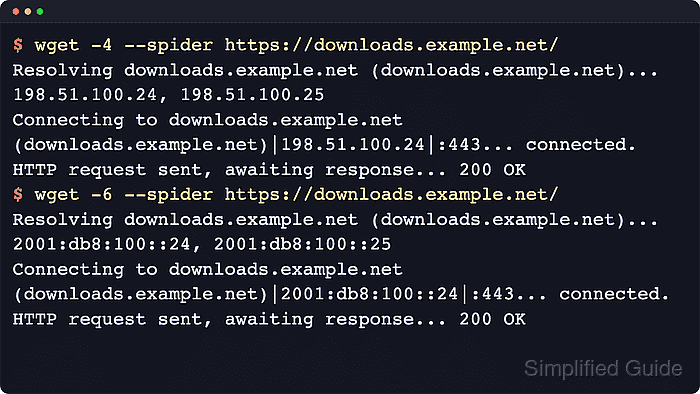
On current GNU wget builds compiled with IPv6 support, -4 and --inet4-only force IPv4, while -6 and --inet6-only force IPv6. The matching inet4_only and inet6_only directives in /$HOME/.wgetrc/ make the same choice persistent, and --prefer-family is the alternative when you only want to change which family is tried first without blocking the other one.
Keep the forced setting narrow. Command-line flags are safest for troubleshooting or a single automation job, while a saved /$HOME/.wgetrc/ rule makes sense only when the same account should always stay on one family. Never set both startup-file directives to on at the same time.
Tool: What Is My IP Address?
Steps to force IPv4 or IPv6 in wget:
- Force one probe onto IPv4 and confirm the Connecting to line shows a dotted-decimal address.
$ wget --inet4-only --spider https://example.com/
Spider mode enabled. Check if remote file exists.
--2026-06-06 01:42:19--  https://example.com/
Resolving example.com (example.com)... 104.20.23.154, 172.66.147.243
Connecting to example.com (example.com)|104.20.23.154|:443... connected.
HTTP request sent, awaiting response... 200 OK
Length: unspecified [text/html]
Remote file exists and could contain further links,
but recursion is disabled -- not retrieving.
The dotted-decimal address confirms that wget stayed on IPv4 for that run.
- Force the same probe onto IPv6 and confirm wget stays on the colon-separated addresses returned by DNS.
$ wget --inet6-only --tries=1 --timeout=10 --spider https://example.com/
Spider mode enabled. Check if remote file exists.
--2026-06-06 01:42:19--  https://example.com/
Resolving example.com (example.com)... 2606:4700:10::6814:179a, 2606:4700:10::ac42:93f3
Connecting to example.com (example.com)|2606:4700:10::6814:179a|:443... failed: Network is unreachable.
Connecting to example.com (example.com)|2606:4700:10::ac42:93f3|:443... failed: Network is unreachable.
If the local host has no IPv6 route, --inet6-only stops after IPv6 connection failures instead of trying IPv4. On a host with working IPv6 routing, the same command should end with 200 OK after an IPv6 Connecting to line.
- Persist one address-family default in /$HOME/.wgetrc/ only when every future wget command for that account should inherit it.
~/.wgetrc
inet4_only = on
inet6_only = off
Flip the two values when the account should stay on IPv6 instead. Do not set both directives to on. Related: How to configure default options in ~/.wgetrc
- Verify the saved default without repeating the family flag on the command line.
$ wget --spider https://example.com/
Spider mode enabled. Check if remote file exists.
--2026-06-06 01:42:19--  https://example.com/
Resolving example.com (example.com)... 104.20.23.154, 172.66.147.243
Connecting to example.com (example.com)|104.20.23.154|:443... connected.
HTTP request sent, awaiting response... 200 OK
Length: unspecified [text/html]
Remote file exists and could contain further links,
but recursion is disabled -- not retrieving.
If the saved default is IPv6 instead, the Connecting to line should show a colon-separated address. Use --no-config for a clean one-off test when an existing startup file may be changing the result. Related: How to debug wget connections
Related: How to set connection and read timeouts in wget