How to trace an IPv6 route with traceroute
IPv6 route problems can hide behind a healthy IPv4 path because the two address families use separate DNS records, route tables, firewall policy, and provider paths. Linux traceroute can force an IPv6 trace so each visible hop belongs to the IPv6 route being checked.
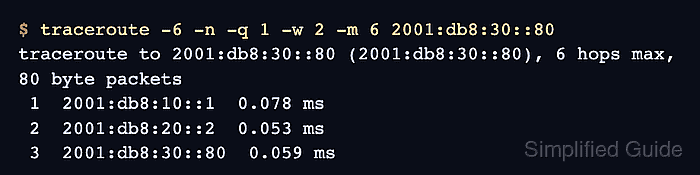
The -6 option selects IPv6, and -n keeps responding hop addresses numeric instead of waiting on reverse DNS lookups. Use a destination hostname with an AAAA record or a literal IPv6 address from the affected service, ticket, or monitoring alert.
A responding destination row proves that IPv6 diagnostic probes reached that address from the source host. Missing middle-hop replies can still mean rate limiting or filtering, while Network is unreachable means the local host has no usable IPv6 route for that destination.
Steps to trace an IPv6 route with traceroute:
- Choose an authorized IPv6 destination for the trace.
Run route probes only against networks, hosts, or services where diagnostic testing is allowed.
- Confirm that the source host has an IPv6 route to the destination address.
$ ip -6 route get 2001:db8:30::80
2001:db8:30::80 from :: via 2001:db8:10::1 dev eth0 src 2001:db8:10::10 metric 1024 pref medium
Replace 2001:db8:30::80 with the target IPv6 address. If the command returns RTNETLINK answers: Network is unreachable, fix the local IPv6 route, gateway, VPN, or interface assignment before interpreting traceroute output.
- Run an IPv6 trace with numeric hop addresses.
$ traceroute -6 -n -q 1 -w 2 -m 6 2001:db8:30::80
traceroute to 2001:db8:30::80 (2001:db8:30::80), 6 hops max, 80 byte packets
 1  2001:db8:10::1  0.078 ms
 2  2001:db8:20::2  0.053 ms
 3  2001:db8:30::80  0.059 ms
-6 selects IPv6, -q 1 sends one probe per hop, -w 2 waits up to two seconds per probe, and -m 6 keeps an initial run short. Raise -m when the destination is farther away.
- Read the final responding row before blaming middle-hop timeouts.
3 2001:db8:30::80 0.059 ms
The destination answered at hop 3. Asterisks on earlier rows are not automatically a route failure when later hops or the destination still answer.
Related: How to interpret traceroute timeout hops - Compare a trace that stops at the hop limit with the intended destination.
$ traceroute -6 -n -q 1 -w 2 -m 2 2001:db8:30::80
traceroute to 2001:db8:30::80 (2001:db8:30::80), 2 hops max, 80 byte packets
 1  2001:db8:10::1  0.016 ms
 2  2001:db8:20::2  0.011 ms
Here, -m 2 ends before the destination at hop 3. Raise the hop limit before treating the last visible router as the failure boundary.
- Capture a local no-route failure separately from a routed trace.
$ ip -6 route get 2606:4700:4700::1111
RTNETLINK answers: Network is unreachable
traceroute -6 cannot send probes until the source host has an IPv6 route for the target. If the route exists but the destination still does not answer, test ICMP or TCP probes to match the traffic being investigated.
Related: How to use ICMP probes with traceroute
Related: How to use TCP probes with traceroute
Tool: Traceroute Hops Analyzer