Network filters often treat diagnostic probes differently from user traffic. A default Linux traceroute sends UDP probes to high destination ports, so a web, mail, or SSH path can look blocked even when the service port is reachable.
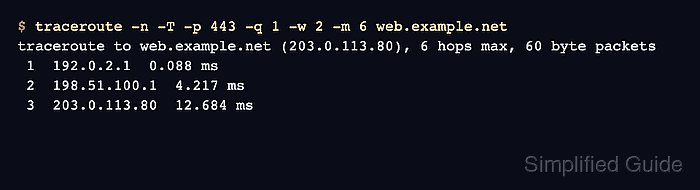
The -T option switches Linux traceroute to TCP SYN probes, and -p sets the destination port those probes target. Use the port that matches the reported symptom, such as 443 for HTTPS or 22 for SSH, instead of tracing only the default probe method.
TCP traceroute is route evidence, not a full application test. It can show whether hop-limited probes reach the target service port and whether the final host sends a TCP response, while middle-hop asterisks still need the same careful reading as any other traceroute output.
Related: How to interpret traceroute timeout hops
Tool: Traceroute Hops Analyzer
Steps to use TCP probes with traceroute:
- Choose the authorized target and service port.
Run route probes only against hosts, networks, and ports where diagnostic testing is allowed.
- Capture the default traceroute baseline from the affected source.
$ traceroute -n -q 1 -w 2 -m 6 web.example.net
traceroute to web.example.net (203.0.113.80), 6 hops max, 60 byte packets
 1  192.0.2.1  0.061 ms
 2  198.51.100.1  4.005 ms
 3  *
 4  *
 5  *
 6  *
-n keeps hop addresses numeric, -q 1 sends one probe per hop for a compact comparison, -w 2 waits up to two seconds per probe, and -m 6 keeps the sample short. Linux traceroute uses UDP probes by default.
- Run the TCP trace against the service port.
$ traceroute -n -T -p 443 -q 1 -w 2 -m 6 web.example.net
traceroute to web.example.net (203.0.113.80), 6 hops max, 60 byte packets
 1  192.0.2.1  0.088 ms
 2  198.51.100.1  4.217 ms
 3  203.0.113.80  12.684 ms
-T selects TCP SYN probes. -p 443 keeps every probe pointed at the HTTPS port instead of the default high UDP port range.
- Add -O info when the final TCP flags matter.
$ traceroute -n -T -p 443 -O info -q 1 -w 2 -m 6 web.example.net
traceroute to web.example.net (203.0.113.80), 6 hops max, 60 byte packets
 1  192.0.2.1  0.091 ms
 2  198.51.100.1  4.291 ms
 3  203.0.113.80 <syn,ack,mss=1460,sack,timestamps,window_scaling>  12.703 ms
A syn,ack final reply means a listener answered the TCP SYN probe. A reset reply can still prove the host answered on the path, but it does not mean the service is open.
- Compare the default and TCP probe results.
Default probe: no destination reply within 6 hops
TCP probe: destination answered on port 443 at hop 3
Reading: the route to the HTTPS port responds, while the default UDP probe path is filtered or incomplete
Use ICMP probes instead when comparing against ping-like reachability.
Related: How to use ICMP probes with traceroute - Record the result with the tested port and final row.
target: web.example.net
probe method: TCP SYN
destination port: 443
destination row: 203.0.113.80 answered at hop 3
next check: test the HTTPS request itself if users still report application failure
A successful TCP traceroute narrows the routing or filtering question. It does not replace an application-level check such as an HTTPS request, SSH login attempt, or service-specific health test.

Mohd Shakir Zakaria is a cloud architect with deep roots in software development and open-source advocacy. Certified in AWS, Red Hat, VMware, ITIL, and Linux, he specializes in designing and managing robust cloud and on-premises infrastructures.


