How to export a SavedModel in TensorFlow
Model training and model delivery are separate lifecycle stages. A SavedModel packages the TensorFlow graph, learned variables, assets, and callable endpoints into a directory that an inference runtime can load without the original model-building code.
For a current Keras model, model.export() writes an inference artifact rather than a full training archive. Use the native .keras format instead when another Keras process must restore optimizer state or resume training.
The exported artifact must remain a complete directory, including saved_model.pb and the variables subdirectory. Load it through tf.saved_model.load() and call the default serving signature before handing its input and output contract to TensorFlow Serving or another consumer.
Steps to export a TensorFlow model as a SavedModel:
- Create export_savedmodel_demo.py with the TensorFlow import, deterministic seed, and versioned export path.
- export_savedmodel_demo.py
import os
from pathlib import Path

os.environ["TF_CPP_MIN_LOG_LEVEL"] = "2"

import tensorflow as tf

tf.get_logger().setLevel("ERROR")
tf.keras.utils.set_random_seed(7)

export_dir = Path("exported/number_classifier/1")
- Append the training tensors to export_savedmodel_demo.py.
- export_savedmodel_demo.py
features = tf.constant(
    [
        [0.0, 0.0, 0.0, 0.0],
        [0.0, 1.0, 0.0, 1.0],
        [1.0, 0.0, 1.0, 0.0],
        [1.0, 1.0, 1.0, 1.0],
        [0.2, 0.9, 0.1, 0.8],
        [0.8, 0.2, 0.9, 0.1],
    ],
    dtype=tf.float32,
)
labels = tf.constant([[0.0], [0.0], [1.0], [1.0], [0.0], [1.0]], dtype=tf.float32)
- Append the model definition and training pass to export_savedmodel_demo.py.
- export_savedmodel_demo.py
inputs = tf.keras.Input(shape=(4,), name="features")
hidden = tf.keras.layers.Dense(8, activation="relu")(inputs)
scores = tf.keras.layers.Dense(1, activation="sigmoid")(hidden)
model = tf.keras.Model(inputs=inputs, outputs=scores, name="number_classifier")
model.compile(optimizer="adam", loss="binary_crossentropy")
model.fit(features, labels, epochs=12, verbose=0)
- Append the export and reloaded-signature check to export_savedmodel_demo.py.
- export_savedmodel_demo.py
model.export(export_dir)

restored = tf.saved_model.load(str(export_dir))
signature = restored.signatures["serving_default"]
_, keyword_inputs = signature.structured_input_signature
input_name, input_spec = next(iter(keyword_inputs.items()))
sample_batch = tf.constant(
    [
        [0.1, 0.9, 0.2, 0.8],
        [0.9, 0.1, 0.8, 0.2],
    ],
    dtype=input_spec.dtype,
)
prediction = signature(**{input_name: sample_batch})
output_name, output_tensor = next(iter(prediction.items()))

print(f"TensorFlow: {tf.__version__}")
print(f"SavedModel directory: {export_dir}")
print(f"Contains SavedModel: {tf.saved_model.contains_saved_model(str(export_dir))}")
print(f"Signature names: {sorted(restored.signatures.keys())}")
print(f"Input: {input_name} shape={tuple(input_spec.shape)} dtype={input_spec.dtype.name}")
print(f"Output: {output_name} shape={tuple(output_tensor.shape)}")
The numeric 1 directory follows the version layout used by TensorFlow Serving, where each changed serving artifact needs its own version number.
- Run the completed script to exercise the SavedModel export through a separately loaded serving signature.
$ python3 export_savedmodel_demo.py
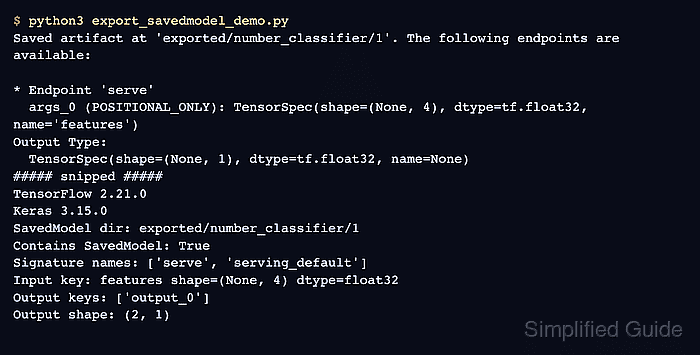
Saved artifact at 'exported/number_classifier/1'. The following endpoints are available:

* Endpoint 'serve'
  args_0 (POSITIONAL_ONLY): TensorSpec(shape=(None, 4), dtype=tf.float32, name='features')
Output Type:
  TensorSpec(shape=(None, 1), dtype=tf.float32, name=None)
##### snipped #####
TensorFlow: 2.21.0
SavedModel directory: exported/number_classifier/1
Contains SavedModel: True
Signature names: ['serve', 'serving_default']
Input: features shape=(None, 4) dtype=float32
Output: output_0 shape=(2, 1)
Contains SavedModel: True confirms the export format, while the final shape comes from inference through the separately loaded signature.
- Inspect the exported directory for the SavedModel protobuf and variable checkpoint.
$ ls -R exported/number_classifier/1
exported/number_classifier/1:
assets
fingerprint.pb
saved_model.pb
variables

exported/number_classifier/1/assets:

exported/number_classifier/1/variables:
variables.data-00000-of-00001
variables.index
The whole version directory is the deployable unit because model variables and assets can live outside saved_model.pb.
- Inspect the default serving signature before handing the export to another runtime.
$ saved_model_cli show --dir exported/number_classifier/1 --tag_set serve --signature_def serving_default
The given SavedModel SignatureDef contains the following input(s):
  inputs['features'] tensor_info:
      dtype: DT_FLOAT
      shape: (-1, 4)
      name: serving_default_features:0
The given SavedModel SignatureDef contains the following output(s):
  outputs['output_0'] tensor_info:
      dtype: DT_FLOAT
      shape: (-1, 1)
      name: StatefulPartitionedCall_1:0
Method name is: tensorflow/serving/predict
The features input and output_0 output are the field names a serving client must map.
Related: How to inspect a TensorFlow SavedModel with saved_model_cli
Related: How to deploy TensorFlow Serving with Docker - Run the exported serving_default signature with two four-value feature rows to prove its checkpoint variables produce predictions.
$ saved_model_cli run \
  --dir exported/number_classifier/1 \
  --tag_set serve \
  --signature_def serving_default \
  --input_exprs 'features=[[0.1,0.9,0.2,0.8],[0.9,0.1,0.8,0.2]]'
##### snipped #####
INFO:tensorflow:Restoring parameters from exported/number_classifier/1/variables/variables
Result for output key output_0:
[[0.56982714]
 [0.41488308]]
The restore message confirms that saved_model_cli loaded the variable checkpoint before the two prediction rows were returned.