How to build an image augmentation pipeline in TensorFlow
Image classifiers benefit from seeing plausible variations of each training sample instead of memorizing one fixed pixel arrangement. TensorFlow can generate those variants as batches are read while leaving source images and validation data unchanged.
Mapping Keras preprocessing layers through tf.data.Dataset runs the transforms outside the model, so prefetch() can overlap them with training but model export will not include them. The training branch therefore owns the random layers, while any required serving-time preprocessing belongs in the exported model or serving application.
Resize and rescale before cache() so deterministic work can be reused, then place random augmentation after the cache so later iterations draw new transformations. Validation branches stop at deterministic preprocessing, which keeps evaluation inputs stable.
Steps to build an image augmentation pipeline in TensorFlow:
- Create image-augmentation-pipeline.py with reproducible image tensors and labels.
- image-augmentation-pipeline.py
import os

os.environ["TF_CPP_MIN_LOG_LEVEL"] = "2"

import tensorflow as tf

layers = tf.keras.layers

tf.get_logger().setLevel("ERROR")
tf.keras.utils.set_random_seed(7)

IMAGE_SIZE = 64
BATCH_SIZE = 4

images = tf.reshape(
    tf.range(8 * 48 * 48 * 3, dtype=tf.float32),
    (8, 48, 48, 3),
)
images = tf.math.floormod(images, 256.0)
labels = tf.constant([0, 1, 0, 1, 0, 1, 0, 1], dtype=tf.int32)
- Append the deterministic preprocessing stack and random augmentation layers below labels.
resize_and_rescale = tf.keras.Sequential(
    [
        layers.Resizing(IMAGE_SIZE, IMAGE_SIZE),
        layers.Rescaling(1.0 / 255.0),
    ]
)

augment = tf.keras.Sequential(
    [
        layers.RandomFlip("horizontal", seed=7),
        layers.RandomRotation(0.15, seed=7),
        layers.RandomZoom(0.1, seed=7),
    ]
)
The fixed seeds make the demonstration repeatable; the random-layer state still advances between calls. Suitable transforms preserve the meaning of the real labels.
Related: How to set a random seed in TensorFlow - Append the cached deterministic dataset below augment.
def prepare(image, label):
    return resize_and_rescale(image), label


base_ds = (
    tf.data.Dataset.from_tensor_slices((images, labels))
    .map(prepare, num_parallel_calls=tf.data.AUTOTUNE)
    .cache()
)
An empty cache() keeps the prepared dataset in memory. A larger image dataset needs enough memory or a filename argument for a disk-backed cache.
- Append the separate training and validation branches below base_ds.
ordered_train_ds = base_ds.shuffle(
    len(labels),
    seed=7,
    reshuffle_each_iteration=False,
).batch(BATCH_SIZE)

train_ds = ordered_train_ds.map(
    lambda image, label: (augment(image, training=True), label),
    num_parallel_calls=tf.data.AUTOTUNE,
).prefetch(tf.data.AUTOTUNE)

validation_ds = base_ds.batch(BATCH_SIZE).prefetch(tf.data.AUTOTUNE)
The fixed shuffle order isolates augmentation during the comparison; ordinary multi-epoch training usually reshuffles while keeping augmentation restricted to the training branch.
- Append the independent pipeline checks below validation_ds.
first_images, first_labels = next(iter(train_ds))
second_images, second_labels = next(iter(train_ds))
validation_images, validation_labels = next(iter(validation_ds))
baseline_images, baseline_labels = next(iter(base_ds.batch(BATCH_SIZE)))

augmentation_changes_pixels = not bool(
    tf.reduce_all(tf.equal(first_images, second_images)).numpy()
)
labels_preserved = bool(
    tf.reduce_all(tf.equal(first_labels, second_labels)).numpy()
)
validation_matches_base = bool(
    tf.reduce_all(tf.abs(validation_images - baseline_images) < 1e-6).numpy()
    and tf.reduce_all(tf.equal(validation_labels, baseline_labels)).numpy()
)
min_pixel = float(tf.reduce_min(first_images).numpy())
max_pixel = float(tf.reduce_max(first_images).numpy())
pixels_in_unit_range = 0.0 <= min_pixel and max_pixel <= 1.0

print(f"train_batch_shape={tuple(first_images.shape)}")
print(f"augmentation_changes_pixels={augmentation_changes_pixels}")
print(f"labels_preserved={labels_preserved}")
print(f"validation_matches_base={validation_matches_base}")
print(f"pixels_in_unit_range={pixels_in_unit_range}")
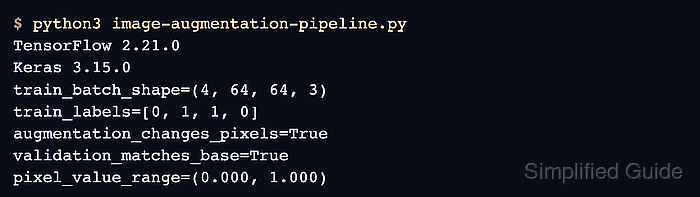
- Run image-augmentation-pipeline.py to verify changing training pixels, preserved labels, and stable validation pixels.
$ python3 image-augmentation-pipeline.py
train_batch_shape=(4, 64, 64, 3)
augmentation_changes_pixels=True
labels_preserved=True
validation_matches_base=True
pixels_in_unit_range=True