Randomness enters a TensorFlow program through weight initialization, shuffled input data, and sampled augmentation. A fixed seed lets a fresh process replay those pseudorandom choices, which makes debugging and controlled comparisons easier to repeat.
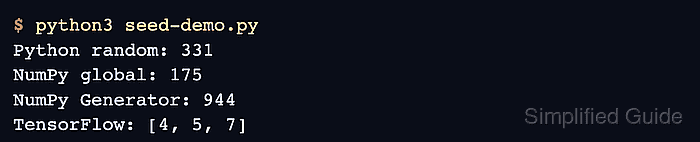
The tf.keras.utils.set_random_seed() utility applies one integer to Python's random module, NumPy's legacy global generator, and TensorFlow's global random state. Those common sources then begin from the same state each time the program starts.
Seeded random streams remain tied to the software and hardware environment. A np.random.default_rng() instance needs its own seed, while exact GPU or parallel-operation repeatability may also require TensorFlow operation determinism, which can reduce performance.
Steps to set a random seed in TensorFlow:
- Create seed-demo.py with the imports and shared seed call before any random-dependent work.
- seed-demo.py
import random

import numpy as np
import tensorflow as tf

SEED = 7

tf.keras.utils.set_random_seed(SEED)
- Append one sample from each seeded random source below the seed call in seed-demo.py.
print("Python:", random.randint(0, 999))
print("NumPy:", int(np.random.randint(0, 1000)))
print(
    "TensorFlow:",
    tf.random.uniform((3,), minval=0, maxval=10, dtype=tf.int32).numpy().tolist(),
)
- Run seed-demo.py in a fresh Python process to record the first sequence.
$ python3 seed-demo.py
Python: 331
NumPy: 175
TensorFlow: [4, 5, 7]
- Run seed-demo.py again in another fresh Python process to confirm the sequence repeats.
$ python3 seed-demo.py
Python: 331
NumPy: 175
TensorFlow: [4, 5, 7]
Different values on the second run indicate that another random source is unseeded or that the seed call occurs after random-dependent work has already started.

Mohd Shakir Zakaria is a cloud architect with deep roots in software development and open-source advocacy. Certified in AWS, Red Hat, VMware, ITIL, and Linux, he specializes in designing and managing robust cloud and on-premises infrastructures.


