A model can leave a GPU, TPU, or training loop idle when its input pipeline cannot prepare the next batch fast enough. A well-ordered tf.data pipeline overlaps independent work, reuses deterministic results, and keeps a ready batch close to the consumer.
TensorFlow can use tf.data.AUTOTUNE to choose parallel map() calls and the prefetch() buffer at runtime. A completed cache() retains the elements produced before its position, so later epochs can skip repeated decoding or resizing while transformations after the cache continue to run.
The cache must fit the prepared dataset in memory or at a chosen local cache path, and its position changes training behavior. Keep deterministic parsing before cache(), place random shuffling or augmentation after it, and compare the same batch count before and after optimization because storage, CPU work, and model demand determine the real gain.
Steps to optimize TensorFlow tf.data pipeline performance:
- Create the benchmark input and deterministic preprocessing section in optimize-tfdata-pipeline.py.
- optimize-tfdata-pipeline.py
import os
import time

os.environ["TF_CPP_MIN_LOG_LEVEL"] = "2"

import tensorflow as tf

tf.get_logger().setLevel("ERROR")
tf.keras.utils.set_random_seed(2026)

AUTOTUNE = tf.data.AUTOTUNE
EXAMPLES = 256
BATCH_SIZE = 32
EPOCHS = 3
IMAGE_SHAPE = (128, 128, 3)
TARGET_SIZE = (96, 96)

source_image = tf.random.uniform(
    IMAGE_SHAPE,
    minval=0,
    maxval=256,
    dtype=tf.int32,
    seed=7,
)
encoded_image = tf.io.encode_jpeg(tf.cast(source_image, tf.uint8)).numpy()
encoded_images = tf.constant([encoded_image] * EXAMPLES)
labels = tf.range(EXAMPLES, dtype=tf.int32) % 2

def decode_and_resize(image_bytes, label):
    image = tf.io.decode_jpeg(image_bytes, channels=3)
    image = tf.image.resize(image, TARGET_SIZE)
    image = tf.cast(image, tf.float32) / 255.0
    return image, label
The encoded image set supplies repeatable decode and resize work without depending on project files. The final project comparison later replaces this synthetic input with the training dataset.
- Append the baseline and optimized pipeline builders below decode_and_resize().
def build_pipeline(optimized):
    dataset = tf.data.Dataset.from_tensor_slices((encoded_images, labels))
    if optimized:
        dataset = dataset.map(
            decode_and_resize,
            num_parallel_calls=AUTOTUNE,
        )
        dataset = dataset.cache()
    else:
        dataset = dataset.map(decode_and_resize)

    dataset = dataset.shuffle(
        buffer_size=EXAMPLES,
        seed=2026,
        reshuffle_each_iteration=False,
    )
    dataset = dataset.batch(BATCH_SIZE)
    if optimized:
        dataset = dataset.prefetch(AUTOTUNE)
    return dataset
The baseline performs decoding and resizing sequentially during every epoch. The optimized path parallelizes that deterministic work, caches its output, and prefetches complete batches while keeping shuffle() after the cache boundary.
- Append the timed dataset consumer below build_pipeline().
def benchmark(dataset):
    started = time.perf_counter()
    checksum = 0.0
    batches = 0
    for _ in range(EPOCHS):
        for images, _ in dataset:
            checksum += float(tf.reduce_sum(images).numpy())
            batches += 1
    return time.perf_counter() - started, batches, checksum
- Append the comparison and proof output below benchmark().
baseline_seconds, baseline_batches, baseline_checksum = benchmark(
    build_pipeline(optimized=False)
)
optimized_dataset = build_pipeline(optimized=True)
optimized_seconds, optimized_batches, optimized_checksum = benchmark(
    optimized_dataset
)
sample_images, sample_labels = next(iter(optimized_dataset))

print(f"tensorflow={tf.__version__}")
print(f"baseline_seconds={baseline_seconds:.3f}")
print(f"optimized_seconds={optimized_seconds:.3f}")
print(f"speedup={baseline_seconds / optimized_seconds:.2f}x")
print(f"batches_match={baseline_batches == optimized_batches}")
print(f"checksums_match={abs(baseline_checksum - optimized_checksum) < 1e-3}")
print(f"image_batch_shape={tuple(sample_images.shape)}")
print(f"label_batch_shape={tuple(sample_labels.shape)}")
print(f"pipeline_type={type(optimized_dataset).__name__}")
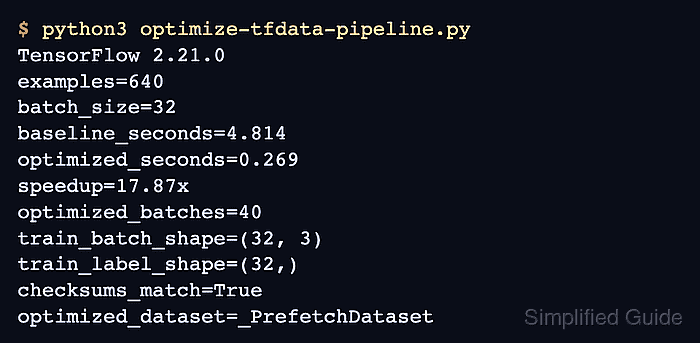
- Run the completed benchmark to confirm faster delivery without changed batches.
$ python3 optimize-tfdata-pipeline.py
tensorflow=2.21.0
baseline_seconds=0.194
optimized_seconds=0.108
speedup=1.79x
batches_match=True
checksums_match=True
image_batch_shape=(32, 96, 96, 3)
label_batch_shape=(32,)
pipeline_type=_PrefetchDataset
The exact timings vary with CPU load and storage, but optimized_seconds should be lower while both match checks remain True.
- Record a fixed-batch baseline from the current project training dataset.
def time_batches(dataset, count=100):
    started = time.perf_counter()
    for _ in dataset.take(count):
        pass
    return time.perf_counter() - started

baseline_seconds = time_batches(train_ds)
print(f"baseline_100_batches={baseline_seconds:.3f}")
The baseline uses the unoptimized train_ds on the same machine, data source, and batch count as the later measurement.
- Apply the measured optimization order to the project training dataset.
AUTOTUNE = tf.data.AUTOTUNE

train_ds = (
    raw_train_ds
    .map(parse_and_preprocess, num_parallel_calls=AUTOTUNE)
    .cache()
    .shuffle(buffer_size=10000, reshuffle_each_iteration=True)
    .batch(64)
    .prefetch(AUTOTUNE)
)
raw_train_ds and parse_and_preprocess represent the project objects. An oversized prepared dataset needs either no cache or a dedicated local cache filename that changes whenever deterministic preprocessing changes.
The cache belongs before random augmentation unless every epoch should reuse one frozen augmented copy. Deterministic decoding or resizing stays before the cache, while random transformations stay after it.
Related: How to build an image augmentation pipeline in TensorFlow - Measure the optimized project pipeline with the same fixed-batch timer.
optimized_seconds = time_batches(train_ds)
print(f"optimized_100_batches={optimized_seconds:.3f}")
assert optimized_seconds < baseline_seconds, (
    "The optimized pipeline did not beat the recorded baseline."
)
If the assertion fails, use the TensorBoard Input Pipeline Analyzer to locate the slow iterator before adding more buffering or parallelism.
Related: How to profile TensorFlow training in TensorBoard - Remove the standalone benchmark after the project pipeline passes the fixed-batch comparison.
$ rm optimize-tfdata-pipeline.py

Mohd Shakir Zakaria is a cloud architect with deep roots in software development and open-source advocacy. Certified in AWS, Red Hat, VMware, ITIL, and Linux, he specializes in designing and managing robust cloud and on-premises infrastructures.


