How to show packet payloads in tcpdump
Tcpdump payload output helps when a terminal capture must prove which plaintext bytes crossed an interface before a log, proxy, or application changed them. A short ASCII or hex capture can show an HTTP request line, SMTP command, syslog message, or protocol marker without opening the traffic in Wireshark.
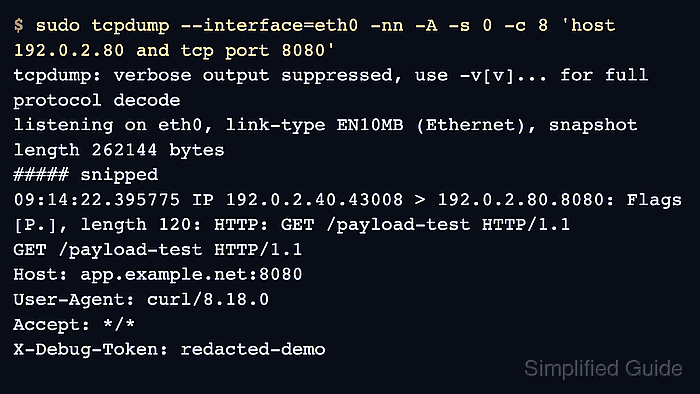
Payload printing is controlled by the output option chosen for the same narrow capture. Use -A when the expected value is readable text, -X when hex offsets and an ASCII column make protocol framing easier to inspect, and -x when the byte values matter more than printable characters.
Use -s 0 when the payload might sit beyond a shortened snapshot length, and keep the host, port, and packet count tight enough for the terminal output to stay reviewable. Encrypted sessions such as HTTPS still show TCP and TLS records, but tcpdump cannot print decrypted headers or body text without keys and a separate decryption workflow.
Steps to show packet payloads in tcpdump:
- Choose the interface, target host, and plaintext port that carry the payload.
The examples use 192.0.2.80:8080 as a controlled HTTP endpoint. Replace it with the host and port that receive the traffic being investigated.
- Print readable payload bytes with ASCII output.
$ sudo tcpdump --interface=eth0 -nn -A -s 0 -c 8 'host 192.0.2.80 and tcp port 8080'
tcpdump: verbose output suppressed, use -v[v]... for full protocol decode
listening on eth0, link-type EN10MB (Ethernet), snapshot length 262144 bytes
##### snipped
09:14:22.395775 IP 192.0.2.40.43008 > 192.0.2.80.8080: Flags [P.], seq 1:121, ack 1, length 120: HTTP: GET /payload-test HTTP/1.1
GET /payload-test HTTP/1.1
Host: app.example.net:8080
User-Agent: curl/8.18.0
Accept: */*
X-Debug-Token: redacted-demo

##### snipped
8 packets captured
20 packets received by filter
0 packets dropped by kernel
-A prints packet bytes as ASCII after each packet summary. Nonprintable header bytes may appear before the request text; the readable lines are the payload evidence.
- Use hex and ASCII together when packet framing or nonprintable separators matter.
$ sudo tcpdump --interface=eth0 -nn -X -s 0 -c 8 'host 192.0.2.80 and tcp port 8080'
tcpdump: verbose output suppressed, use -v[v]... for full protocol decode
listening on eth0, link-type EN10MB (Ethernet), snapshot length 262144 bytes
##### snipped
09:14:25.420470 IP 192.0.2.40.43020 > 192.0.2.80.8080: Flags [P.], seq 1:121, ack 1, length 120: HTTP: GET /payload-test HTTP/1.1
        0x0030:  4745 5420 2f70 6179 6c6f 6164 2d74  GET /payload-t
        0x0040:  6573 7420 4854 5450 2f31 2e31 0d0a  est HTTP/1.1..
        0x0050:  486f 7374 3a20 6170 702e 6578 616d  Host: app.exam
        0x0060:  706c 652e 6e65 743a 3830 3830 0d0a  ple.net:8080..
        0x0070:  5573 6572 2d41 6765 6e74 3a20 6375  User-Agent: cu
        0x0080:  726c 2f38 2e31 382e 300d 0a41 6363  rl/8.18.0..Acc
        0x0090:  6570 743a 202a 2f2a 0d0a 582d 4465  ept: */*..X-De
        0x00a0:  6275 672d 546f 6b65 6e3a 2072 6564  bug-Token: red
        0x00b0:  6163 7465 642d 6465 6d6f 0d0a 0d0a  acted-demo....
##### snipped
8 packets captured
20 packets received by filter
0 packets dropped by kernel
-X keeps the ASCII column next to the hex bytes, which helps identify newline boundaries, binary padding, or protocol fields around the text.
- Use hex-only output when printable text is noisy but byte values still matter.
$ sudo tcpdump --interface=eth0 -nn -x -s 0 -c 8 'host 192.0.2.80 and tcp port 8080' tcpdump: verbose output suppressed, use -v[v]... for full protocol decode listening on eth0, link-type EN10MB (Ethernet), snapshot length 262144 bytes ##### snipped 09:14:28.519102 IP 192.0.2.40.45662 > 192.0.2.80.8080: Flags [P.], seq 1:121, ack 1, length 120: HTTP: GET /payload-test HTTP/1.1 0x0030: 4745 5420 2f70 6179 6c6f 6164 2d74 0x0040: 6573 7420 4854 5450 2f31 2e31 0d0a 0x0050: 486f 7374 3a20 6170 702e 6578 616d 0x0060: 706c 652e 6e65 743a 3830 3830 0d0a ##### snipped 8 packets captured 20 packets received by filter 0 packets dropped by kernel - Keep the payload evidence bounded and sanitized.
Payload captures can expose credentials, cookies, tokens, internal hostnames, and private data. Stop the capture as soon as the expected value appears, and share only the minimum sanitized lines needed for the handoff.
Use a TLS-aware tool, server-side logs, or a saved PCAP with the required keys when the investigation needs decrypted HTTPS content.