Full-packet captures are for investigations where headers alone cannot answer the question. Payload inspection, stream reassembly, and PCAP handoff to another analyst all depend on keeping enough bytes from each packet.
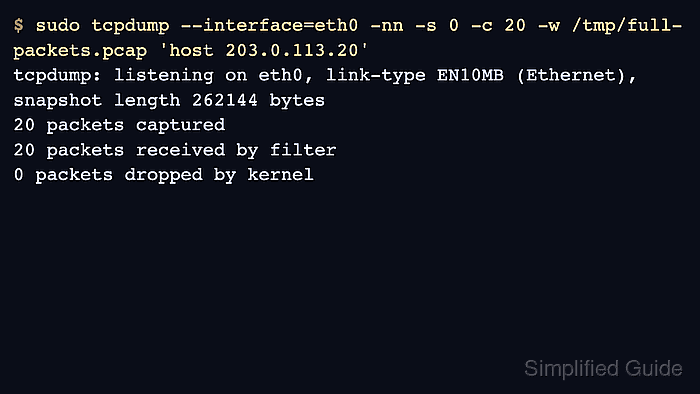
Tcpdump controls saved packet bytes with the snapshot length. Current tcpdump packages use 262144 bytes as the default snapshot length, and -s 0 maps to that default while keeping the intent visible in the command. A smaller -s value writes only the first part of each matching packet.
Full-packet captures increase file size and can preserve credentials, cookies, tokens, and private application data. Keep the interface, host, port, and capture count narrow, then verify the saved PCAP shows the expected snapshot length and no truncation markers in the packets that matter.
Steps to capture full packets with tcpdump:
- Run the capture with an explicit full snapshot length, the selected interface, and a narrow filter.
$ sudo tcpdump --interface=eth0 -nn -s 0 -c 20 -w /tmp/full-packets.pcap 'host 203.0.113.20'
tcpdump: listening on eth0, link-type EN10MB (Ethernet), snapshot length 262144 bytes
20 packets captured
20 packets received by filter
0 packets dropped by kernel
-s 0 keeps the capture at tcpdump's current default snapshot length. Use an explicit value only when a platform or capture appliance requires a different cap. Related: How to select a capture interface in tcpdump
- Confirm that tcpdump wrote a PCAP file with the expected capture length.
$ file /tmp/full-packets.pcap
/tmp/full-packets.pcap: pcap capture file, microsecond ts (little-endian) - version 2.4 (Ethernet, capture length 262144)
- Read a few packets from the file before handing it off.
$ tcpdump -nn -vv -r /tmp/full-packets.pcap -c 2
reading from file /tmp/full-packets.pcap, link-type EN10MB (Ethernet), snapshot length 262144
10:14:11.474644 IP (tos 0x0, ttl 64, id 41228, flags [DF], proto TCP (6), length 60) 192.0.2.40.53018 > 203.0.113.20.8080: Flags [S], length 0
10:14:11.488203 IP (tos 0x0, ttl 64, id 52911, flags [DF], proto TCP (6), length 60) 203.0.113.20.8080 > 192.0.2.40.53018: Flags [S.], length 0
- Look for truncation markers if the packets are larger than ordinary headers.
$ tcpdump -nn -r /tmp/full-packets.pcap -c 3
reading from file /tmp/full-packets.pcap, link-type EN10MB (Ethernet), snapshot length 262144
10:14:12.002110 IP 192.0.2.40.53018 > 203.0.113.20.8080: Flags [P.], seq 1:518, ack 1, length 517
10:14:12.003421 IP 203.0.113.20.8080 > 192.0.2.40.53018: Flags [.], ack 518, length 0
10:14:12.004901 IP 203.0.113.20.8080 > 192.0.2.40.53018: Flags [P.], seq 1:289, ack 518, length 288
Output such as [|tcp] or [|http] means tcpdump could not print the complete protocol data from the captured bytes.
- Use a shorter snapshot length only when headers are enough.
$ sudo tcpdump --interface=eth0 -nn -s 128 -c 20 -w /tmp/headers-only.pcap 'host 203.0.113.20'
tcpdump: listening on eth0, link-type EN10MB (Ethernet), snapshot length 128 bytes
20 packets captured
20 packets received by filter
0 packets dropped by kernel
Do not shorten snapshot length when a later analyst must inspect application payload or reconstruct streams.

Mohd Shakir Zakaria is a cloud architect with deep roots in software development and open-source advocacy. Certified in AWS, Red Hat, VMware, ITIL, and Linux, he specializes in designing and managing robust cloud and on-premises infrastructures.


