Plain HTTP captures can show the request line and headers a client sends before the traffic reaches an application, proxy, or web server. That wire-level view helps isolate normalized logs, suspected proxy rewrites, or an application that receives a different header set than the client was configured to send.
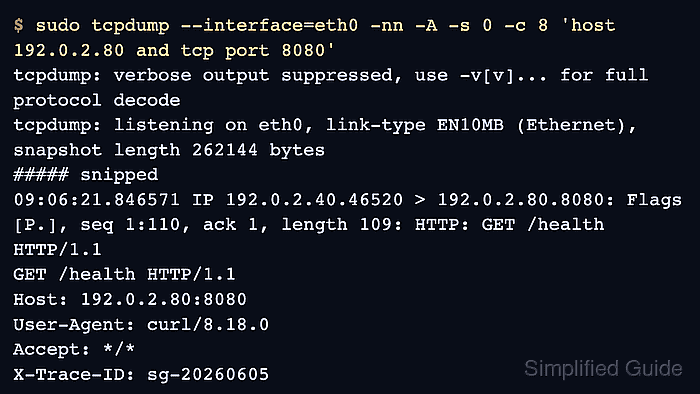
Tcpdump does not understand browser state, but ASCII payload output can print unencrypted HTTP bytes from the packet payload. Use a controlled HTTP endpoint, a narrow host-and-port filter, and a short packet count so the capture collects only the request needed for proof.
Plaintext capture is limited to HTTP traffic that is not protected by TLS. For HTTPS, tcpdump can show the TCP and TLS session but not the decrypted header contents; use server logs, a trusted debugging proxy, or application instrumentation when the encrypted request headers are the evidence target.
Related: How to view HTTP request headers with cURL
Related: How to show packet payloads in tcpdump
Tool: HTTP Header Checker
Steps to capture HTTP headers with tcpdump:
- Choose a plaintext HTTP endpoint and the interface that carries the request.
The examples use 192.0.2.80:8080 as a controlled test endpoint. Replace it with the server and port that receive the HTTP request being investigated.
- Start a short ASCII payload capture for the target host and HTTP port.
$ sudo tcpdump --interface=eth0 -nn -A -s 0 -c 8 'host 192.0.2.80 and tcp port 8080'
tcpdump: verbose output suppressed, use -v[v]... for full protocol decode
tcpdump: listening on eth0, link-type EN10MB (Ethernet), snapshot length 262144 bytes
Option -A prints packet payload bytes as ASCII, -s 0 keeps the full packet payload, and -c 8 stops the capture after a small request exchange. Increase the count when the request does not appear before tcpdump exits.
- Send a controlled request with the header that needs proof.
$ curl -sS --header 'X-Trace-ID: sg-20260605' http://192.0.2.80:8080/health
ok
- Read the request line and header fields in the capture output.
##### snipped
09:06:21.846571 IP 192.0.2.40.46520 > 192.0.2.80.8080: Flags [P.], seq 1:110, ack 1, length 109: HTTP: GET /health HTTP/1.1
E...!H@.@...
GET /health HTTP/1.1
Host: 192.0.2.80:8080
User-Agent: curl/8.18.0
Accept: */*
X-Trace-ID: sg-20260605

##### snipped
8 packets captured
20 packets received by filter
0 packets dropped by kernel
The header is present on the client-to-server packet, so a missing value in the application can be investigated at the proxy, server, or application layer.
- Copy only the sanitized request lines needed for the ticket or handoff.
HTTP payload captures can include Authorization headers, cookies, form fields, and internal hostnames. Save only the minimum sanitized evidence needed to prove the header behavior.

Mohd Shakir Zakaria is a cloud architect with deep roots in software development and open-source advocacy. Certified in AWS, Red Hat, VMware, ITIL, and Linux, he specializes in designing and managing robust cloud and on-premises infrastructures.


