How to capture ARP traffic with tcpdump
ARP failures often look like ordinary IPv4 reachability trouble because a host can have an address, a route, and a default gateway configured while still failing to learn the neighbor MAC address. Capturing ARP traffic shows whether the local segment answers the who-has request before routing or application checks take over.
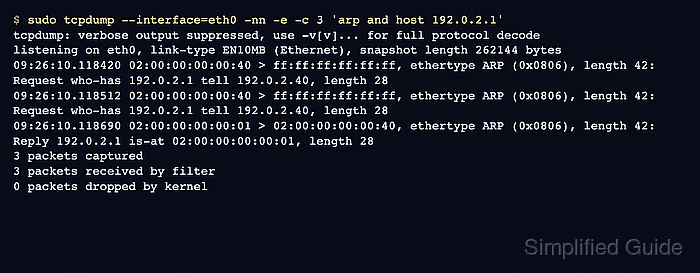
ARP stays inside one broadcast domain, so the capture has to run on the interface connected to the subnet that owns the target address. The arp and host <address> filter keeps unrelated ARP chatter out of the capture, and -e keeps Ethernet headers visible so the frame source and destination MAC addresses are not lost.
One or more who-has requests followed by an is-at reply confirms that the target IPv4 address resolved during the test window. Repeated requests without a reply move the check toward a wrong VLAN, a silent peer, switch isolation, a duplicate address, or an address that is not present on that segment.
Steps to capture ARP traffic with tcpdump:
- Identify the interface used to reach the local neighbor.
$ ip route get 192.0.2.1
192.0.2.1 dev eth0 src 192.0.2.40 uid 1000
    cache
Use the dev value as the tcpdump interface. ARP for a different subnet will not appear unless the capture runs on the segment where that address is resolved.
- Clear only the cached neighbor entry when the test needs a fresh ARP request.
$ sudo ip neigh flush to 192.0.2.1 dev eth0
Skip this when you are passively watching other hosts or when the target is already unresolved. Flushing one neighbor entry does not change routes or interface addresses.
- Start a bounded ARP capture for the target address in one terminal.
$ sudo tcpdump --interface=eth0 -nn -e -c 3 'arp and host 192.0.2.1'
tcpdump: verbose output suppressed, use -v[v]... for full protocol decode
listening on eth0, link-type EN10MB (Ethernet), snapshot length 262144 bytes
The host filter keeps the capture focused on the address being resolved. Increase the count if the segment sends extra ARP requests before the reply appears.
- Trigger one neighbor lookup from another terminal.
$ ping -c 1 192.0.2.1
PING 192.0.2.1 (192.0.2.1) 56(84) bytes of data.
64 bytes from 192.0.2.1: icmp_seq=1 ttl=64 time=0.328 ms

--- 192.0.2.1 ping statistics ---
1 packets transmitted, 1 received, 0% packet loss, time 0ms
If ICMP is blocked, use a controlled connection attempt to the same local address. The important part is forcing the host to resolve the IPv4 neighbor while tcpdump is running.
- Confirm the request and reply in the tcpdump terminal.
tcpdump: verbose output suppressed, use -v[v]... for full protocol decode
listening on eth0, link-type EN10MB (Ethernet), snapshot length 262144 bytes
09:26:10.118420 02:00:00:00:00:40 > ff:ff:ff:ff:ff:ff, ethertype ARP (0x0806), length 42: Request who-has 192.0.2.1 tell 192.0.2.40, length 28
09:26:10.118512 02:00:00:00:00:40 > ff:ff:ff:ff:ff:ff, ethertype ARP (0x0806), length 42: Request who-has 192.0.2.1 tell 192.0.2.40, length 28
09:26:10.118690 02:00:00:00:00:01 > 02:00:00:00:00:40, ethertype ARP (0x0806), length 42: Reply 192.0.2.1 is-at 02:00:00:00:00:01, length 28
3 packets captured
3 packets received by filter
0 packets dropped by kernel
- Check whether the reply maps the expected IP address to the expected MAC address.
A matching request and reply proves ARP resolution for that target during the capture. Requests that repeat without a reply usually shift the next check to VLAN membership, switch port isolation, peer power or link state, duplicate IP use, or a missing address on the local segment. Tool: MAC Address Details Lookup can inspect the returned MAC address when vendor flags or locally administered address clues matter.