MAC address filters isolate frames by the link-layer endpoint visible on the capture interface. They help when a bridge member, virtual machine, gateway, access point client, or host with a changing IP address has to be separated from other traffic on the same segment.
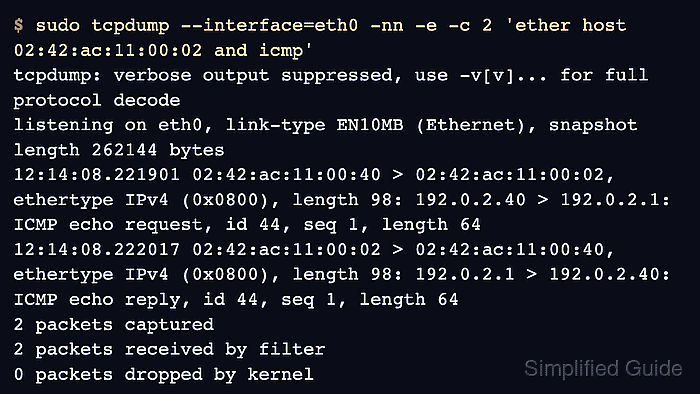
Tcpdump passes expressions such as ether host, ether src, and ether dst to libpcap. Use ether host when either direction is acceptable, then switch to ether src or ether dst when the frame direction itself is the proof. Add -e so tcpdump prints the Ethernet source and destination before the IP conversation.
MAC address filters prove only the local link seen by the selected interface. Routed traffic usually shows the next-hop MAC address, not the remote server's hardware address, and the Linux any pseudo-device can use a cooked capture header instead of the original Ethernet header. Capture on the bridge, VLAN, tap, or physical interface that still exposes the Ethernet header needed for the check.
Related: How to capture ARP traffic with tcpdump
Related: How to select a capture interface in tcpdump
Tool: MAC Address Details Lookup can inspect a captured MAC address when vendor, locally administered, or special-use clues matter.
Steps to filter packets by MAC address in tcpdump:
- Find the MAC address on the same link as the capture interface.
$ ip neigh show 192.0.2.1
192.0.2.1 dev eth0 lladdr 02:42:ac:11:00:02 REACHABLE
Use the neighbor entry, switch table, wireless controller, hypervisor, or ARP capture that belongs to the interface where tcpdump will run. A MAC address learned on a different VLAN or bridge is not proof for this capture point.
- Capture frames to or from that MAC address and print Ethernet headers.
$ sudo tcpdump --interface=eth0 -nn -e -c 2 'ether host 02:42:ac:11:00:02 and icmp'
tcpdump: verbose output suppressed, use -v[v]... for full protocol decode
listening on eth0, link-type EN10MB (Ethernet), snapshot length 262144 bytes
12:14:08.221901 02:42:ac:11:00:40 > 02:42:ac:11:00:02, ethertype IPv4 (0x0800), length 98: 192.0.2.40 > 192.0.2.1: ICMP echo request, id 44, seq 1, length 64
12:14:08.222017 02:42:ac:11:00:02 > 02:42:ac:11:00:40, ethertype IPv4 (0x0800), length 98: 192.0.2.1 > 192.0.2.40: ICMP echo reply, id 44, seq 1, length 64
2 packets captured
2 packets received by filter
0 packets dropped by kernel
The MAC addresses before ethertype are the local frame endpoints. The IP addresses after ethertype IPv4 are the layer-3 conversation carried inside those frames.
- Match only frames sent by the device when the source MAC is the evidence.
$ sudo tcpdump --interface=eth0 -nn -e -c 1 'ether src 02:42:ac:11:00:02 and icmp'
tcpdump: verbose output suppressed, use -v[v]... for full protocol decode
listening on eth0, link-type EN10MB (Ethernet), snapshot length 262144 bytes
12:15:11.004738 02:42:ac:11:00:02 > 02:42:ac:11:00:40, ethertype IPv4 (0x0800), length 98: 192.0.2.1 > 192.0.2.40: ICMP echo reply, id 45, seq 1, length 64
1 packet captured
1 packet received by filter
0 packets dropped by kernel
- Match only frames sent to the device when the destination MAC is the evidence.
$ sudo tcpdump --interface=eth0 -nn -e -c 1 'ether dst 02:42:ac:11:00:02 and icmp'
tcpdump: verbose output suppressed, use -v[v]... for full protocol decode
listening on eth0, link-type EN10MB (Ethernet), snapshot length 262144 bytes
12:15:42.880316 02:42:ac:11:00:40 > 02:42:ac:11:00:02, ethertype IPv4 (0x0800), length 98: 192.0.2.40 > 192.0.2.1: ICMP echo request, id 46, seq 1, length 64
1 packet captured
1 packet received by filter
0 packets dropped by kernel
src and dst refer to the Ethernet frame direction on the capture interface. They do not necessarily match client/server direction after routing, NAT, bridging, or load balancing.
- Combine the MAC filter with a host or port filter after the device is confirmed.
$ sudo tcpdump --interface=eth0 -nn -e -c 2 'ether host 02:42:ac:11:00:02 and tcp port 443'
tcpdump: verbose output suppressed, use -v[v]... for full protocol decode
listening on eth0, link-type EN10MB (Ethernet), snapshot length 262144 bytes
12:16:31.440213 02:42:ac:11:00:40 > 02:42:ac:11:00:02, ethertype IPv4 (0x0800), length 74: 192.0.2.40.52014 > 203.0.113.20.443: Flags [S], seq 3248983991, win 64240, length 0
12:16:31.455018 02:42:ac:11:00:02 > 02:42:ac:11:00:40, ethertype IPv4 (0x0800), length 74: 203.0.113.20.443 > 192.0.2.40.52014: Flags [S.], ack 3248983992, win 65160, length 0
2 packets captured
2 packets received by filter
0 packets dropped by kernel
When the IP peer is remote, the MAC address in the capture is usually the gateway or next hop for that routed flow.
- Verify that the expected MAC address appears in the Ethernet source or destination field before using the capture as device-specific evidence.
If an IP filter sees traffic but the MAC filter stays empty, rerun the capture on the interface where the original Ethernet frame is visible. Common fixes are selecting the bridge member instead of any, choosing the VLAN interface, or capturing on the tap or veth side that faces the device.

Mohd Shakir Zakaria is a cloud architect with deep roots in software development and open-source advocacy. Certified in AWS, Red Hat, VMware, ITIL, and Linux, he specializes in designing and managing robust cloud and on-premises infrastructures.


