How to reset a failed service using systemctl
When a service enters the failed state, systemd keeps that result attached to the unit until the service is started again, restarted, or the failed state is cleared manually. Resetting that state is useful after a bad start has already been diagnosed, a configuration issue has been corrected, or a stale failure record is cluttering later checks.
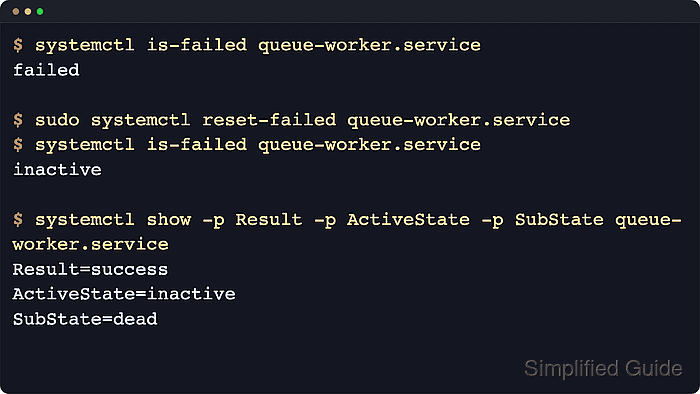
The systemctl reset-failed verb tells the systemd manager to clear the unit's recorded failure result from memory. Current upstream systemd documentation also notes that it resets the unit start-rate limit counter and the restart counter for service units, which matters when a service has already hit start-limit-hit and refuses another manual start.
Resetting the failed state does not repair the service itself. If the unit file, dependency, permissions, or application configuration is still broken, the next systemctl start or restart returns the service to failed again. Examples below use queue-worker.service as a placeholder unit name; replace it with the actual service name and use systemctl --user for per-user units.
Steps to reset a failed service using systemctl:
- List failed services when the exact unit name is not certain.
$ systemctl --failed --type=service --no-pager --no-legend
● queue-worker.service loaded failed failed Queue Worker Service
The columns show the unit name, load state, active state, substate, and description. If the unit is not listed here, it is not currently recorded as failed.
- Review the failure details before clearing the state.
$ systemctl status --no-pager --full queue-worker.service
× queue-worker.service - Queue Worker Service
     Loaded: loaded (/etc/systemd/system/queue-worker.service; disabled; preset: enabled)
     Active: failed (Result: exit-code) since Mon 2026-04-13 12:56:23 UTC; 16ms ago
    Process: 202 ExecStart=/bin/sh -c echo startup check failed >&2; exit 1 (code=exited, status=1/FAILURE)
   Main PID: 202 (code=exited, status=1/FAILURE)

Apr 13 12:56:23 host systemd[1]: Started queue-worker.service - Queue Worker Service.
Apr 13 12:56:23 host sh[202]: startup check failed
Apr 13 12:56:23 host systemd[1]: queue-worker.service: Main process exited, code=exited, status=1/FAILURE
Apr 13 12:56:23 host systemd[1]: queue-worker.service: Failed with result 'exit-code'.
Do not skip the status check when the root cause is still unknown. Clearing the failed flag only removes the recorded failure state; it does not explain why the service failed.
- Clear the failed state for the service.
$ sudo systemctl reset-failed queue-worker.service
The command accepts more than one unit name, and with no unit name it resets the failed state of all units.
Reset only the units that were actually reviewed. Clearing every failed unit at once can hide other unresolved failures from later troubleshooting.
- Confirm that the unit is no longer marked as failed.
$ systemctl is-failed queue-worker.service
inactive
After reset-failed, a service that is not running returns to inactive rather than failed. The command does not start the service automatically.
Use systemctl show -p Result -p ActiveState -p SubState queue-worker.service when an exact property view is needed.
If the unit had reached a start-rate limit, current systemd also clears that counter here so a later manual start is not blocked by stale restart attempts.
After the underlying problem is fixed, start or restart the service normally. If the fault remains, the next activation returns the unit to failed again.