How to create a Runas alias in sudoers
Delegating commands to service accounts gets hard to review when every sudoers rule repeats the same run-as account list. A Runas_Alias gives that target list one uppercase name, so the rule can stay readable while the allowed command list remains explicit.
A sudoers Runas_Alias is used inside the parentheses of a user specification, such as (SERVICE_ACCOUNTS). The alias name must start with an uppercase letter and use uppercase letters, numbers, and underscores. The command path after the parentheses still controls what the delegated user may run.
Use visudo for the drop-in so a syntax error does not replace a working sudoers policy file. A narrow sample policy can allow deployer to run only /usr/bin/id as postgres or backup, then visudo and sudo -l can prove the saved rule before operators use it.
Related: How to create a user alias in sudoers
Related: How to create a command alias in sudoers
Related: How to create a host alias in sudoers
Steps to create a sudoers Runas alias:
- Choose the delegated user, target accounts, and command path.
The example uses deployer as the delegated user, postgres and backup as target service accounts, and /usr/bin/id as the allowed command. Replace them with accounts and commands that already exist on your host.
- Open a sudoers drop-in with visudo.
$ sudo visudo -f /etc/sudoers.d/runas-alias-demo
Related: How to create a sudoers drop-in file
- Add the Runas_Alias definition and the sudoers rule that references it.
Runas_Alias SERVICE_ACCOUNTS = postgres, backup

deployer ALL = (SERVICE_ACCOUNTS) NOPASSWD: /usr/bin/id
The alias controls the allowed run-as targets inside the parentheses. Keep the command list narrow; replacing /usr/bin/id with ALL would allow the delegated user to run any command as the listed accounts.
- Save the file from visudo.
If visudo reports a syntax error, choose edit or exit without saving. Do not force a broken sudoers file into place.
- Validate the drop-in syntax.
$ sudo visudo -cf /etc/sudoers.d/runas-alias-demo
/etc/sudoers.d/runas-alias-demo: parsed OK
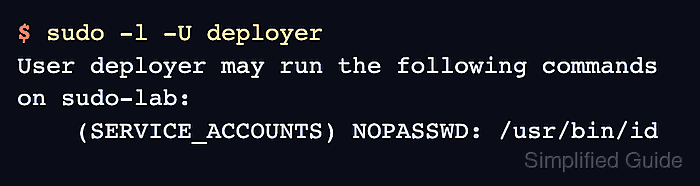
- List the delegated user's sudo privileges.
$ sudo -l -U deployer User deployer may run the following commands on sudo-lab: (SERVICE_ACCOUNTS) NOPASSWD: /usr/bin/id - Run the allowed command as one target account from the delegated user's shell.
$ sudo -u postgres /usr/bin/id -un
postgres
The output should match the account named after -u. Test each target account in the alias before handing the rule to operators.