How to set sudoers Defaults for one command
A sudoers Defaults setting can be too broad when only one delegated command needs different behavior. A command-specific Defaults entry keeps the setting attached to the matching command path, so neighboring sudo commands continue to use the normal policy.
The command-scoped form is Defaults!cmnd, with no space between Defaults and !. The command can be a full path or a Cmnd_Alias, and sudo applies command-specific Defaults after it knows the command path, which makes the scope narrower than a plain Defaults entry.
The examples preserve one non-secret environment variable for /usr/bin/env without preserving it for /usr/bin/printenv. Keep the command grant separate from the Defaults line, validate the sudoers file with visudo, and test both the covered command and a sibling command before relying on the policy.
Related: Create a sudoers drop-in file
Related: Check sudoers syntax with visudo
Related: List sudo privileges for a user
Related: Preserve environment variables with sudo
Steps to set sudoers Defaults for one command:
- Choose the exact command path and Defaults setting.
The examples keep REF only when ops runs /usr/bin/env through sudo. Use a non-secret variable or setting for testing; do not preserve passwords, tokens, dynamic linker variables, or user-controlled paths.
- Open a dedicated sudoers drop-in with visudo.
$ sudo visudo -f /etc/sudoers.d/cmd-env
Keep an existing root shell, console session, or other recovery path open while editing sudoers policy. A syntax error can block new sudo sessions.
Related: How to create a sudoers drop-in file
- Add the command-specific Defaults entry and the separate command rule.
- /etc/sudoers.d/cmd-env
Defaults!/usr/bin/env env_keep += "REF"
ops ALL=(root) NOPASSWD: /usr/bin/env
ops ALL=(root) NOPASSWD: /usr/bin/printenv
The Defaults!/usr/bin/env line changes behavior only for /usr/bin/env. The next two lines grant ops permission to run the test commands; remove NOPASSWD: when the user should authenticate normally.
Command-specific Defaults entries may not include command-line arguments. If the Defaults entry must cover a command pattern with arguments or several commands, define a Cmnd_Alias and reference the alias after Defaults!.
Related: Create a command alias in sudoers
- Validate the edited drop-in.
$ sudo visudo -cf /etc/sudoers.d/cmd-env
/etc/sudoers.d/cmd-env: parsed OK
- Parse the complete sudoers policy.
$ sudo visudo -c
/etc/sudoers: parsed OK
Do not stop after checking only the edited drop-in. The full parse catches interactions with /etc/sudoers and included policy files.
- Confirm the target user can run the intended test commands.
$ sudo -l -U ops
User ops may run the following commands on server:
    (root) NOPASSWD: /usr/bin/env
    (root) NOPASSWD: /usr/bin/printenv
The privilege list confirms the command grant. The next steps prove the command-specific Defaults behavior.
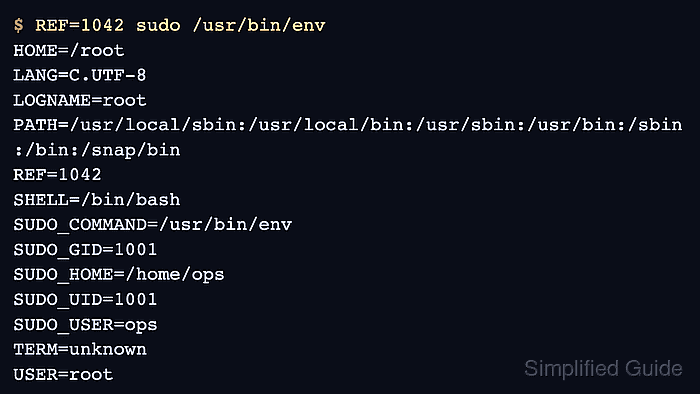
- Run the covered command with the variable set in the invoking user's environment.
$ REF=1042 sudo /usr/bin/env
HOME=/root
LANG=C.UTF-8
LOGNAME=root
##### snipped
REF=1042
SUDO_COMMAND=/usr/bin/env
SUDO_USER=ops
USER=root
The Defaults entry is working when /usr/bin/env shows REF in the root command environment.
- Run a sibling command that is allowed but not covered by the command-specific Defaults entry.
$ REF=1042 sudo /usr/bin/printenv REF
No output from printenv means sudo stripped REF for /usr/bin/printenv, so the Defaults entry did not become a global environment exception.
- Review policy order if the setting does not apply to the expected command.
Check the absolute command path, later matching Defaults entries, skipped drop-in names under /etc/sudoers.d, and whether the command should be represented by a Cmnd_Alias. Command-specific Defaults are applied after the command path is known, so a later or more specific policy entry can change the result.
Related: Check sudoers rule order